Ga door naar hoofdinhoud
Word lid van de reparatiegemeenschap - Account aanmaken

Dell XPS M1730 Keyboard Replacement

Wat je nodig hebt

  1. Dell XPS M1730 Keyboard Replacement, Battery: stap 1, afbeelding 1 van 1
    • Push the sliding button near the battery compartment.

    Vraag FixBot
    Voeg opmerking toe

  2. Dell XPS M1730 Keyboard Replacement: stap 2, afbeelding 1 van 1
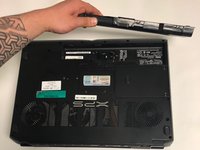
    • Slide the button next to the battery and lift up on the lip of the battery edge.

    Vraag FixBot

    Voeg opmerking toe

  3. Dell XPS M1730 Keyboard Replacement: stap 3, afbeelding 1 van 2 Dell XPS M1730 Keyboard Replacement: stap 3, afbeelding 2 van 2
    • Lift and remove the battery.

    Vraag FixBot

    Voeg opmerking toe

  4. Dell XPS M1730 Keyboard Replacement, Keyboard: stap 4, afbeelding 1 van 3 Dell XPS M1730 Keyboard Replacement, Keyboard: stap 4, afbeelding 2 van 3 Dell XPS M1730 Keyboard Replacement, Keyboard: stap 4, afbeelding 3 van 3
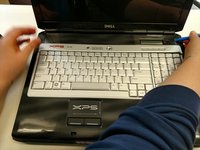
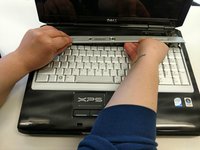
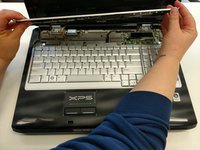
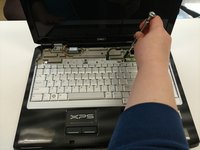
    • Remove the plastic trim at the base of the screen screen. Start from the tab on the right side and work to the left side.

    Vraag FixBot

    Voeg opmerking toe

  5. Dell XPS M1730 Keyboard Replacement: stap 5, afbeelding 1 van 2 Dell XPS M1730 Keyboard Replacement: stap 5, afbeelding 2 van 2
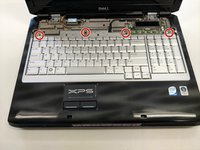
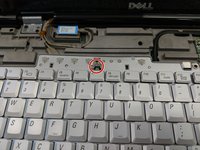
    • Remove the four screws from the top of the keyboard bracket.

    Vraag FixBot

    Voeg opmerking toe

  6. Dell XPS M1730 Keyboard Replacement: stap 6, afbeelding 1 van 3 Dell XPS M1730 Keyboard Replacement: stap 6, afbeelding 2 van 3 Dell XPS M1730 Keyboard Replacement: stap 6, afbeelding 3 van 3
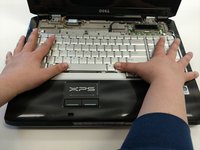
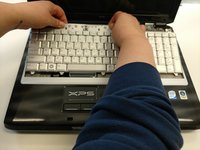
    • Remove the keyboard by sliding it forward, off of the clips, and then lifting up.

    Vraag FixBot

    Voeg opmerking toe

  7. Dell XPS M1730 Keyboard Replacement: stap 7, afbeelding 1 van 3 Dell XPS M1730 Keyboard Replacement: stap 7, afbeelding 2 van 3 Dell XPS M1730 Keyboard Replacement: stap 7, afbeelding 3 van 3
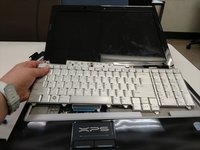
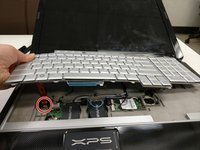
    • Lift the keyboard about 2 inches up from the laptop platform.

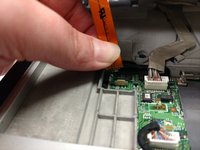
    • From this angle the keyboard ribbon connector can be seen and disconnected.

    Vraag FixBot

    Voeg opmerking toe

Conclusie

To reassemble your device, follow these instructions in reverse order.

Annuleren: ik heb deze handleiding niet afgemaakt.

0Gids Commentaar

Voeg opmerking toe

Weergavestatistieken:

Afgelopen 24 uren: 0

Afgelopen 7 dagen: 2

Afgelopen 30 dagen: 30

Altijd: 1,135