Ga door naar hoofdinhoud
Word lid van de reparatiegemeenschap - Account aanmaken

Dell Optiplex SX280 Hard Drive Replacement

    1. Dell Optiplex SX280 Hard Drive Replacement, Panel Cover: stap 1, afbeelding 1 van 1
      • Make sure the computer is turned off, by selecting the start menu and choosing “Shut Down”.

      • Ensure all cables, speakers and other devices are unplugged and turned off before opening the computer case.

      Vraag FixBot

      Voeg opmerking toe

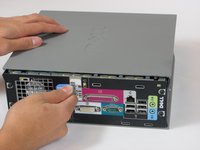
    2. Dell Optiplex SX280 Hard Drive Replacement: stap 2, afbeelding 1 van 2 Dell Optiplex SX280 Hard Drive Replacement: stap 2, afbeelding 2 van 2
      • Lay the computer on its side; you will see a blue knob.

      • Turn this knob 90 deg clockwise.

      Vraag FixBot

      Voeg opmerking toe

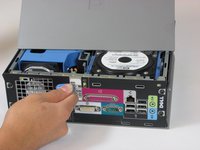
    3. Dell Optiplex SX280 Hard Drive Replacement: stap 3, afbeelding 1 van 2 Dell Optiplex SX280 Hard Drive Replacement: stap 3, afbeelding 2 van 2
      • Slide the panel case forward about 1/2 inch while knob is turned.

      • Lift panel case off computer.

      Vraag FixBot

      Voeg opmerking toe

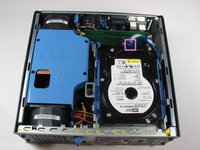
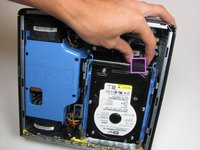
    1. Dell Optiplex SX280 Hard Drive Replacement, Hard Drive: stap 4, afbeelding 1 van 2 Dell Optiplex SX280 Hard Drive Replacement, Hard Drive: stap 4, afbeelding 2 van 2
      • Unplug the blue cable that connects the hard drive to the motherboard.

      Vraag FixBot

      Voeg opmerking toe

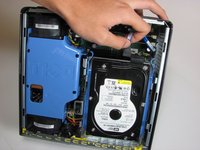
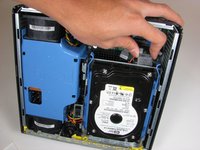
    2. Dell Optiplex SX280 Hard Drive Replacement: stap 5, afbeelding 1 van 2 Dell Optiplex SX280 Hard Drive Replacement: stap 5, afbeelding 2 van 2
      • Unplug the power supply, distinguished by its red and yellow wires (yellow wire obscured from view).

      Vraag FixBot

      Voeg opmerking toe

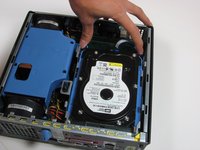
    3. Dell Optiplex SX280 Hard Drive Replacement: stap 6, afbeelding 1 van 1
      • Squeeze the release tabs on either side of the hard drive.

      Vraag FixBot

      Voeg opmerking toe

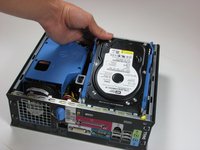
    4. Dell Optiplex SX280 Hard Drive Replacement: stap 7, afbeelding 1 van 2 Dell Optiplex SX280 Hard Drive Replacement: stap 7, afbeelding 2 van 2
      • Slide the Hard Drive out while squeezing the tabs.

      Vraag FixBot

      Voeg opmerking toe

Conclusie

To reassemble your device, follow these instructions in reverse order.

Annuleren: ik heb deze handleiding niet afgemaakt.

6 andere personen hebben deze handleiding voltooid.

Wyatt

Lid sinds: 10/06/10

784 Reputatie

6 handleidingen geschreven

Team

Cal Poly, Team 22-4, Maness Fall 2010 Lid van Cal Poly, Team 22-4, Maness Fall 2010

CPSU-MANESS-F10S22G4

4 Leden

63 handleidingen geschreven

2Gids Commentaar

Thanks for great tutorial.

Politers - Antwoord Deel

Yeah great tutorial!

Rebinas - Antwoord Deel

Voeg opmerking toe

Weergavestatistieken:

Afgelopen 24 uren: 1

Afgelopen 7 dagen: 5

Afgelopen 30 dagen: 28

Altijd: 6,337