Ga door naar hoofdinhoud
Word lid van de reparatiegemeenschap - Account aanmaken

Dell Inspiron 1545 Keyboard Replacement

Wat je nodig hebt

    1. Dell Inspiron 1545 Keyboard Replacement, Battery: stap 1, afbeelding 1 van 1
      • Before attempting to remove the battery ensure that the laptop is disconnected from all power sources and turned off.

      • Turn the laptop over to its back.

      Vraag FixBot

      Voeg opmerking toe

    2. Dell Inspiron 1545 Keyboard Replacement: stap 2, afbeelding 1 van 1
      • Slide the release latch while simultaneously pulling backwards on the battery.

      Vraag FixBot

      Voeg opmerking toe

    3. Dell Inspiron 1545 Keyboard Replacement: stap 3, afbeelding 1 van 1
      • Slide the battery out of the battery bay.

      Vraag FixBot

      Voeg opmerking toe

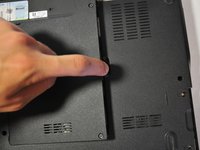
    1. Dell Inspiron 1545 Keyboard Replacement, Base Cover: stap 4, afbeelding 1 van 1
      • Unscrew the four screws (3mm Phillips #1) that hold the base cover in place.

      • The top 3 screws are "captive" (held in by a retaining ring) and will not come out.

      Vraag FixBot

      Voeg opmerking toe

    2. Dell Inspiron 1545 Keyboard Replacement: stap 5, afbeelding 1 van 2 Dell Inspiron 1545 Keyboard Replacement: stap 5, afbeelding 2 van 2
      • Carefully lift the base cover vertically away from the laptop.

      Vraag FixBot

      Voeg opmerking toe

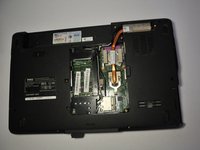
    1. Dell Inspiron 1545 Keyboard Replacement, Center Control Cover: stap 6, afbeelding 1 van 1
      • After removing the battery, remove the two screws (3mm Phillips #1) beneath it. These screws hold the Center Control Cover in place.

      Vraag FixBot

      Voeg opmerking toe

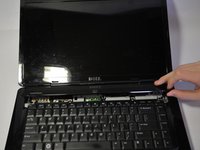
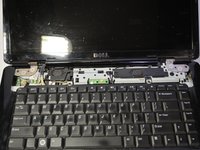
    2. Dell Inspiron 1545 Keyboard Replacement: stap 7, afbeelding 1 van 1
      • Flip the laptop over to the front and open the display as far as possible.

      Vraag FixBot

      Voeg opmerking toe

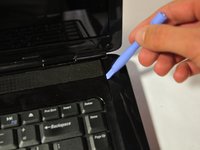
    3. Dell Inspiron 1545 Keyboard Replacement: stap 8, afbeelding 1 van 3 Dell Inspiron 1545 Keyboard Replacement: stap 8, afbeelding 2 van 3 Dell Inspiron 1545 Keyboard Replacement: stap 8, afbeelding 3 van 3
      • The Center Control Cover is VERY fragile, be careful when using prying tools.

      • Pry the Center Control Cover from the laptop. On the right there is a small divot, it is advised that you start removing the panel from here.

      • Carefully lift the Center Control Cover away from the laptop.

      Vraag FixBot

      Voeg opmerking toe

    1. Dell Inspiron 1545 Keyboard Replacement, Keyboard: stap 9, afbeelding 1 van 1
      • Remove the two screws (5mm Phillips #1) at the top of the keyboard.

      Vraag FixBot

      Voeg opmerking toe

    2. Dell Inspiron 1545 Keyboard Replacement: stap 10, afbeelding 1 van 1
      • Slide the keyboard out and away from the laptop and lift it up to access the keyboard connector.

      • Do not pull hard on the keyboard while removing it, you may damage the keyboard or the keyboard connector.

      Vraag FixBot

      Voeg opmerking toe

    3. Dell Inspiron 1545 Keyboard Replacement: stap 11, afbeelding 1 van 1
      • Lift the connector latch that secures the keyboard cable to the connector on the motherboard and remove the cable.

      Vraag FixBot

      Voeg opmerking toe

    4. Dell Inspiron 1545 Keyboard Replacement: stap 12, afbeelding 1 van 1
      • Lift the keyboard up and away from the laptop.

      Vraag FixBot

      Voeg opmerking toe

Conclusie

To reassemble your device, follow these instructions in reverse order.

Annuleren: ik heb deze handleiding niet afgemaakt.

15 andere personen hebben deze handleiding voltooid.

Nathan Lemay

Lid sinds: 04/16/14

3.160 Reputatie

15 handleidingen geschreven

Team

Cal Poly, Team 9-14, Regan Spring 2014 Lid van Cal Poly, Team 9-14, Regan Spring 2014

CPSU-REGAN-S14S9G14

4 Leden

30 handleidingen geschreven

3Gids Commentaar

Step 4 and 5 are not needed.

James Thrun - Antwoord Deel

Steps 4 and 5 are unnecessary for removing the keyboard. Other than that, well done.

lee - Antwoord Deel

The connector latch is broken. What should I do?

Mjeed - Antwoord Deel

Voeg opmerking toe

Weergavestatistieken:

Afgelopen 24 uren: 1

Afgelopen 7 dagen: 18

Afgelopen 30 dagen: 63

Altijd: 8,014