Ga door naar hoofdinhoud
Word lid van de reparatiegemeenschap - Account aanmaken

Dell Alienware 13 Memory Module Replacement

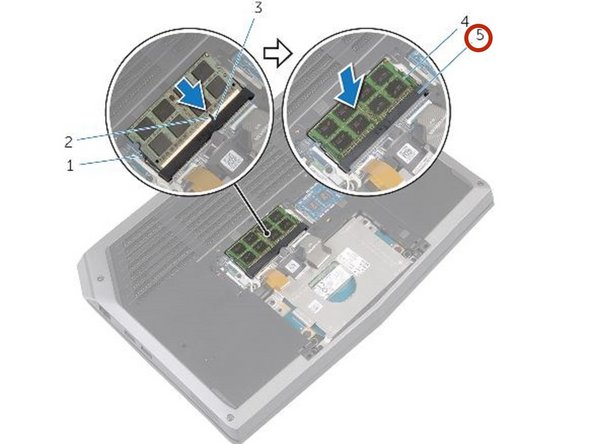
  1. Dell Alienware 13 Memory Module Replacement, Popping out the Memory Modules: stap 1, afbeelding 1 van 3 Dell Alienware 13 Memory Module Replacement, Popping out the Memory Modules: stap 1, afbeelding 2 van 3 Dell Alienware 13 Memory Module Replacement, Popping out the Memory Modules: stap 1, afbeelding 3 van 3
    • WARNING: Before working inside your computer, read the safety information that shipped with your computer and follow the steps in Before Working Inside Your Computer. After working inside your computer, follow the instructions in After Working Inside Your Computer.

    • Using your fingertips, carefully spread apart the securing clips on each end of the memory-module slot until the memory module pops up.

    Vraag FixBot

    Voeg opmerking toe

  2. Dell Alienware 13 Memory Module Replacement, Removing the Memory Module: stap 2, afbeelding 1 van 1
    • Slide and remove the memory module from the memory-module slot.

    Vraag FixBot

    Voeg opmerking toe

  3. Dell Alienware 13 Memory Module Replacement, Aligning the new Memory Module: stap 3, afbeelding 1 van 2 Dell Alienware 13 Memory Module Replacement, Aligning the new Memory Module: stap 3, afbeelding 2 van 2
    • Align the notch on the NEW memory module with the tab on the memory-module slot.

    Vraag FixBot

    Voeg opmerking toe

Conclusie

To reassemble your device, follow these instructions in reverse order.

Annuleren: ik heb deze handleiding niet afgemaakt.

Terrence15

Lid sinds: 12/18/17

80.125 Reputatie

441 handleidingen geschreven

Team

RampUP America, Inc. Lid van RampUP America, Inc.

Community

45 Leden

2.003 handleidingen geschreven

0Gids Commentaar

Voeg opmerking toe

Weergavestatistieken:

Afgelopen 24 uren: 0

Afgelopen 7 dagen: 0

Afgelopen 30 dagen: 20

Altijd: 433