Ga door naar hoofdinhoud
Word lid van de reparatiegemeenschap - Account aanmaken

Canon PowerShot SD30 Control Panel Replacement

Wat je nodig hebt

  1. Canon PowerShot SD30 Control Panel Replacement, Front Cover: stap 1, afbeelding 1 van 2 Canon PowerShot SD30 Control Panel Replacement, Front Cover: stap 1, afbeelding 2 van 2
    • Be sure to remove the wrist strap and battery before removing the cover.

    • Remove the two 2mm black screws that are located on the underside of the camera.

    • Remove the two 3mm silver screws from the right side of camera.

    Vraag FixBot

    Voeg opmerking toe

  2. Canon PowerShot SD30 Control Panel Replacement: stap 2, afbeelding 1 van 1
    • Gently remove the front cover.

    Vraag FixBot

    Voeg opmerking toe

  3. Canon PowerShot SD30 Control Panel Replacement, Back Cover: stap 3, afbeelding 1 van 3 Canon PowerShot SD30 Control Panel Replacement, Back Cover: stap 3, afbeelding 2 van 3 Canon PowerShot SD30 Control Panel Replacement, Back Cover: stap 3, afbeelding 3 van 3
    • Remove the wrist strap and battery before removing the back cover.

    • Remove the 2mm screw from the back of the camera.

    • Remove two 2mm screws from the bottom of the camera.

    • Remove two 2mm screws the left side of camera.

    Vraag FixBot

    Voeg opmerking toe

  4. Canon PowerShot SD30 Control Panel Replacement: stap 4, afbeelding 1 van 1
    • Gently remove the back cover.

    Vraag FixBot

    Voeg opmerking toe

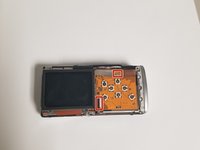
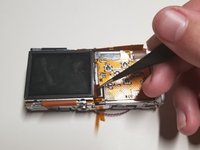
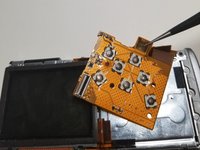
  5. Canon PowerShot SD30 Control Panel Replacement, Control Panel: stap 5, afbeelding 1 van 3 Canon PowerShot SD30 Control Panel Replacement, Control Panel: stap 5, afbeelding 2 van 3 Canon PowerShot SD30 Control Panel Replacement, Control Panel: stap 5, afbeelding 3 van 3
    Gereedschap gebruikt in deze stap:
    Tweezers
    $4.99
    • Use the tweezers to pull up on the piece of black plastic connected to the ribbon to unhook and remove the ribbon connected to the screen.

    • You also have to pull up on the top part of the control panel because it is connected to the metal by a sticky pad.

    Vraag FixBot

    Voeg opmerking toe

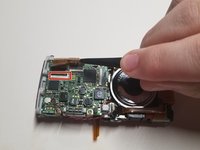
  6. Canon PowerShot SD30 Control Panel Replacement: stap 6, afbeelding 1 van 3 Canon PowerShot SD30 Control Panel Replacement: stap 6, afbeelding 2 van 3 Canon PowerShot SD30 Control Panel Replacement: stap 6, afbeelding 3 van 3
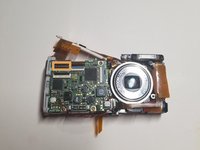
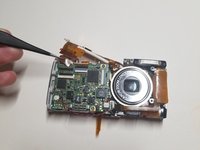
    • Turn the camera over to the side with the lens and remove the ribbon on the left side.

    • After removing the ribbon there will be a second ribbon to remove that was hiding underneath the first ribbon.

    Vraag FixBot

    Voeg opmerking toe

  7. Canon PowerShot SD30 Control Panel Replacement: stap 7, afbeelding 1 van 1
    • Lift up the button that connects to the power button of the camera so you can remove the control panel.

    Vraag FixBot

    Voeg opmerking toe

  8. Canon PowerShot SD30 Control Panel Replacement: stap 8, afbeelding 1 van 1
    • Remove the control panel from the camera.

    Vraag FixBot

    Voeg opmerking toe

Conclusie

To reassemble your device, follow these instructions in reverse order.

Annuleren: ik heb deze handleiding niet afgemaakt.

2 andere personen hebben deze handleiding voltooid.

0Gids Commentaar

Voeg opmerking toe

Weergavestatistieken:

Afgelopen 24 uren: 0

Afgelopen 7 dagen: 6

Afgelopen 30 dagen: 44

Altijd: 526