Ga door naar hoofdinhoud
Word lid van de reparatiegemeenschap - Account aanmaken

Canon PowerShot S230 Camera Casing Replacement

Wat je nodig hebt

  1. Canon PowerShot S230 Camera Casing Replacement, Battery: stap 1, afbeelding 1 van 1
    • On the bottom of the camera, use your thumb to press the rubber battery cover towards the side of the camera with the strap base. The cover will shift to extend beyond the rest of the camera.

    Vraag FixBot

    Voeg opmerking toe

  2. Canon PowerShot S230 Camera Casing Replacement: stap 2, afbeelding 1 van 1
    • Hold the end of the battery cover that extends beyond the camera and lift it up.

    Vraag FixBot

    Voeg opmerking toe

  3. Canon PowerShot S230 Camera Casing Replacement: stap 3, afbeelding 1 van 1
    • Locate the orange tab next to the battery. Next roll the tab back in order for the battery to come out.

    Vraag FixBot

    Voeg opmerking toe

  4. Canon PowerShot S230 Camera Casing Replacement: stap 4, afbeelding 1 van 1
    • Pull the battery out.

    Vraag FixBot

    Voeg opmerking toe

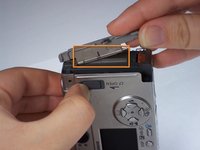
  5. Canon PowerShot S230 Camera Casing Replacement, Memory Card: stap 5, afbeelding 1 van 3 Canon PowerShot S230 Camera Casing Replacement, Memory Card: stap 5, afbeelding 2 van 3 Canon PowerShot S230 Camera Casing Replacement, Memory Card: stap 5, afbeelding 3 van 3
    • Locate the sliding button labeled "CF open" on the back of the camera.

    • Press and slide down the button labeled "CF open". The memory card cover will pop open.

    Vraag FixBot

    Voeg opmerking toe

  6. Canon PowerShot S230 Camera Casing Replacement: stap 6, afbeelding 1 van 3 Canon PowerShot S230 Camera Casing Replacement: stap 6, afbeelding 2 van 3 Canon PowerShot S230 Camera Casing Replacement: stap 6, afbeelding 3 van 3
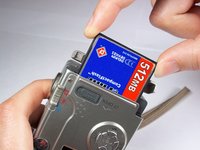
    • Push down on the black square button next to the memory card slot. This will release the memory card from the slot.

    Vraag FixBot

    Voeg opmerking toe

  7. Canon PowerShot S230 Camera Casing Replacement: stap 7, afbeelding 1 van 2 Canon PowerShot S230 Camera Casing Replacement: stap 7, afbeelding 2 van 2
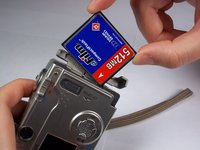
    • Pull the memory card out of the memory card slot.

    Vraag FixBot

    Voeg opmerking toe

  8. Canon PowerShot S230 Camera Casing Replacement, Camera Casing: stap 8, afbeelding 1 van 1
    • Remove two 2.4mm Phillips screws from the right side of the camera.

    Vraag FixBot

    Voeg opmerking toe

  9. Canon PowerShot S230 Camera Casing Replacement: stap 9, afbeelding 1 van 1
    • Remove two 2.4mm Phillips screws above the label on the bottom of the camera.

    • Remove two 2.8mm Phillips screws next to the tripod hole.

    Vraag FixBot

    Voeg opmerking toe

  10. Canon PowerShot S230 Camera Casing Replacement: stap 10, afbeelding 1 van 1
    • Remove the two 3.2mm Phillips screws that are closer to the top and bottom edges of the camera.

    • Remove the two 3.8mm Phillips screws on either side of the strap base.

    Vraag FixBot

    Voeg opmerking toe

  11. Canon PowerShot S230 Camera Casing Replacement: stap 11, afbeelding 1 van 1
    • Remove one 1.6mm Phillips screw from the above the CF open button on back of the camera.

    Vraag FixBot

    Voeg opmerking toe

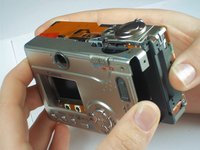
  12. Canon PowerShot S230 Camera Casing Replacement: stap 12, afbeelding 1 van 3 Canon PowerShot S230 Camera Casing Replacement: stap 12, afbeelding 2 van 3 Canon PowerShot S230 Camera Casing Replacement: stap 12, afbeelding 3 van 3
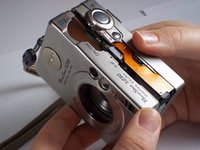
    • Gently pull the front casing from the camera.

    • The following items will either fall off or will be loose: the strap base, the gray rubber cover labeled "Digital A/V Out", and the black rubber piece over the view finder.

    • Remove the memory card cover by sliding down the CF open button and moving the pin.

    Vraag FixBot

    Voeg opmerking toe

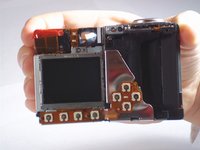
  13. Canon PowerShot S230 Camera Casing Replacement: stap 13, afbeelding 1 van 2 Canon PowerShot S230 Camera Casing Replacement: stap 13, afbeelding 2 van 2
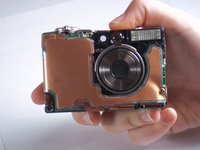
    • Gently pull the back casing from the camera.

    Vraag FixBot

    Voeg opmerking toe

Conclusie

To reassemble your device, follow these instructions in reverse order.

Annuleren: ik heb deze handleiding niet afgemaakt.

Tanya Malalang

Lid sinds: 01/12/11

340 Reputatie

3 handleidingen geschreven

Team

Cal Poly, Team 13-1, Forte Winter 2011 Lid van Cal Poly, Team 13-1, Forte Winter 2011

CPSU-FORTE-W11S13G1

4 Leden

5 handleidingen geschreven

0Gids Commentaar

Voeg opmerking toe

Weergavestatistieken:

Afgelopen 24 uren: 1

Afgelopen 7 dagen: 9

Afgelopen 30 dagen: 43

Altijd: 2,152