Ga door naar hoofdinhoud
Word lid van de reparatiegemeenschap - Account aanmaken

Canon PowerShot A80 Flash Assembly Replacement

Wat je nodig hebt

  1. Canon PowerShot A80 Flash Assembly Replacement, Back Cover: stap 1, afbeelding 1 van 1
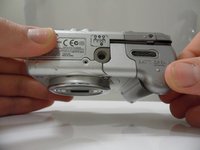
    • Remove the three Phillips #00 screws from the bottom of the camera.

    Vraag FixBot

    Voeg opmerking toe

  2. Canon PowerShot A80 Flash Assembly Replacement: stap 2, afbeelding 1 van 2 Canon PowerShot A80 Flash Assembly Replacement: stap 2, afbeelding 2 van 2
    • Open the door to the CompactFlash memory card slot by sliding it towards you and swinging it open.

    • Remove the memory card if it is still in the camera.

    • Use the Phillips #00 screwdriver to remove the single screw underneath the memory card slot door.

    Vraag FixBot

    Voeg opmerking toe

  3. Canon PowerShot A80 Flash Assembly Replacement: stap 3, afbeelding 1 van 1
    • Remove the Phillips #00 screw located inside the top of the memory card compartment.

    Vraag FixBot

    Voeg opmerking toe

  4. Canon PowerShot A80 Flash Assembly Replacement: stap 4, afbeelding 1 van 2 Canon PowerShot A80 Flash Assembly Replacement: stap 4, afbeelding 2 van 2
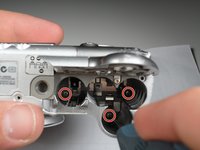
    • Open the battery compartment door at the bottom of the camera by sliding the latch to the right and then sliding the door down.

    • Remove the batteries from the compartment.

    • Remove the three Phillips #00 screws located inside the battery compartment.

    • The screw on the left is longer than the other two.

    Vraag FixBot

    Voeg opmerking toe

  5. Canon PowerShot A80 Flash Assembly Replacement: stap 5, afbeelding 1 van 1
    • Remove the top lid of the camera.

    • Be cautious of the fragile mylar cable that connects the lid to the main body of the camera.

    • Removing the lid takes a little force. Do this gently. There may be a snapping sound.

    • The door to the memory card compartment will be freed and should be removable now.

    • In other versions of this camera, there is a tab that secures the top from the wrist strap. If yours has this, you won't be able to completely separate the top until you have removed the top screw in Step 8.

    Vraag FixBot

    Voeg opmerking toe

  6. Canon PowerShot A80 Flash Assembly Replacement: stap 6, afbeelding 1 van 1
    • Remove the two Phillips #00 screws from the side of the camera.

    • Open the small rubber door below this screw that covers the connectors.

    Vraag FixBot

    Voeg opmerking toe

  7. Canon PowerShot A80 Flash Assembly Replacement: stap 7, afbeelding 1 van 2 Canon PowerShot A80 Flash Assembly Replacement: stap 7, afbeelding 2 van 2
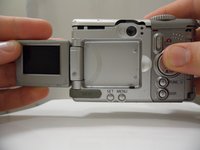
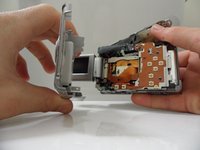
    • Open and pivot the LCD screen to its widest open position.

    • Remove the rear cover by pulling it straight away from the body of the camera.

    • When reassembling the camera, remember to replace the screws in the same location from which you removed them. Otherwise, you may damage the camera.

    Vraag FixBot

    Voeg opmerking toe

  8. Canon PowerShot A80 Flash Assembly Replacement, Front Cover: stap 8, afbeelding 1 van 1
    • Using a Phillips #00 screwdriver, remove the 3.3 mm long top screw located on the side of the camera. This screw holds the side panels and the front cover together.

    • The side panel may get stuck on the internal wires, so gently wiggle this panel loose.

    Vraag FixBot

    Voeg opmerking toe

  9. Canon PowerShot A80 Flash Assembly Replacement: stap 9, afbeelding 1 van 1
    • Gently remove the side panel by pulling it away from the camera.

    • The side panel may get stuck on the internal wires, so gently wiggle this panel loose.

    Vraag FixBot

    Voeg opmerking toe

  10. Canon PowerShot A80 Flash Assembly Replacement: stap 10, afbeelding 1 van 1
    • Using the Phillips #00 screwdriver, unscrew the 2.4 mm long screw that holds on the front panel underneath the side panel.

    Vraag FixBot

    Voeg opmerking toe

  11. Canon PowerShot A80 Flash Assembly Replacement: stap 11, afbeelding 1 van 1
    • Underneath the battery cover there is a 3.8 mm screw in the corner. Using the Phillips #00 screwdriver, remove this screw.

    Vraag FixBot

    Voeg opmerking toe

  12. Canon PowerShot A80 Flash Assembly Replacement: stap 12, afbeelding 1 van 1
    • Gently pull up on the front cover to remove it from the body.

    Vraag FixBot

    Voeg opmerking toe

  13. Canon PowerShot A80 Flash Assembly Replacement, Flash Assembly: stap 13, afbeelding 1 van 1
    • Unscrew the 3.8 mm screw under the flash housing.

    Vraag FixBot

    Voeg opmerking toe

  14. Canon PowerShot A80 Flash Assembly Replacement: stap 14, afbeelding 1 van 1
    • Lift up black cover.

    • Black cover is attached to the top of the capacitor with adhesive.

    Vraag FixBot

    Voeg opmerking toe

  15. Canon PowerShot A80 Flash Assembly Replacement: stap 15, afbeelding 1 van 1
    • If the entire flash housing needs to be replaced...

    • Unsolder the black and red wires from the back of the circuit board behind the flash.

    Vraag FixBot

    Voeg opmerking toe

  16. Canon PowerShot A80 Flash Assembly Replacement: stap 16, afbeelding 1 van 2 Canon PowerShot A80 Flash Assembly Replacement: stap 16, afbeelding 2 van 2
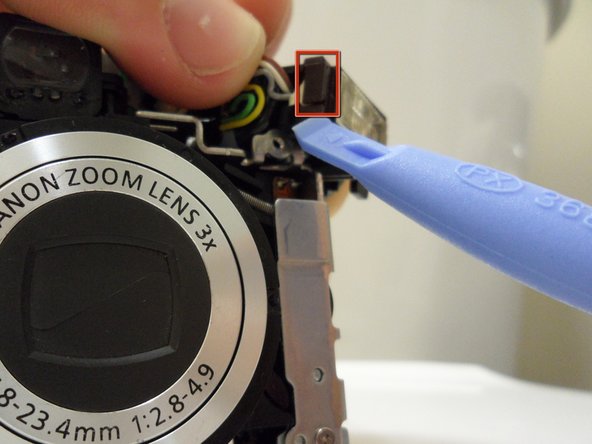
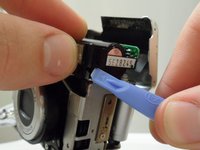
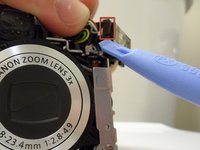
    • Use the opening tool to unclip both sides of the black cover on top of the flash

    Vraag FixBot

    Voeg opmerking toe

  17. Canon PowerShot A80 Flash Assembly Replacement: stap 17, afbeelding 1 van 1
    • Use the opening tool to lift off the black flash cover.

    Vraag FixBot

    Voeg opmerking toe

  18. Canon PowerShot A80 Flash Assembly Replacement: stap 18, afbeelding 1 van 1
    • If the flash needs to to fixed...

    • Unsolder the brown wire from the circuit board.

    • The piece of metal that attaches these parts will have to be bent back.

    • Make sure the capacitor is discharged before these steps are attempted. Do so with a screwdriver with a rubber handle.

    Vraag FixBot

    Voeg opmerking toe

  19. Canon PowerShot A80 Flash Assembly Replacement: stap 19, afbeelding 1 van 1
    • Unsolder the gray wire attached to the capacitor.

    • This is the last wire that connects to the flash.

    Vraag FixBot

    Voeg opmerking toe

Conclusie

To reassemble your device, follow these instructions in reverse order. Remember to re-solder any wires that were unsoldered.

Annuleren: ik heb deze handleiding niet afgemaakt.

Één andere persoon heeft deze handleiding voltooid.

ryne contreras

Lid sinds: 01/28/11

141 Reputatie

1 Handleiding geschreven

Team

Cal Poly, Team 7-31, Regan Winter 2011 Lid van Cal Poly, Team 7-31, Regan Winter 2011

CPSU-REGAN-W11S7G31

6 Leden

12 handleidingen geschreven

0Gids Commentaar

Voeg opmerking toe

Weergavestatistieken:

Afgelopen 24 uren: 2

Afgelopen 7 dagen: 11

Afgelopen 30 dagen: 75

Altijd: 3,883