Ga door naar hoofdinhoud
Word lid van de reparatiegemeenschap - Account aanmaken

Canon PowerShot A460 LCD Screen Replacement

Wat je nodig hebt

    1. Canon PowerShot A460 LCD Screen Replacement, Battery: stap 1, afbeelding 1 van 1
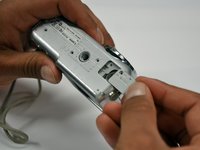
      • Slide the switch on the battery cover labeled "CARD/BATT. OPEN." to the right.

      • While still holding the switch, pull the cover down, allowing it to release and open.

      Vraag FixBot

      Voeg opmerking toe

    2. Canon PowerShot A460 LCD Screen Replacement: stap 2, afbeelding 1 van 1
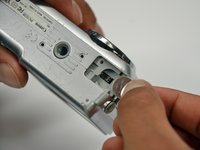
      • Tilt the camera slightly to allow the batteries to fall out.

      Vraag FixBot

      Voeg opmerking toe

    3. Canon PowerShot A460 LCD Screen Replacement: stap 3, afbeelding 1 van 1
      • Press on and release the memory card to eject it.

      Vraag FixBot

      Voeg opmerking toe

    1. Canon PowerShot A460 LCD Screen Replacement, Front Casing: stap 4, afbeelding 1 van 1
      • Unscrew the 5mm Phillips #00 screw from the bottom of the camera.

      • Make sure to keep the different size screws organized to make reassembling the camera simpler.

      Vraag FixBot

      Voeg opmerking toe

    2. Canon PowerShot A460 LCD Screen Replacement: stap 5, afbeelding 1 van 1
      • Unscrew the three 2mm Phillips #00 screws that are located on the bottom of the camera.

      Vraag FixBot

      Voeg opmerking toe

    3. Canon PowerShot A460 LCD Screen Replacement: stap 6, afbeelding 1 van 1
      • Remove the 4mm Phillips #00 screw that is located on the left side of the camera, if the display screen is facing you.

      Vraag FixBot

      Voeg opmerking toe

    4. Canon PowerShot A460 LCD Screen Replacement: stap 7, afbeelding 1 van 1
      • Take out the 4mm Phillips #00 screw under the rubber flap on the right end of the camera.

      Vraag FixBot

      Voeg opmerking toe

    5. Canon PowerShot A460 LCD Screen Replacement: stap 8, afbeelding 1 van 2 Canon PowerShot A460 LCD Screen Replacement: stap 8, afbeelding 2 van 2
      • Remove the second battery cover on the bottom of camera.

      • Take the silver battery out of the camera.

      Vraag FixBot

      Voeg opmerking toe

    6. Canon PowerShot A460 LCD Screen Replacement: stap 9, afbeelding 1 van 3 Canon PowerShot A460 LCD Screen Replacement: stap 9, afbeelding 2 van 3 Canon PowerShot A460 LCD Screen Replacement: stap 9, afbeelding 3 van 3
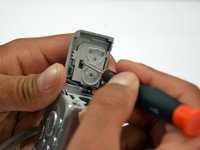
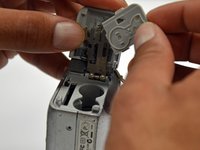
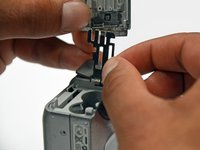
      • Remove the 4mm Phillips #00 screw on the inside of the flap that hides the battery and memory card slots.

      • Remove the light grey, plastic piece.

      • Remove the plastic portion of the battery flap cover. The metal piece will remain attached.

      Vraag FixBot

      Voeg opmerking toe

    7. Canon PowerShot A460 LCD Screen Replacement: stap 10, afbeelding 1 van 3 Canon PowerShot A460 LCD Screen Replacement: stap 10, afbeelding 2 van 3 Canon PowerShot A460 LCD Screen Replacement: stap 10, afbeelding 3 van 3
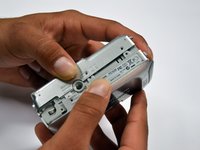
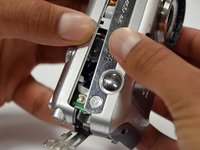
      • Slightly pull on each side of the camera. It should loosen up and come apart.

      • If it does not pull apart right away, use a little more force.

      • Do not give up!

      Vraag FixBot

      Voeg opmerking toe

    1. Canon PowerShot A460 LCD Screen Replacement, Back Casing: stap 11, afbeelding 1 van 1
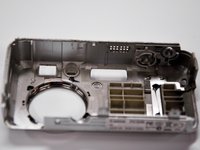
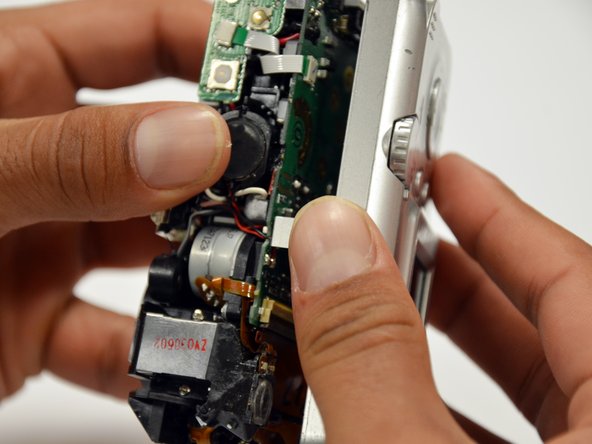
      • Remove the back case of the camera by pulling from the top.

      • Be careful when pulling off the case. There is a delicate gold ribbon connecting the bottom of the camera to the back case.

      Vraag FixBot

      Voeg opmerking toe

    1. Canon PowerShot A460 LCD Screen Replacement, LCD Screen: stap 12, afbeelding 1 van 1
      • Remove the 4mm Phillips #00 screw from above the ribbon.

      Vraag FixBot

      Voeg opmerking toe

    2. Canon PowerShot A460 LCD Screen Replacement: stap 13, afbeelding 1 van 1
      • Gently peel off the blue tape on the top of the LCD screen.

      Vraag FixBot

      Voeg opmerking toe

    3. Canon PowerShot A460 LCD Screen Replacement: stap 14, afbeelding 1 van 1
      • Remove the 4mm Phillips #00 screw previously concealed by the blue tape.

      Vraag FixBot

      Voeg opmerking toe

    4. Canon PowerShot A460 LCD Screen Replacement: stap 15, afbeelding 1 van 1
      • Gently lift the LCD screen off of the front casing by pulling up a tab on the side of the camera.

      Vraag FixBot

      Voeg opmerking toe

    5. Canon PowerShot A460 LCD Screen Replacement: stap 16, afbeelding 1 van 1
      • Using a spudger, lift the grey tabs to allow the ribbon to slide out.

      Vraag FixBot

      Voeg opmerking toe

    6. Canon PowerShot A460 LCD Screen Replacement: stap 17, afbeelding 1 van 1
      • Since the tabs have been lifted, the ribbon should now slide out out easily.

      • Be careful not to distort the ribbon in any way.

      Vraag FixBot

      Voeg opmerking toe

Conclusie

To reassemble your device, follow these instructions in reverse order.

Annuleren: ik heb deze handleiding niet afgemaakt.

3 andere personen hebben deze handleiding voltooid.

Alex

Lid sinds: 01/18/13

112 Reputatie

2 handleidingen geschreven

Team

Cal Poly, Team 19-42, Regan Winter 2013 Lid van Cal Poly, Team 19-42, Regan Winter 2013

CPSU-REGAN-W13S19G42

4 Leden

18 handleidingen geschreven

2Gids Commentaar

Thanks for this super documented guide.

I did it!! I found a second hand lcd on Ebay.

Now my camera is working again.

Super DIY guide!! Thanks a lot!!

Pierre - Antwoord Deel

Explained in detail, very clear, easy to understand. I just unpacked it for the first time. Still able to do as told. Thank you.

Rachsuthee Waiprib - Antwoord Deel

Voeg opmerking toe

Weergavestatistieken:

Afgelopen 24 uren: 2

Afgelopen 7 dagen: 7

Afgelopen 30 dagen: 45

Altijd: 2,188