Ga door naar hoofdinhoud
Word lid van de reparatiegemeenschap - Account aanmaken

Brother PT-D200 Faceplate Replacement

Wat je nodig hebt

  1. Brother PT-D200 Faceplate Replacement, Battery: stap 1, afbeelding 1 van 1
    • Flip the device over and press down on the indication arrows located at the top center of the back cover and pull it open.

    Vraag FixBot
  2. Brother PT-D200 Faceplate Replacement: stap 2, afbeelding 1 van 1
    • Remove the six AAA batteries.

    Vraag FixBot
  3. Brother PT-D200 Faceplate Replacement, Back of Device: stap 3, afbeelding 1 van 1
    • Use the Helping Hand 1/4" screwdriver to unscrew the six 3/16" corner screws.

    Vraag FixBot
  4. Brother PT-D200 Faceplate Replacement: stap 4, afbeelding 1 van 1
    • Close the back cover and then flip the device over and separate the top half from the bottom half as shown.

    • Be gentle when lifting the top of the device, there is a ribbon cable attaching the two halves together.

    Vraag FixBot
  5. Brother PT-D200 Faceplate Replacement, Circuit Board Cables: stap 5, afbeelding 1 van 1
    • Gently pull out the ribbon cable from the circuit board.

    • The ribbon cable is very fragile.

    Vraag FixBot
  6. Brother PT-D200 Faceplate Replacement: stap 6, afbeelding 1 van 1
    • Remove two-pin plastic connector from the circuit board.

    • Gently pull the two-pin connector from the circuit board to avoid damaging the board.

    Vraag FixBot
  7. Brother PT-D200 Faceplate Replacement, Face Plate: stap 7, afbeelding 1 van 1
    • On the top portion of the device there are four grey clips locking the faceplate in place. The two top clips are circled in the image. The two others are located in the other corners of the device.

    Vraag FixBot
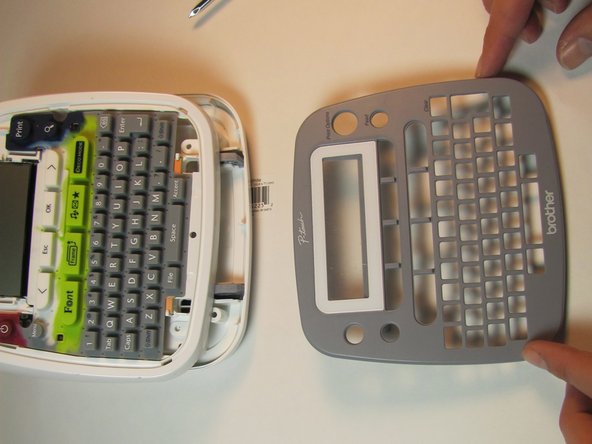
  8. Brother PT-D200 Faceplate Replacement: stap 8, afbeelding 1 van 2 Brother PT-D200 Faceplate Replacement: stap 8, afbeelding 2 van 2
    • Pull the clips inward two at a time, first the top then the bottom, to snap the face plate off.

    Vraag FixBot
Conclusie

To reassemble your device, follow these instructions in reverse order.

Één andere persoon heeft deze handleiding voltooid.

[deleted]

Lid sinds: 01/24/14

301 Reputatie

3 handleidingen geschreven

0Gids Commentaar

Voeg opmerking toe

Weergavestatistieken:

Afgelopen 24 uren: 2

Afgelopen 7 dagen: 17

Afgelopen 30 dagen: 83

Altijd: 1,035