Inleiding
Replacement Parts Finder:
http://www.service.braun.com/home.asp?rg...
Contact information
Braun Consumer Service
Phone: 1-800-BRAUN-11 (1-800-272-8611)
Wat je nodig hebt
-
-
-
Soldering is required to install this battery one or two batteries may be required verify how many you need before you order
 Vraag FixBot
-
-
-
First pry the left side of the cover off, then pry the right side of the cover off before removing. Trying to pry the cover off from only one side will result in breaking the plastic tabs.
-
-
-
-
Pull the side covers off from the bottom, they hinge from the top and will come off freely once you rotate them up and away from the body starting at the bottom.
-
-
-
R17 AA NiMh Battery With Pin Tabs 1650 Mah 1.2V Battery Measures .559" x 1.97", 14.2mm x 50mm
-
-
-
Replacing the batteries will not always repair the shaver, the circuit board may be bad, if the indicator lights on the circuit board do not light up when plugged in the circuit board is most likely bad, you should replace the entire circuit board and battery assembly.
-
-


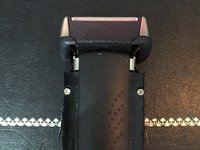
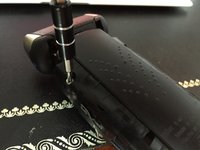
To reassemble your device, follow these instructions in reverse order.
Annuleren: ik heb deze handleiding niet afgemaakt.
19 andere personen hebben deze handleiding voltooid.

8Gids Commentaar
Great tutorial. It was all I needed, since I wasn't sure how to get the case open. Thanks!
Thanks for the tutorial! Mine had intermittent problem with the on/off switch and I was googling how to open the case. Easy and simple, bets razor I’ve had and not willing to change :D
Thanks for the guide! Without knowing how to open the case, replacing the battery would have been a lost cause. In my case the batteries were tired. After replacing and recharging them the razor sounds young again and full of pep.
