Ga door naar hoofdinhoud
Word lid van de reparatiegemeenschap - Account aanmaken

Bose SoundTouch 20 Speaker Replacement

Wat je nodig hebt

  1. Bose SoundTouch 20  Speaker Replacement, Speaker: stap 1, afbeelding 1 van 2 Bose SoundTouch 20  Speaker Replacement, Speaker: stap 1, afbeelding 2 van 2
    • Remove the (6) six 1.5 cm Phillips screws holding on the bottom cover of the speaker using a Phillips #0 screwdriver.

    • Lift the cover straight up and set the cover to the side.

    Vraag FixBot

    Voeg opmerking toe

  2. Bose SoundTouch 20  Speaker Replacement: stap 2, afbeelding 1 van 2 Bose SoundTouch 20  Speaker Replacement: stap 2, afbeelding 2 van 2
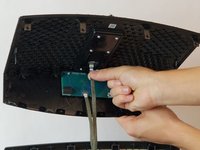
    • Gently pull the white ribbon from the connector on the top side of the power board.

    • Make sure to pull straight back so you don't bend or damage the ribbon.

    Vraag FixBot

    Voeg opmerking toe

  3. Bose SoundTouch 20  Speaker Replacement: stap 3, afbeelding 1 van 2 Bose SoundTouch 20  Speaker Replacement: stap 3, afbeelding 2 van 2
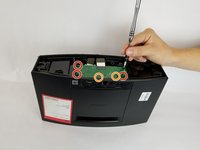
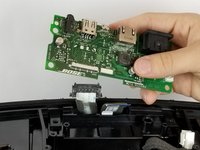
    • Remove the (4) four 1.5 cm screws connecting the power board to the speaker.

    • Remove the (2) two 1 cm screws connecting the power board to the speaker.

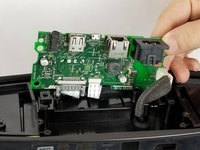
    • When lifting the board, be careful of the two ribbons located underneath the board. Don't lift the board straight up, instead tilt it towards the cables. As shown in picture 2.

    Vraag FixBot

    Voeg opmerking toe

  4. Bose SoundTouch 20  Speaker Replacement: stap 4, afbeelding 1 van 2 Bose SoundTouch 20  Speaker Replacement: stap 4, afbeelding 2 van 2
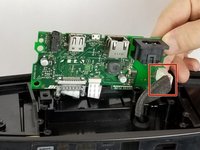
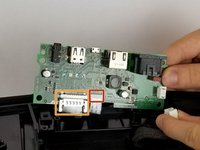
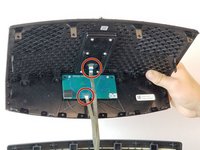
    • Remove the white cable by pressing on the side of the connector with a tab and pulling backwards.

    Vraag FixBot

    Voeg opmerking toe

  5. Bose SoundTouch 20  Speaker Replacement: stap 5, afbeelding 1 van 2 Bose SoundTouch 20  Speaker Replacement: stap 5, afbeelding 2 van 2
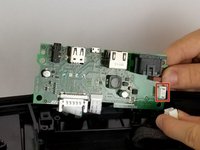
    • Gently pull the thinner white ribbon located towards the center of the board.

    • Pull straight down to prevent bending or damaging the ribbon.

    • Squeeze the plastic sides of the plug and pull straight down to remove this ribbon.

    • After removing the two ribbons, completely remove the power supply board and set it to the side.

    Vraag FixBot

    Voeg opmerking toe

  6. Bose SoundTouch 20  Speaker Replacement: stap 6, afbeelding 1 van 2 Bose SoundTouch 20  Speaker Replacement: stap 6, afbeelding 2 van 2
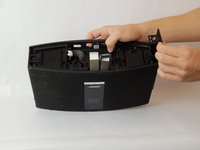
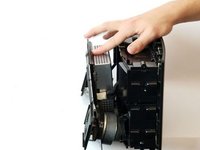
    • To remove the side panel from the speaker, lift the top of the sides from the slots.

    • The sides will be bent up after removing from the slots, they do not come up right away.

    • After completing the previous step, pull gently straight up to remove the side.

    • Repeat on both sides of the speaker.

    Vraag FixBot

    Voeg opmerking toe

  7. Bose SoundTouch 20  Speaker Replacement: stap 7, afbeelding 1 van 3 Bose SoundTouch 20  Speaker Replacement: stap 7, afbeelding 2 van 3 Bose SoundTouch 20  Speaker Replacement: stap 7, afbeelding 3 van 3
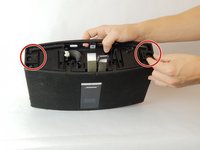
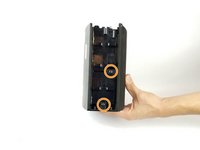
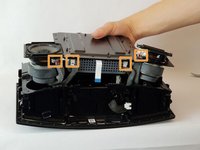
    • Remove the (2) two 1.5 cm screws circled in picture one.

    • Rotate the speaker to its side and remove the (2) two 1.5 cm screws circled in picture 2. Remove these screws on either side of the speaker.

    • After all screws are removed, gently remove the cover from the speaker as shown in picture 3.

    Vraag FixBot

    Voeg opmerking toe

  8. Bose SoundTouch 20  Speaker Replacement: stap 8, afbeelding 1 van 2 Bose SoundTouch 20  Speaker Replacement: stap 8, afbeelding 2 van 2
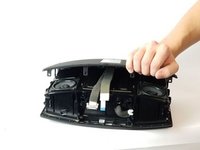
    • After lifting the cover, you will see two ribbons attaching the cover to the speaker. Gently remove these ribbons by pulling straight down.

    • Make sure to pull the ribbons straight out so you don't bend or damage the ribbon.

    Vraag FixBot

    Voeg opmerking toe

  9. Bose SoundTouch 20  Speaker Replacement: stap 9, afbeelding 1 van 1
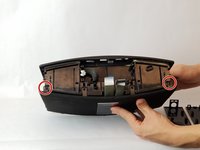
    • Remove the (14) fourteen 1 cm screws from the speaker.

    • Remove the (2) two 1.5 cm screws from the top left and right hand corners of the speakers, respectively.

    Vraag FixBot

    Voeg opmerking toe

  10. Bose SoundTouch 20  Speaker Replacement: stap 10, afbeelding 1 van 3 Bose SoundTouch 20  Speaker Replacement: stap 10, afbeelding 2 van 3 Bose SoundTouch 20  Speaker Replacement: stap 10, afbeelding 3 van 3
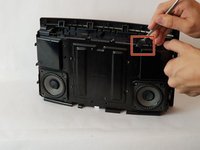
    • Using a metal spudger or a prying tool, gently push forward to separate the cover from the speaker.

    • After lifting the cover, you will see two ribbons attaching the cover to the speaker. Gently remove these ribbons by pulling straight down.

    Vraag FixBot

    Voeg opmerking toe

  11. Bose SoundTouch 20  Speaker Replacement: stap 11, afbeelding 1 van 1
    • Gently pull out the speaker from the placeholder by twisting and turning it.

    • The speaker is heavy and very magnetic.

    • Insert the replacement speaker by gently pushing it back into its place holder.

    Vraag FixBot

    Voeg opmerking toe

Conclusie

To reassemble your device, follow these instructions in reverse order.

Annuleren: ik heb deze handleiding niet afgemaakt.

4 andere personen hebben deze handleiding voltooid.

Samar Al mashrafi

Lid sinds: 09/26/17

269 Reputatie

1 Handleiding geschreven

Team

USF Tampa, Team S11-G3, Passmore Fall 2017 Lid van USF Tampa, Team S11-G3, Passmore Fall 2017

USFT-PASSMORE-F17S11G3

4 Leden

11 handleidingen geschreven

2Gids Commentaar

hi, where can we find the speakers?

Rochlby Conan - Antwoord Deel

Hi, where can i find the speaker

faria quitamba - Antwoord Deel
Voeg opmerking toe

Weergavestatistieken:

Afgelopen 24 uren: 3

Afgelopen 7 dagen: 45

Afgelopen 30 dagen: 144

Altijd: 9,991