Ga door naar hoofdinhoud
Word lid van de reparatiegemeenschap - Account aanmaken

Bose SoundLink Color Button Pad Replacement

Wat je nodig hebt

    1. Bose SoundLink Color  Button Pad Replacement, Outer Casing: stap 1, afbeelding 1 van 2 Bose SoundLink Color  Button Pad Replacement, Outer Casing: stap 1, afbeelding 2 van 2
      • Four round, plastic plugs are located on the back of the device.

      • Using a metal spudger, carefully pry up the plastic covers.

      • The covers are all glued on, so be careful not to scar the casing when prying them off. If possible, use a spudger or plastic opening tool to remove them.

      Vraag FixBot

      Voeg opmerking toe

    2. Bose SoundLink Color  Button Pad Replacement: stap 2, afbeelding 1 van 2 Bose SoundLink Color  Button Pad Replacement: stap 2, afbeelding 2 van 2
      • Remove the four 1.8 cm-long T15 Torx Security screws from the outer case.

      • Some of these use T15 "Star" 5-point Torx security screws instead of the more common 6-point ones.

      Vraag FixBot

      Voeg opmerking toe

    3. Bose SoundLink Color  Button Pad Replacement: stap 3, afbeelding 1 van 2 Bose SoundLink Color  Button Pad Replacement: stap 3, afbeelding 2 van 2
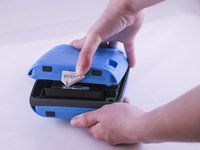
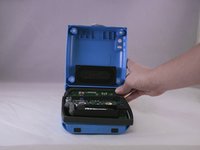
      • Carefully open up the casing.

      • The top button pad may need to be re-glued upon installing the new casing.

      Vraag FixBot

      Voeg opmerking toe

    1. Bose SoundLink Color  Button Pad Replacement, Button Pad: stap 4, afbeelding 1 van 2 Bose SoundLink Color  Button Pad Replacement, Button Pad: stap 4, afbeelding 2 van 2
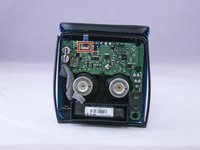
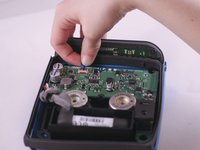
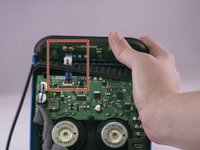
      • Lift up the retaining flap on the button cable ZIF connector.

      • Pull the button cable straight out of the connector.

      Vraag FixBot

      Voeg opmerking toe

    2. Bose SoundLink Color  Button Pad Replacement: stap 5, afbeelding 1 van 2 Bose SoundLink Color  Button Pad Replacement: stap 5, afbeelding 2 van 2
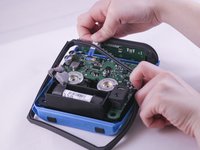
      • Carefully pull the ribbon cable through the rubber gasket that runs around the device.

      Vraag FixBot

      Voeg opmerking toe

    3. Bose SoundLink Color  Button Pad Replacement: stap 6, afbeelding 1 van 1
      • To remove the old rubber button pad, carefully peel it off of the blue casing.

      Vraag FixBot

      Voeg opmerking toe

Conclusie

To reassemble your device, follow these instructions in reverse order, starting from Step 6.

Annuleren: ik heb deze handleiding niet afgemaakt.

8 andere personen hebben deze handleiding voltooid.

3Gids Commentaar

Great guide, and I think I can manage this. But, where can I get the Replacement Bose SoundLink Color Button Pad??

Fred

Fred Fish - Antwoord Deel

I’m wondering the same thing. Where do you get the replacement Bose Soundlink Color button pad? We just bought a new charger because we thought that was the problem. But that didn’t make any difference. We still can’t turn the speaker on!

Lynn Wilson - Antwoord Deel

I got the bose soundlink color button panel only with bose India authorised service center in South Mumbai . That cost me in Indian RS. 2360. Including approx $35 USD.

nrirehan - Antwoord Deel

Voeg opmerking toe

Weergavestatistieken:

Afgelopen 24 uren: 0

Afgelopen 7 dagen: 16

Afgelopen 30 dagen: 69

Altijd: 11,535