Ga door naar hoofdinhoud
Word lid van de reparatiegemeenschap - Account aanmaken

BOSE SoundTouch 30 Subwoofer Replacement

Wat je nodig hebt

  1. BOSE SoundTouch 30 Subwoofer Replacement, Base Plate: stap 1, afbeelding 1 van 2 BOSE SoundTouch 30 Subwoofer Replacement, Base Plate: stap 1, afbeelding 2 van 2
    • Remove the four 15.5 mm PH2 screws securing the base plate to the device.

    Vraag FixBot

    Voeg opmerking toe

  2. BOSE SoundTouch 30 Subwoofer Replacement, Power Supply: stap 2, afbeelding 1 van 1
    • Remove the six 15.5mm PH2 screws securing the grille and rear panel to the device.

    Vraag FixBot

    Voeg opmerking toe

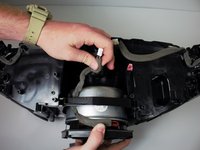
  3. BOSE SoundTouch 30 Subwoofer Replacement: stap 3, afbeelding 1 van 2 BOSE SoundTouch 30 Subwoofer Replacement: stap 3, afbeelding 2 van 2
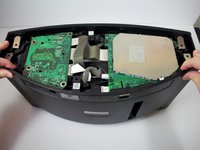
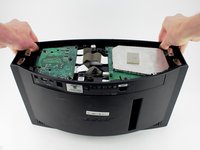
    • Remove the grille and rear panel by grabbing the corners and pulling upwards and outwards.

    • There is a small ribbon cable that connects the display assembly to the body of the device. Make sure to disconnect the cable before pulling the grille all the way off or else the cable could snap.

    Vraag FixBot

    Voeg opmerking toe

  4. BOSE SoundTouch 30 Subwoofer Replacement: stap 4, afbeelding 1 van 1
    • Remove all four 15.5 mm PH2 screws holding the power supply down.

    • The power supply is identified by a green board with a large metal covering.

    Vraag FixBot

    Voeg opmerking toe

  5. BOSE SoundTouch 30 Subwoofer Replacement: stap 5, afbeelding 1 van 2 BOSE SoundTouch 30 Subwoofer Replacement: stap 5, afbeelding 2 van 2
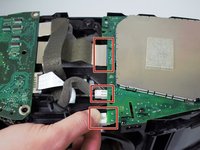
    • Disconnect the three cables from the power supply by squeezing the white tabs if present and gently pulling.

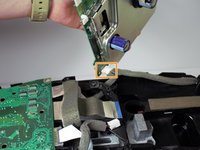
    • Pick up the power supply and remove the fourth cable from the underside of the power supply.

    • Remove the power supply.

    Vraag FixBot

    Voeg opmerking toe

  6. BOSE SoundTouch 30 Subwoofer Replacement, Motherboard: stap 6, afbeelding 1 van 3 BOSE SoundTouch 30 Subwoofer Replacement, Motherboard: stap 6, afbeelding 2 van 3 BOSE SoundTouch 30 Subwoofer Replacement, Motherboard: stap 6, afbeelding 3 van 3
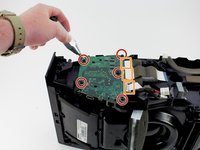
    • Remove the five 15.5 mm PH2 screws holding the motherboard down.

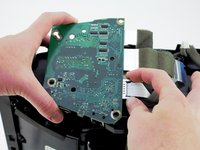
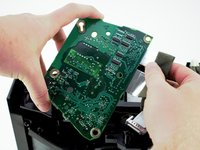
    • Remove the three cables from the side of the motherboard by squeezing the grey tabs if present and gently pulling.

    • Remove the motherboard.

    • The motherboard is identified as the smaller green board with an ethernet, USB Type A, and an auxiliary port.

    Vraag FixBot

    Voeg opmerking toe

  7. BOSE SoundTouch 30 Subwoofer Replacement, Subwoofer: stap 7, afbeelding 1 van 1
    • Remove the eight 15.5 mm PH2 screws holding the plastic insert down.

    • Remove the plastic insert.

    Vraag FixBot

    Voeg opmerking toe

  8. BOSE SoundTouch 30 Subwoofer Replacement: stap 8, afbeelding 1 van 1
    • Remove the three 15.5 mm PH2 screws holding the metal insert down.

    • Remove the metal insert.

    Vraag FixBot

    Voeg opmerking toe

  9. BOSE SoundTouch 30 Subwoofer Replacement: stap 9, afbeelding 1 van 1
    • Remove the three 19 mm PH2 screws holding the metal subwoofer cover down.

    • Remove the subwoofer cover.

    Vraag FixBot

    Voeg opmerking toe

  10. BOSE SoundTouch 30 Subwoofer Replacement: stap 10, afbeelding 1 van 1
    • Remove the four 19 mm PH2 screws holding the subwoofer in place.

    • Be careful not to let the screwdriver slip and damage the fragile subwoofer.

    Vraag FixBot

    Voeg opmerking toe

  11. BOSE SoundTouch 30 Subwoofer Replacement: stap 11, afbeelding 1 van 2 BOSE SoundTouch 30 Subwoofer Replacement: stap 11, afbeelding 2 van 2
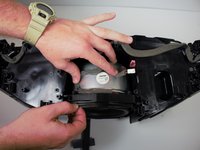
    • Remove the subwoofer by pulling towards the back of the device while tucking the wire under the plastic enclosure.

    Vraag FixBot

    Voeg opmerking toe

Conclusie

To reassemble your device, follow these instructions in reverse order.

Annuleren: ik heb deze handleiding niet afgemaakt.

2 andere personen hebben deze handleiding voltooid.

Brennen Irey

Lid sinds: 04/18/18

1.269 Reputatie

6 handleidingen geschreven

Team

Cal Poly, Team S16-G2, Livingston Spring 2018 Lid van Cal Poly, Team S16-G2, Livingston Spring 2018

CPSU-LIVINGSTON-S18S16G2

4 Leden

8 handleidingen geschreven

0Gids Commentaar

Voeg opmerking toe

Weergavestatistieken:

Afgelopen 24 uren: 7

Afgelopen 7 dagen: 13

Afgelopen 30 dagen: 80

Altijd: 5,556