Ga door naar hoofdinhoud
Word lid van de reparatiegemeenschap - Account aanmaken

BLU Life X8 Back Camera Replacement

Wat je nodig hebt

  1. BLU Life X8 Back Camera Replacement, Battery: stap 1, afbeelding 1 van 2 BLU Life X8 Back Camera Replacement, Battery: stap 1, afbeelding 2 van 2
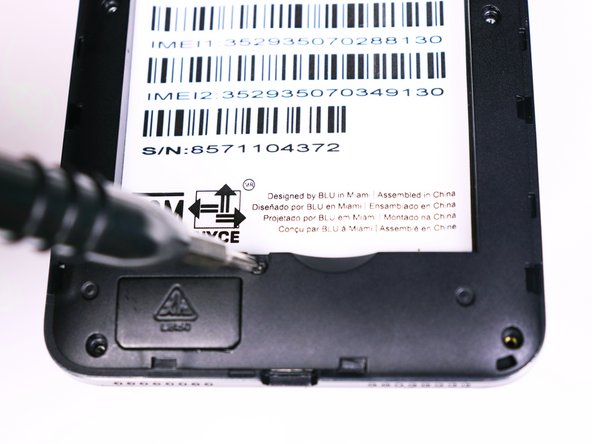
    • Flip the phone over so that the screen is facing down.

    • Slide the opening tool between the micro-USB port and the back cover.

    • Use the opening tool to create a gap.

    Vraag FixBot

    Voeg opmerking toe

  2. BLU Life X8 Back Camera Replacement: stap 2, afbeelding 1 van 1
    • Use your thumb to pry off the back panel once the gap is large enough.

    Vraag FixBot

    Voeg opmerking toe

  3. BLU Life X8 Back Camera Replacement: stap 3, afbeelding 1 van 1
    • Once the back panel is off, locate the indent at the bottom of the battery.

    • Use your thumb to slip the battery out of the case.

    Vraag FixBot

    Voeg opmerking toe

  4. BLU Life X8 Back Camera Replacement, Back Camera: stap 4, afbeelding 1 van 2 BLU Life X8 Back Camera Replacement, Back Camera: stap 4, afbeelding 2 van 2
    • Use the Phillips #00 (1.5mm) bit to undo the (9) screws from the back of the device.

    Vraag FixBot

    Voeg opmerking toe

  5. BLU Life X8 Back Camera Replacement: stap 5, afbeelding 1 van 1
    • Wedge the opening tool into the seam of between the screen and the gray frame.

    • Run the opening tool along the seam to release the clips that hold the two pieces together.

    • You may need to use the opening picks to prevent the clips from reengaging.

    Vraag FixBot

    Voeg opmerking toe

  6. BLU Life X8 Back Camera Replacement: stap 6, afbeelding 1 van 1
    • Once all the clips have been released, pull back the frame and set it aside.

    Vraag FixBot

    Voeg opmerking toe

  7. BLU Life X8 Back Camera Replacement: stap 7, afbeelding 1 van 1
    Gereedschap gebruikt in deze stap:
    Tweezers
    $4.99
    • Use the tweezers to unlock the ribbon cable from the motherboard

    • The ribbon cable should be free. Pull back on the ribbons to release it from the connector

    Vraag FixBot

    Voeg opmerking toe

  8. BLU Life X8 Back Camera Replacement: stap 8, afbeelding 1 van 1
    • Lift the back camera from its housing

    • The back camera may be glued to the phone

    Vraag FixBot

    Voeg opmerking toe

Conclusie

To reassemble your device, follow these instructions in reverse order.

Annuleren: ik heb deze handleiding niet afgemaakt.

Één andere persoon heeft deze handleiding voltooid.

Alexander Prasil

Lid sinds: 09/28/17

555 Reputatie

5 handleidingen geschreven

Team

USF Tampa, Team S1-G2, Nance Fall 2017 Lid van USF Tampa, Team S1-G2, Nance Fall 2017

USFT-NANCE-F17S1G2

4 Leden

6 handleidingen geschreven

0Gids Commentaar

Voeg opmerking toe

Weergavestatistieken:

Afgelopen 24 uren: 2

Afgelopen 7 dagen: 6

Afgelopen 30 dagen: 28

Altijd: 525