Inleiding
When a keyboard no longer functions correctly it is necessary to replace it to regain proper function.
Wat je nodig hebt
-
-
Turn the laptop upside down so that the underside is facing up and locate the two switches that are on each side of the battery.
-
Slide the switch on the top right corner to the right.
-
Slide and hold the switch on the top left corner to the left and carefully remove the battery.
 Vraag FixBot
-
-
-
-
Turn the laptop to its normal position and open the display to show the keyboard.
-
Gently push back the five tabs holding the keyboard down using the plastic opening tool.
-
-
-
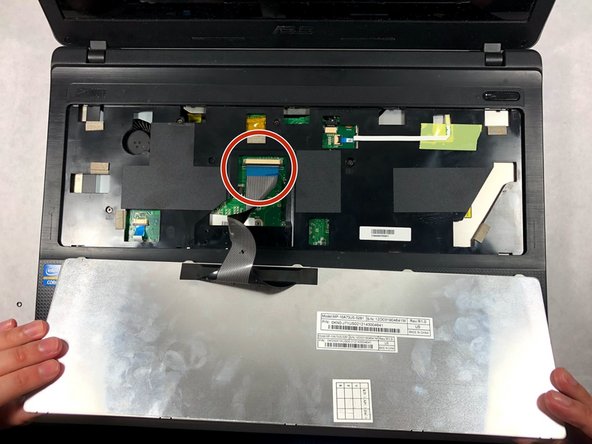
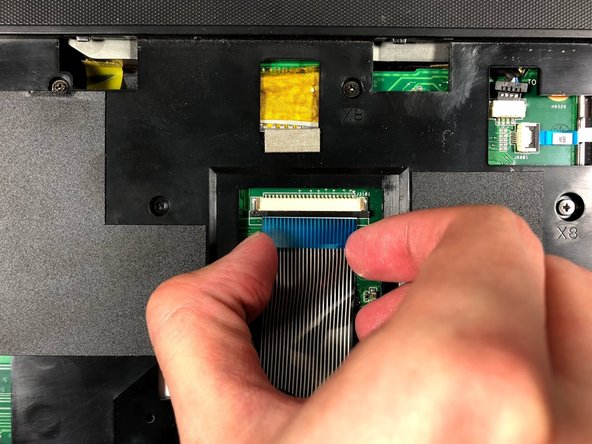
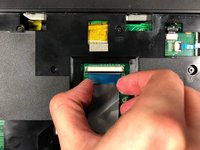
Once the keyboard is free, disconnect the ribbon cable from the zero insertion force (ZIF) connector by flipping up the locking flap and pulling the cable out.
-


To reassemble your device, follow these instructions in reverse order.

Team

UMass Dartmouth, Team S3-G1, Bailey Fall 2017 Lid van UMass Dartmouth, Team S3-G1, Bailey Fall 2017
UMASSD-BAILEY-F17S3G1
2 Leden
8 handleidingen geschreven
