Ga door naar hoofdinhoud
Word lid van de reparatiegemeenschap - Account aanmaken

Asus X751L Wireless Card Replacement

Wat je nodig hebt

  1. Asus X751L Wireless Card Replacement, Keyboard: stap 1, afbeelding 1 van 1
    • With the screen closed, place your laptop upside-down with the front facing you.

    • Remove the six 14.6mm Phillips #00 screws.

    • Remove the four 6.6mm Phillips #00 screws.

    Vraag FixBot

    Voeg opmerking toe

  2. Asus X751L Wireless Card Replacement: stap 2, afbeelding 1 van 1
    • Flip the laptop over and open the lid.

    • Pry around the edges of the laptop base using the plastic opening tool.

    • Prying too hard can break the plastic clips.

    Vraag FixBot

    Voeg opmerking toe

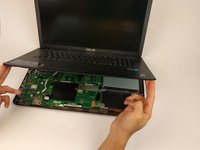
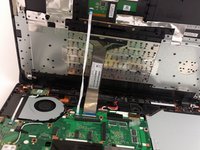
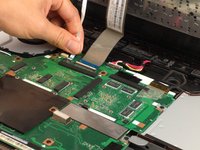
  3. Asus X751L Wireless Card Replacement: stap 3, afbeelding 1 van 3 Asus X751L Wireless Card Replacement: stap 3, afbeelding 2 van 3 Asus X751L Wireless Card Replacement: stap 3, afbeelding 3 van 3
    • Carefully lift the keyboard up.

    • Be very careful when lifting the keyboard up. Two zero insertion force (ZIF) cables are between the keyboard assembly and the motherboard. Do not lift the assembly too high.

    • Disconnect the two ZIF connectors from the motherboard using your fingernail to lift the cream-colored tab.

    Vraag FixBot

    Voeg opmerking toe

  4. Asus X751L Wireless Card Replacement, Wireless Card: stap 4, afbeelding 1 van 1
    • Remove the single 4.7mm PH00 screw holding the wireless card to the motherboard.

    Vraag FixBot

    Voeg opmerking toe

  5. Asus X751L Wireless Card Replacement: stap 5, afbeelding 1 van 1
    • Using your fingers, lightly lift up on the black and white antenna cords.

    Vraag FixBot

    Voeg opmerking toe

  6. Asus X751L Wireless Card Replacement: stap 6, afbeelding 1 van 1
    • With your fingers lightly pull the wireless card out of the slot.

    • Make sure to keep the card parallel with the motherboard when removing from the slot.

    Vraag FixBot

    Voeg opmerking toe

Conclusie

To reassemble your device, follow these instructions in reverse order.

Annuleren: ik heb deze handleiding niet afgemaakt.

3 andere personen hebben deze handleiding voltooid.

Matthew Martin

Lid sinds: 02/02/17

217 Reputatie

1 Handleiding geschreven

Team

USF Tampa, Team 17-2, Blackwell Spring 2017 Lid van USF Tampa, Team 17-2, Blackwell Spring 2017

USFT-BLACKWELL-S17S17G2

4 Leden

5 handleidingen geschreven

1Gids Commentaar

I feel the existing WiFi card is not very good. Is there is better one I can get for the Asus X751L?

July 3, 2023.


cookbake2 - Antwoord Deel

Voeg opmerking toe

Weergavestatistieken:

Afgelopen 24 uren: 5

Afgelopen 7 dagen: 11

Afgelopen 30 dagen: 39

Altijd: 2,791