Ga door naar hoofdinhoud
Word lid van de reparatiegemeenschap - Account aanmaken

Asus Q525U RAM Replacement

Wat je nodig hebt

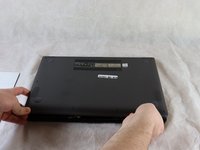
  1. Asus Q525U RAM Replacement, Back Cover: stap 1, afbeelding 1 van 3 Asus Q525U RAM Replacement, Back Cover: stap 1, afbeelding 2 van 3 Asus Q525U RAM Replacement, Back Cover: stap 1, afbeelding 3 van 3
    • Begin by powering off the device and flipping the device over.

    • Carefully remove the two longer 9.5 mm screws on the corners with a Phillips #1 screwdriver.

    • Remove the eight 7.5 mm Phillips #1 screws on the back of the device.

    Vraag FixBot

    Voeg opmerking toe

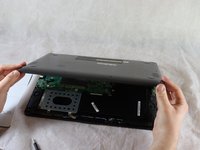
  2. Asus Q525U RAM Replacement: stap 2, afbeelding 1 van 3 Asus Q525U RAM Replacement: stap 2, afbeelding 2 van 3 Asus Q525U RAM Replacement: stap 2, afbeelding 3 van 3
    • Use an opening pick to separate the back cover from the device.

    • For easiest removal, begin by prying at one of the front corners and sliding the tool under the cover in a counter-clockwise motion (to the left) toward the laptop hinge.

    Vraag FixBot

    Voeg opmerking toe

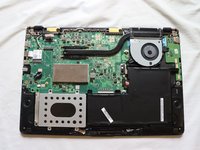
  3. Asus Q525U RAM Replacement: stap 3, afbeelding 1 van 3 Asus Q525U RAM Replacement: stap 3, afbeelding 2 van 3 Asus Q525U RAM Replacement: stap 3, afbeelding 3 van 3
    • Once the cover has been separated from the device, carefully lift the back cover off the device (begin by lifting from the front of the cover first).

    • The back cover should be easily removable, allowing full access to all of the internal components.

    Vraag FixBot

    Voeg opmerking toe

  4. Asus Q525U RAM Replacement, RAM: stap 4, afbeelding 1 van 1
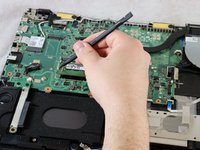
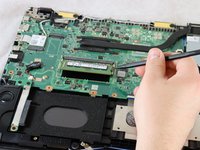
    • Position the flat end of the Spudger under one of the corners on the RAM cover and pry it up slightly.

    • Move the spudger around the periphery of the cover to lift the cover up.

    Vraag FixBot

    Voeg opmerking toe

  5. Asus Q525U RAM Replacement: stap 5, afbeelding 1 van 1
    • Lift the RAM cover off.

    • The RAM should now be fully exposed.

    Vraag FixBot

    Voeg opmerking toe

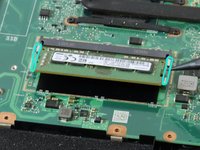
  6. Asus Q525U RAM Replacement: stap 6, afbeelding 1 van 3 Asus Q525U RAM Replacement: stap 6, afbeelding 2 van 3 Asus Q525U RAM Replacement: stap 6, afbeelding 3 van 3
    • Using a spudger or your fingers, gently pull the metal brackets away from the RAM.

    • After pulling both brackets away from the component, the RAM should release at an upward angle (allowing for removal and replacement).

    Vraag FixBot

    Voeg opmerking toe

  7. Asus Q525U RAM Replacement: stap 7, afbeelding 1 van 1
    • Slide the RAM stick out of the socket.

    Vraag FixBot

    Voeg opmerking toe

Conclusie

To reassemble your device, follow these instructions in reverse order.

Annuleren: ik heb deze handleiding niet afgemaakt.

Één andere persoon heeft deze handleiding voltooid.

Stewart Crandall

Lid sinds: 02/22/22

613 Reputatie

5 handleidingen geschreven

Team

Clemson, Team 2-5, Hunter Spring 2022 Lid van Clemson, Team 2-5, Hunter Spring 2022

CLEM-HUNTER-S22S2G5

4 Leden

12 handleidingen geschreven

0Gids Commentaar

Voeg opmerking toe

Weergavestatistieken:

Afgelopen 24 uren: 0

Afgelopen 7 dagen: 9

Afgelopen 30 dagen: 46

Altijd: 1,578