Ga door naar hoofdinhoud
Word lid van de reparatiegemeenschap - Account aanmaken

Apple TV 4K Remote Logic Board Replacement

Wat je nodig hebt

    1. Apple TV 4K Remote Logic Board Replacement, Remote Logic Board: stap 1, afbeelding 1 van 1
      • Heat iOpener according to manufacturer's instructions.

      • Place over the face of the remote to soften the adhesive under the glass.

      Vraag FixBot

      Voeg opmerking toe

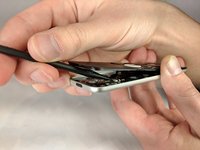
    2. Apple TV 4K Remote Logic Board Replacement: stap 2, afbeelding 1 van 2 Apple TV 4K Remote Logic Board Replacement: stap 2, afbeelding 2 van 2
      • Using a spudger, gently lift the face of the remote. Starting from the bottom and working your way to the top.

      Vraag FixBot

      Voeg opmerking toe

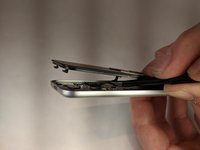
    3. Apple TV 4K Remote Logic Board Replacement: stap 3, afbeelding 1 van 1
      • Push front face forward to disengage plastic clips at the top of the remote.

      Vraag FixBot

      Voeg opmerking toe

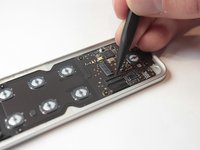
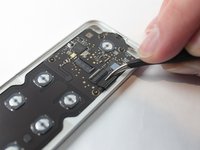
    4. Apple TV 4K Remote Logic Board Replacement: stap 4, afbeelding 1 van 2 Apple TV 4K Remote Logic Board Replacement: stap 4, afbeelding 2 van 2
      Gereedschap gebruikt in deze stap:
      Tweezers
      $4.99
      • Unlatch the connector that binds the touch screen and logic board.

      • Afterwards, use tweezers to detach the connector that binds the touch screen to the logic board.

      Vraag FixBot

      Voeg opmerking toe

    5. Apple TV 4K Remote Logic Board Replacement: stap 5, afbeelding 1 van 1
      • Lift the face from the body of the remote.

      Vraag FixBot

      Voeg opmerking toe

    6. Apple TV 4K Remote Logic Board Replacement: stap 6, afbeelding 1 van 2 Apple TV 4K Remote Logic Board Replacement: stap 6, afbeelding 2 van 2
      • Lift the latch holding back the connector to the battery.

      • Use tweezers to disconnect the battery connector.

      Vraag FixBot

      Voeg opmerking toe

    7. Apple TV 4K Remote Logic Board Replacement: stap 7, afbeelding 1 van 1
      • Remove the following screws using a T3 Torx screwdriver:

      • Eight 2mm screws

      Vraag FixBot

      Voeg opmerking toe

    8. Apple TV 4K Remote Logic Board Replacement: stap 8, afbeelding 1 van 1
      • Using a plastic spudger, gently remove the logic board from the case of the remote.

      Vraag FixBot

      Voeg opmerking toe

Conclusie

To reassemble your device, follow these instructions in reverse order.

Annuleren: ik heb deze handleiding niet afgemaakt.

4 andere personen hebben deze handleiding voltooid.

Keenan Barber

Lid sinds: 10/04/18

1.367 Reputatie

3 handleidingen geschreven

Team

UW Stout, Team S6-G3, Ogden Fall 2018 Lid van UW Stout, Team S6-G3, Ogden Fall 2018

UWSTOUT-OGDEN-F18S6G3

4 Leden

25 handleidingen geschreven

2Gids Commentaar

Have you ever successfully reconnected the ribbon cable after disassembly? It seems nearly impossible to do by hand…

B R - Antwoord Deel

I can’t find replacement adhesive that fits. How are people getting this thing to stick back together when you’re done??

Jeremy - Antwoord Deel

Voeg opmerking toe

Weergavestatistieken:

Afgelopen 24 uren: 7

Afgelopen 7 dagen: 41

Afgelopen 30 dagen: 205

Altijd: 9,652