Deze vertaling is door een computer gegenereerd en is nog niet door iemand nagekeken. Spreek je deze taal? Bekijk het hier.
Inleiding
Als de USB-poorten aan de achterkant van uw beeldscherm aangesloten apparaten niet herkennen of als ze geen stroom krijgen, moet u mogelijk de USB-poort zelf vervangen. Dit is een relatief eenvoudige reparatie. De benodigde gereedschappen voor dit onderdeel zijn de spudger en de PH 2 schroevendraaier.
Wat je nodig hebt
-
-
-
Zorg ervoor dat het beeldscherm LOSGEKOPPELD is voordat u begint. Het niet opvolgen hiervan kan leiden tot elektrische schokken en ernstig letsel.
-
Draai het Cinema Display om zodat het op de voorzijde ligt en de voetjes van u af wijzen.
-
Draai met de PH 2 schroevendraaier de drie schroeven van de voetjes (9,52 x 4,43 mm) los.
-
Verwijder de achterste voet van de scharnierbevestiging door deze voorzichtig omhoog te trekken.
 Vraag FixBot
-
-
-
Verwijder de schroeven van de achterplaat (5,25 x 4,43 mm) met de PH 2-schroevendraaier.
-
Zodra de schroeven zijn verwijderd, tilt u de achterplaat van het beeldscherm.
-
Verwijder de achterplaat volledig en leg deze opzij.
-
-
-
-
Draai de schroef van de USB-kabelgeleider (8 x 2,72 mm) los met de PH 2-schroevendraaier.
-
-
-
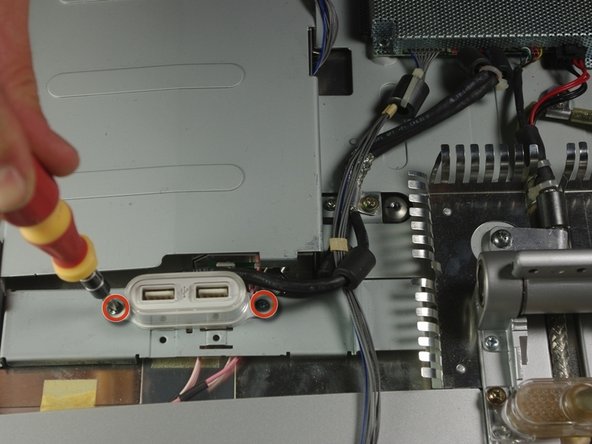
Gebruik de PH 2-schroevendraaier om de twee schroeven (4,85 x 2,94 mm) op de USB-poorten los te draaien.
-
-




Volg deze instructies in omgekeerde volgorde om uw apparaat weer in elkaar te zetten.

Team

Cal Poly, Team 10-41, Forte Spring 2011 Lid van Cal Poly, Team 10-41, Forte Spring 2011
CPSU-FORTE-S11S10G41
5 Leden
72 handleidingen geschreven
