Ga door naar hoofdinhoud
Word lid van de reparatiegemeenschap - Account aanmaken

Anker Soundcore Select Pro A 3126 Button Panel Replacement

Wat je nodig hebt

  1. Anker Soundcore Select Pro A 3126 Button Panel Replacement, Button Panel: stap 1, afbeelding 1 van 2 Anker Soundcore Select Pro A 3126 Button Panel Replacement, Button Panel: stap 1, afbeelding 2 van 2
    • Use a spudger to remove each side speaker cover by inserting it in the crevice and using moderate force to pry them off.

    Vraag FixBot

    Voeg opmerking toe

  2. Anker Soundcore Select Pro A 3126 Button Panel Replacement: stap 2, afbeelding 1 van 2 Anker Soundcore Select Pro A 3126 Button Panel Replacement: stap 2, afbeelding 2 van 2
    • Insert a spudger into the space between the grille and speaker frame to pry the mesh grille covering the front speakers.

    Vraag FixBot

    Voeg opmerking toe

  3. Anker Soundcore Select Pro A 3126 Button Panel Replacement: stap 3, afbeelding 1 van 1
    • Use a Phillips #1 screwdriver to remove the eight 12.7 mm screws securing the front cover.

    Vraag FixBot

    Voeg opmerking toe

  4. Anker Soundcore Select Pro A 3126 Button Panel Replacement: stap 4, afbeelding 1 van 1
    • Using a Phillips #1 screwdriver, remove the eight 8.75 mm screws around the corners of each speaker.

    Vraag FixBot

    Voeg opmerking toe

  5. Anker Soundcore Select Pro A 3126 Button Panel Replacement: stap 5, afbeelding 1 van 1
    • Flip the speaker so you have access to the bottom of the device.

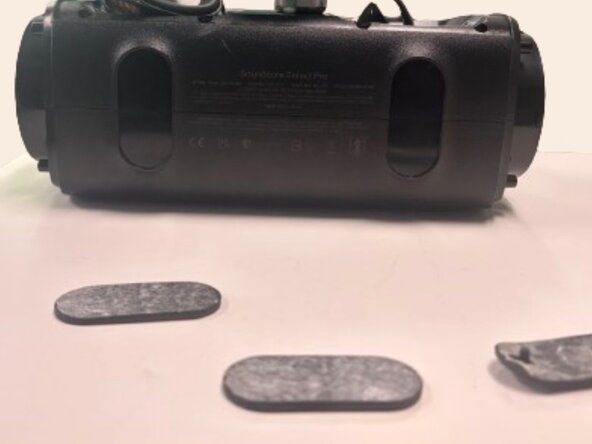
    • Use a spudger to remove both rubber pads that protect the bottom of the device.

    Vraag FixBot

    Voeg opmerking toe

  6. Anker Soundcore Select Pro A 3126 Button Panel Replacement: stap 6, afbeelding 1 van 1
    • Using a spudger remove the rubber pad on the top handle to expose 3 screws underneath.

    • Using a Phillips #1 screwdriver, remove the three 6.75 mm screws.

    Vraag FixBot

    Voeg opmerking toe

  7. Anker Soundcore Select Pro A 3126 Button Panel Replacement: stap 7, afbeelding 1 van 3 Anker Soundcore Select Pro A 3126 Button Panel Replacement: stap 7, afbeelding 2 van 3 Anker Soundcore Select Pro A 3126 Button Panel Replacement: stap 7, afbeelding 3 van 3
    • Using a spudger, pry open the front half of the speaker.

    • The front and back halves of the speaker are connected by several cables. Open the speaker slowly and avoid pulling on the cables, as they can be damaged easily.

    Vraag FixBot

    Voeg opmerking toe

  8. Anker Soundcore Select Pro A 3126 Button Panel Replacement: stap 8, afbeelding 1 van 1
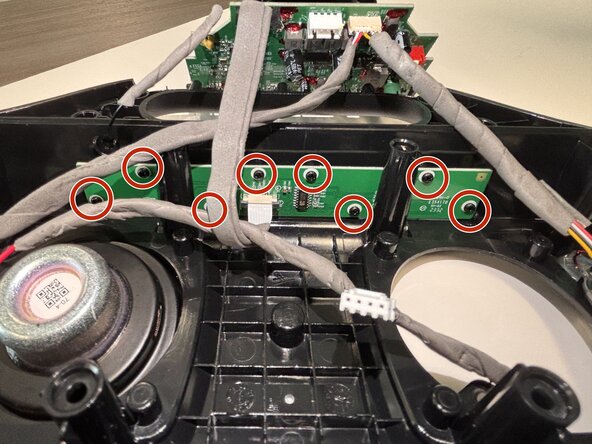
    • Use a Phillips #1 screwdriver to remove the eight 6.5 mm screws securing the button board.

    Vraag FixBot

    Voeg opmerking toe

  9. Anker Soundcore Select Pro A 3126 Button Panel Replacement: stap 9, afbeelding 1 van 2 Anker Soundcore Select Pro A 3126 Button Panel Replacement: stap 9, afbeelding 2 van 2
    • Use the tip of the spudger to push the black plastic locking tab away from the socket.

    • Pull the ribbon cable straight out of the socket.

    • Remove the old button board.

    Vraag FixBot

    Voeg opmerking toe

Conclusie

To reassemble your device, follow these instructions in reverse order.

Annuleren: ik heb deze handleiding niet afgemaakt.

Matthew Garza

Lid sinds: 02/24/26

387 Reputatie

2 handleidingen geschreven

0Gids Commentaar

Voeg opmerking toe

Weergavestatistieken:

Afgelopen 24 uren: 2

Afgelopen 7 dagen: 32

Afgelopen 30 dagen: 32

Altijd: 55