Ga door naar hoofdinhoud
Word lid van de reparatiegemeenschap - Account aanmaken

Amazon Echo Studio Subwoofer Replacement

Wat je nodig hebt

  1. Amazon Echo Studio Subwoofer Replacement, Power Supply Board: stap 1, afbeelding 1 van 3 Amazon Echo Studio Subwoofer Replacement, Power Supply Board: stap 1, afbeelding 2 van 3 Amazon Echo Studio Subwoofer Replacement, Power Supply Board: stap 1, afbeelding 3 van 3
    • Flip the device upside down.

    • Pry up the edge of the rubber base panel with a spudger, then pull the rest of it off by hand.

    Vraag FixBot

    Voeg opmerking toe

  2. Amazon Echo Studio Subwoofer Replacement: stap 2, afbeelding 1 van 3 Amazon Echo Studio Subwoofer Replacement: stap 2, afbeelding 2 van 3 Amazon Echo Studio Subwoofer Replacement: stap 2, afbeelding 3 van 3
    • Use a T15 Torx screwdriver to remove the nine 3.2 mm screws.

    • Use a Torx T10 screwdriver to remove the six 2.7 mm screws.

    • After removing the screws, gently lift the base off, with care not to damage any of the connected cables.

    Vraag FixBot

    Voeg opmerking toe

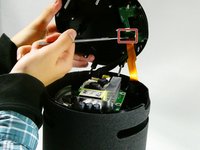
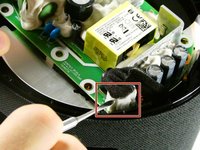
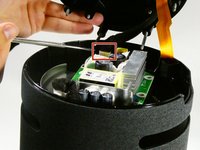
  3. Amazon Echo Studio Subwoofer Replacement: stap 3, afbeelding 1 van 3 Amazon Echo Studio Subwoofer Replacement: stap 3, afbeelding 2 van 3 Amazon Echo Studio Subwoofer Replacement: stap 3, afbeelding 3 van 3
    • Before fully removing the base, remove the three attached connectors.

    Vraag FixBot

    Voeg opmerking toe

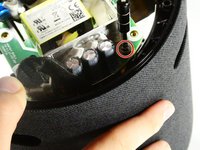
  4. Amazon Echo Studio Subwoofer Replacement: stap 4, afbeelding 1 van 2 Amazon Echo Studio Subwoofer Replacement: stap 4, afbeelding 2 van 2
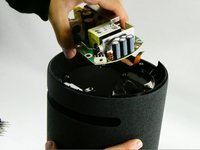
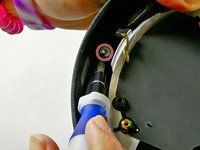
    • Now unscrew the the single 10 mm Phillips screw.

    • Remove the power supply board.

    Vraag FixBot

    Voeg opmerking toe

  5. Amazon Echo Studio Subwoofer Replacement, Subwoofer: stap 5, afbeelding 1 van 1
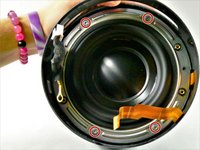
    • Remove the two screws located across from each other on the outside of the plastic ring shown.

    • Remove the plastic outer ring that hugs the inside of the edges of the device.

    • This may require you to use a soft prying tool to separate it from the outer shell.

    Vraag FixBot

    Voeg opmerking toe

  6. Amazon Echo Studio Subwoofer Replacement: stap 6, afbeelding 1 van 3 Amazon Echo Studio Subwoofer Replacement: stap 6, afbeelding 2 van 3 Amazon Echo Studio Subwoofer Replacement: stap 6, afbeelding 3 van 3
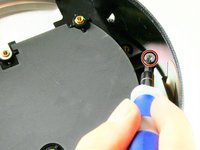
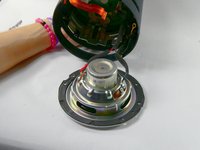
    • Remove the two 2.7 mm screws with a T10 Torx screwdriver.

    • Once the screws are removed, take the power supply's baseplate out of the unit.

    • You may need to gently pry the subwoofer's air ports from the round slots In the side of the unit.

    Vraag FixBot

    Voeg opmerking toe

  7. Amazon Echo Studio Subwoofer Replacement: stap 7, afbeelding 1 van 2 Amazon Echo Studio Subwoofer Replacement: stap 7, afbeelding 2 van 2
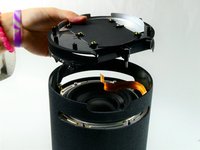
    • On the silver ring located on the outer edge of the plastic portion of the subwoofer, you will see four 2.7 mm screws. Use a Torx T10 screwdriver to remove them, in order to remove of the subwoofer.

    • Once the four screws have been removed, gently pull the subwoofer out as to not damage the wiring connecting the subwoofer to the main board inside the unit.

    • Follow the wires from the subwoofer to the main board and disconnect the connector attaching them.

    • Your subwoofer is now disconnected and ready to be replaced.

    Vraag FixBot

    Voeg opmerking toe

Conclusie

To reassemble your device, follow these instructions in reverse order.

Annuleren: ik heb deze handleiding niet afgemaakt.

Één andere persoon heeft deze handleiding voltooid.

Jaiden Wiles

Lid sinds: 10/26/22

178 Reputatie

1 Handleiding geschreven

Team

UMass Dartmouth, Team 2-6, Petersen Fall 2022 Lid van UMass Dartmouth, Team 2-6, Petersen Fall 2022

UMASSD-PETERSEN-F22S2G6

4 Leden

7 handleidingen geschreven

1Gids Commentaar

Does anybody know where to get a replacement subwoofer?

Matthew Johnson - Antwoord Deel

Voeg opmerking toe

Weergavestatistieken:

Afgelopen 24 uren: 1

Afgelopen 7 dagen: 19

Afgelopen 30 dagen: 54

Altijd: 1,563