Ga door naar hoofdinhoud
Word lid van de reparatiegemeenschap - Account aanmaken

Alienware P18G M14X R1 RAM Replacement

Wat je nodig hebt

  1. Alienware P18G M14X R1 RAM Replacement, Back Cover: stap 1, afbeelding 1 van 1
    • Loosen the top left and top right 6.5mm PH1 screws that hold down the back cover.

    • The screws will not be able to be removed from the back cover. They can only be loosened or tightened.

    Vraag FixBot
  2. Alienware P18G M14X R1 RAM Replacement: stap 2, afbeelding 1 van 1
    • Slide back cover forward using your thumbs.

    Vraag FixBot
  3. Alienware P18G M14X R1 RAM Replacement: stap 3, afbeelding 1 van 1
    • Lift up the cover and set aside exposing the internals of the computer.

    Vraag FixBot
  4. Alienware P18G M14X R1 RAM Replacement, RAM: stap 4, afbeelding 1 van 1
    • Unscrew the two 6.35 mm using the PH1 screw driver.

    Vraag FixBot
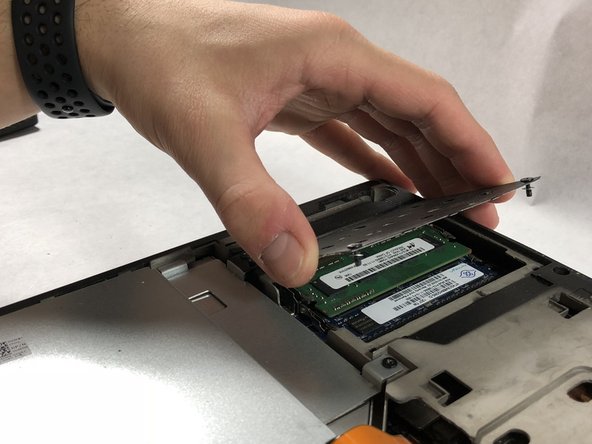
  5. Alienware P18G M14X R1 RAM Replacement: stap 5, afbeelding 1 van 2 Alienware P18G M14X R1 RAM Replacement: stap 5, afbeelding 2 van 2
    • Lift the plate and remove it to uncover the RAM sticks.

    Vraag FixBot
  6. Alienware P18G M14X R1 RAM Replacement: stap 6, afbeelding 1 van 1
    • Push outward on the prongs that secure the RAM stick in the slots.

    • After releasing the prongs the rams stick will rise up.

    Vraag FixBot
  7. Alienware P18G M14X R1 RAM Replacement: stap 7, afbeelding 1 van 1
    • Be very gentle in this step, making sure to not damage anything.

    • Pull the RAM stick out of its housing.

    Vraag FixBot
  8. Alienware P18G M14X R1 RAM Replacement: stap 8, afbeelding 1 van 1
    • Push outward on the prongs that secure the RAM stick in the slots.

    • After releasing the prongs the rams stick will rise up.

    Vraag FixBot
  9. Alienware P18G M14X R1 RAM Replacement: stap 9, afbeelding 1 van 1
    • Be very gentle in this step, making sure to not damage anything.

    • Pull the second ram stick out of its housing.

    Vraag FixBot
Conclusie

To reassemble your device, follow these instructions in reverse order.

Andonaq Grozdani

Lid sinds: 03/01/18

892 Reputatie

5 handleidingen geschreven

Team

UMass Dartmouth, Team S2-G2, Simcock Spring 2018 Lid van UMass Dartmouth, Team S2-G2, Simcock Spring 2018

UMASSD-SIMCOCK-S18S2G2

3 Leden

5 handleidingen geschreven

0Gids Commentaar

Voeg opmerking toe

Weergavestatistieken:

Afgelopen 24 uren: 1

Afgelopen 7 dagen: 2

Afgelopen 30 dagen: 24

Altijd: 1,351