Deze vertaling is door een computer gegenereerd en is nog niet door iemand nagekeken. Spreek je deze taal? Bekijk het hier.

Acer Extensa 4420 harde schijf vervangen

TheMasterG en een andere bijdrager
Voor het laatst geüpdatet op 6 aug 2026
Bekeken: 339
Statistieken weergeven:
- Afgelopen 24 uur:
- 1
- Afgelopen 7 dagen:
- 10
- Afgelopen 30 dagen:
- 59
- Altijd:
- 339
Commentaar: 0
Niemand heeft een opmerking bij deze handleiding geplaatst. Ben jij de eerste?
Go to guide commentsVoltooid: 0 1
Niemand heeft deze handleiding als "voltooid" gemarkeerd. Ben jij de eerste?
1 persoon heeft deze handleiding als "voltooid" gemarkeerd. Dat ben jij—lekker bezig!
Favorieten: 0 1
Niemand heeft deze handleiding gemarkeerd als favoriet of volgt de handleiding. Ben jij de eerste?
1 persoon heeft deze handleiding als favoriet gemarkeerd (en blijft daarmee op de hoogte van meldingen)—dat ben jij!
Door de gemeenschap gemaakte handleiding
Deze handleiding is gemaakt door een enthousiasteling uit de gemeenschap, en niet door de iFixit-stafleden.
Onjuiste gereedschappen
Help om deze handleiding beter te maken door de juiste gereedschappen in plaatjes en/of tekst te gebruiken.
Wat je nodig hebt
Gereedschap
-
Spudger4.9


-
-
-
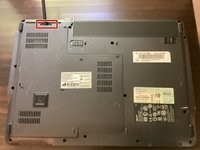
Zorg er eerst voor dat de batterijvergrendeling is uitgeschakeld.
 Vraag FixBot
-
-
-
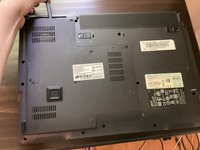
Verschuif vervolgens de andere batterijvergrendeling terwijl u de batterij eruit trekt.
-
-
-
-
Gereedschap gebruikt in deze stap:Phillips #00 Screwdriver$5.49
-
Draai alle vijf schroeven in het achterpaneel los met een Phillips #00 schroevendraaier.
-
-
Gereedschap gebruikt in deze stap:Spudger$3.99
-
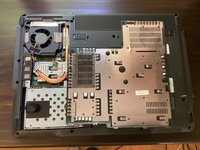
Pak een spudger en begin met het openwrikken van het achterpaneel. Maak het openwrikken af met je handen.
-
-
-
-




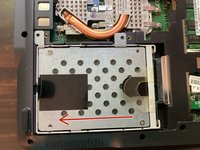
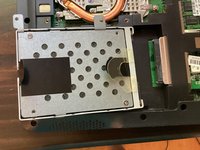
Volg deze instructies in omgekeerde volgorde om uw apparaat weer in elkaar te zetten.