Ga door naar hoofdinhoud
Word lid van de reparatiegemeenschap - Account aanmaken

Acer Aspire 5253 RAM Replacement

Wat je nodig hebt

  1. Acer Aspire 5253 RAM Replacement, Battery: stap 1, afbeelding 1 van 1
    • Turn the laptop over.

    Vraag FixBot
  2. Acer Aspire 5253 RAM Replacement: stap 2, afbeelding 1 van 1
    • "Unlock" your battery by moving the switch as shown so that an unlocked lock on a red background is shown.

    Vraag FixBot
  3. Acer Aspire 5253 RAM Replacement: stap 3, afbeelding 1 van 1
    • Next move the other switch, while the unlocked symbol is still showing. The battery should pop up, and no longer be flush with the bottom of the laptop.

    Vraag FixBot
  4. Acer Aspire 5253 RAM Replacement: stap 4, afbeelding 1 van 1
    • Now remove the battery by lifting it out of the laptop by the side closest to the switches.

    Vraag FixBot
  5. Acer Aspire 5253 RAM Replacement: stap 5, afbeelding 1 van 1
    • You have successfully removed the battery. Congratulations!

    Vraag FixBot
  6. Acer Aspire 5253 RAM Replacement, Back Cover Panel: stap 6, afbeelding 1 van 1
    • Now, locate the two screws that hold the back cover panel onto the laptop.

    Vraag FixBot
  7. Acer Aspire 5253 RAM Replacement: stap 7, afbeelding 1 van 1
    • Unscrew both of the screws that are holding the back panel in place with the Philips #00 head.

    • The screws are 3/8" in length and have a 1/4" head.

    Vraag FixBot
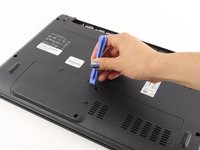
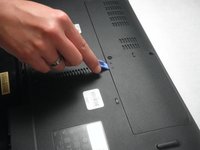
  8. Acer Aspire 5253 RAM Replacement: stap 8, afbeelding 1 van 2 Acer Aspire 5253 RAM Replacement: stap 8, afbeelding 2 van 2
    • Once both screws have been removed use a plastic opening tool to lift the panel up. Starting with the indented notch , and moving left and right from there.

    Vraag FixBot
  9. Acer Aspire 5253 RAM Replacement: stap 9, afbeelding 1 van 1
    • After the panel has been loosened by the plastic opening tool, take your finger, place it in the gap, and remove the panel from the laptop.

    Vraag FixBot
  10. Acer Aspire 5253 RAM Replacement, RAM: stap 10, afbeelding 1 van 1
    • Now, locate the RAM.

    Vraag FixBot
  11. Acer Aspire 5253 RAM Replacement: stap 11, afbeelding 1 van 1
    • Locate the two metal pieces on both sides of the RAM that are holding it in place.

    Vraag FixBot
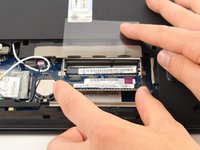
  12. Acer Aspire 5253 RAM Replacement: stap 12, afbeelding 1 van 1
    • Pull the tabs apart to remove the RAM.

    • The RAM will pop up once they are pried open.

    Vraag FixBot
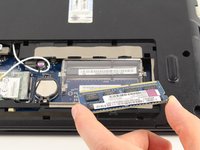
  13. Acer Aspire 5253 RAM Replacement: stap 13, afbeelding 1 van 2 Acer Aspire 5253 RAM Replacement: stap 13, afbeelding 2 van 2
    • Carefully slide the RAM out of the compartment.

    Vraag FixBot
Conclusie

To reassemble your device, follow these instructions in reverse order.

6 andere personen hebben deze handleiding voltooid.

Cynthia Barajas

Lid sinds: 04/08/14

2.258 Reputatie

5 handleidingen geschreven

Team

Cal Poly, Team 8-11, Regan Spring 2014 Lid van Cal Poly, Team 8-11, Regan Spring 2014

CPSU-REGAN-S14S8G11

4 Leden

15 handleidingen geschreven

1Gids Commentaar

which bus-ram acer 5253 can use? i know it use bus 1066 but i don't know with bus 1666 how is machine active?

nhanblack1996 - Antwoord Deel

Voeg opmerking toe

Weergavestatistieken:

Afgelopen 24 uren: 0

Afgelopen 7 dagen: 12

Afgelopen 30 dagen: 79

Altijd: 4,430