Ga door naar hoofdinhoud
Word lid van de reparatiegemeenschap - Account aanmaken

ASUS X550LB-DS71 Fan Replacement

Wat je nodig hebt

  1. ASUS X550LB-DS71 Fan Replacement, Fan: stap 1, afbeelding 1 van 3 ASUS X550LB-DS71 Fan Replacement, Fan: stap 1, afbeelding 2 van 3 ASUS X550LB-DS71 Fan Replacement, Fan: stap 1, afbeelding 3 van 3
    • Make sure to switch off your laptop before starting.

    • Place the laptop on a flat surface with the bottom side facing upwards.

    • Using the Phillips #1 Screwdriver, remove the four 4mm screws in the back panel.

    • Using both hands, slide the back panel away from the laptop horizontally.

    Vraag FixBot

    Voeg opmerking toe

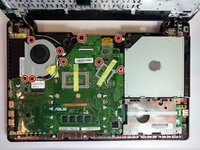
  2. ASUS X550LB-DS71 Fan Replacement: stap 2, afbeelding 1 van 1
    • Using the Phillips #0 Screwdriver, remove the ten 2mm screws at the marked locations.

    • At this point, it is advised to disconnect the hard drive from the motherboard.

    Vraag FixBot

    Voeg opmerking toe

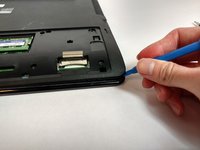
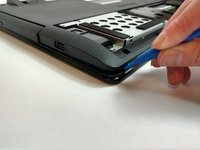
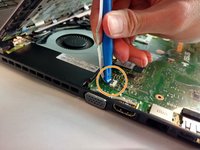
  3. ASUS X550LB-DS71 Fan Replacement: stap 3, afbeelding 1 van 3 ASUS X550LB-DS71 Fan Replacement: stap 3, afbeelding 2 van 3 ASUS X550LB-DS71 Fan Replacement: stap 3, afbeelding 3 van 3
    • Using the plastic opening tool, open the back cover of the laptop.

    • It is recommended that you start from a corner and run the tool along the edge of the cover.

    • Be careful not to bend or crack the cover.

    Vraag FixBot

    Voeg opmerking toe

  4. ASUS X550LB-DS71 Fan Replacement: stap 4, afbeelding 1 van 2 ASUS X550LB-DS71 Fan Replacement: stap 4, afbeelding 2 van 2
    • Locate the three ribbon connectors.

    • Using the plastic opening tool, flip up all three gray tabs and remove the ribbon connectors from the motherboard.

    • Once the tabs are released, the ribbons will be easy to remove. Do not pull on the ribbons.

    Vraag FixBot

    Voeg opmerking toe

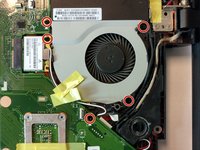
  5. ASUS X550LB-DS71 Fan Replacement: stap 5, afbeelding 1 van 2 ASUS X550LB-DS71 Fan Replacement: stap 5, afbeelding 2 van 2
    • Using the Phillips #0 Screwdriver, remove the nine 2mm screws at the marked locations.

    Vraag FixBot

    Voeg opmerking toe

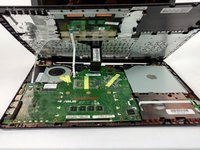
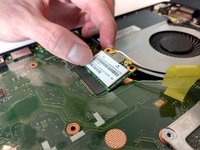
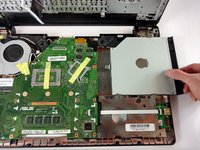
  6. ASUS X550LB-DS71 Fan Replacement: stap 6, afbeelding 1 van 2 ASUS X550LB-DS71 Fan Replacement: stap 6, afbeelding 2 van 2
    • Disconnect the WLAN Card from the motherboard by pulling the connector upwards.

    • Disconnect the optical drive from the motherboard by sliding it to the right.

    Vraag FixBot

    Voeg opmerking toe

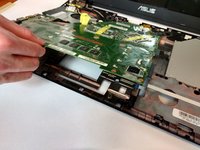
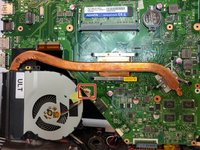
  7. ASUS X550LB-DS71 Fan Replacement: stap 7, afbeelding 1 van 3 ASUS X550LB-DS71 Fan Replacement: stap 7, afbeelding 2 van 3 ASUS X550LB-DS71 Fan Replacement: stap 7, afbeelding 3 van 3
    Gereedschap gebruikt in deze stap:
    Tweezers
    $4.99
    • Flip the motherboard to show the underside.

    • Locate the square fan connection attached to the motherboard.

    • Disconnect it using the tweezers (blunt).

    Vraag FixBot

    Voeg opmerking toe

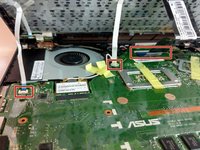
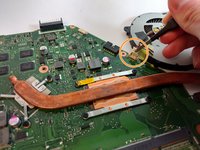
  8. ASUS X550LB-DS71 Fan Replacement: stap 8, afbeelding 1 van 1
    • Remove the black tape from the fan as seen in the marked location.

    • At this point, the fan is now disconnected from the motherboard.

    Vraag FixBot

    Voeg opmerking toe

Conclusie

To reassemble your device, follow these instructions in reverse order.

Annuleren: ik heb deze handleiding niet afgemaakt.

Één andere persoon heeft deze handleiding voltooid.

Nathan Dyer

Lid sinds: 09/25/17

550 Reputatie

5 handleidingen geschreven

Team

USF Tampa, Team S16-G1, Eyestone Fall 2017 Lid van USF Tampa, Team S16-G1, Eyestone Fall 2017

USFT-EYESTONE-F17S16G1

4 Leden

5 handleidingen geschreven

1Gids Commentaar

my mouse of laptop not working pls guide to repaire

Parneet Bhatti (Mantri) - Antwoord Deel

Voeg opmerking toe

Weergavestatistieken:

Afgelopen 24 uren: 1

Afgelopen 7 dagen: 4

Afgelopen 30 dagen: 61

Altijd: 1,494