Populaire forumvragen
Stel een vraagEr zijn geen vragen. Wees de eerste om een vraag te stellen!
Achtergrond
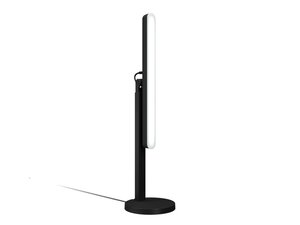
De Logitech Litra Beam is een compacte, hoogwaardige led-streaminglamp gericht op contentmakers, streamers en thuiswerkers. Het biedt instelbare kleurtemperatuur en helderheid met een zachte, directionele diffusie die is ontworpen om flatterende, gelijkmatige verlichting te produceren. De unit is geconstrueerd uit duurzame materialen — een aluminium koellichaam/behuizing gecombineerd met versterkt polycarbonaat en een duurzame clip/houder — om bestand te zijn tegen herhaaldelijk bevestigen en positioneren. Belangrijke kenmerken zijn onder meer USB‑C-voeding, geïntegreerde bediening voor helderheid/kleur en compatibiliteit met Logitech-software voor basisinstellingen.
Identificatie
De Logitech LITRA BEAM kan worden geïdentificeerd aan de hand van het modelnummer (M/N VR0031). Het model-label bevindt zich op de achterkant van de behuizing of op de meegeleverde USB‑C-kabel/verpakking. Dit label vermeldt de model- (M/N), onderdeel- (P/N) en serienummers (S/N).
Specificaties
- Vormfactor: Opklikbare rechthoekige led-lamp voor bureau-/monitorbevestiging
- Lichtbron: Zeer efficiënte led-array (geïntegreerd) met diffuse optiek
- Kleurtemperatuurbereik: 2700 K – 6500 K (instelbaar) — niet gespecificeerd in de FAQ, maar vermeld in productmaterialen
- Helderheidsregeling: Traploos instelbaar (0–100%) via ingebouwde bediening en Logitech-software (Logi Tune/Options+) (bedieningsmethode varieert per platform)
- Kleurweergave-index (CRI): Doorgaans ≥90 (geclaimd in productmaterialen; niet vermeld in de FAQ)
- Connectiviteit / Voeding: USB‑C-voedingsingang (5 V via USB‑C-kabel; voedingsadapter niet inbegrepen) — alleen voeding, geen gegevensverbinding vereist voor basisbediening
- Bevestiging: Geïntegreerde veerclip plus kogelgewricht voor positionering onder meerdere hoeken; compatibel met standaard 1/4" statiefbevestigingen op sommige modellen (controleer de productvariant)
- Materialen: Aluminium behuizing/koellichaam met polycarbonaat diffuser en versterkte cliponderdelen
- Afmetingen & gewicht: Niet gespecificeerd in het meegeleverde ondersteuningsartikel (zie de officiële productpagina voor de exacte afmetingen)
- Model- / Regelgevingsnummers: Geen reserveonderdeel- of modelnummers vermeld in de meegeleverde Logitech-ondersteunings-FAQ; controleer de productverpakking of het label aan de onderzijde voor het M/N-nummer op uw unit
Probleemoplossing
Veelvoorkomende reparatierelevante defecten zijn onder meer het niet inschakelen, onregelmatig flikkeren, zwakke leds of een gebroken/losse clip/houder. Stel een diagnose door te testen met een bekende, goed werkende USB‑C-kabel en voedingsbron, inspecteer de USB‑C-poort en kabel op fysieke schade en bevestig de werking op een andere host; controleer bevestigingsmateriaal en de clip op mechanisch falen. Als leds zwak blijven of flikkeren na het wisselen van kabels en voeding, is een defect aan de interne led-driver of een soldeerverbinding waarschijnlijk en kan reparatie op bordniveau of vervanging vereist zijn.
Bezoek voor aanvullende hulp bij probleemoplossing: Bezoek Logitech Support (https://support.logi.com) voor productondersteuning, diagnostiek en contactopties. Gebruik de Litra Beam FAQ en het contactformulier voor regiospecifieke hulp.
Aanvullende informatie
Garantie-informatie
Raadpleeg de Logitech-garantie-informatie voor uw regio; de meeste regio's bieden een beperkte hardwaregarantie (meestal 1 jaar). Controleer de productregistratie- en garantiepagina's op Logitech.com voor specifieke details.

