Ga door naar hoofdinhoud
Sluit je aan bij de reparatiegemeenschap! Maak een account aan

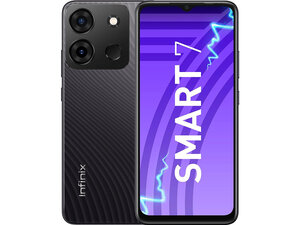
Reparatie-, demontage- en probleemoplossingsinformatie voor de Infinix Smart 7 Android-smartphonefamilie, inclusief de Smart 7 HD, model Infinix X6516.

My phone screen sometimes it's difficulty to touch

Especially the right side of the screen become difficulty to touch, fist time I think there's a problem to screen. I restarted my phone then it becomes good but the problem return

Beantwoord deze vraag Dit probleem heb ik ook

Is dit een goede vraag?

Score 16
3 opmerkingen

It restart on it self

door Deel

Slow problem

door Deel

Ano ang sira pag nag hang ang screen

door Deel

Voeg een opmerking toe

12 Antwoorden

Filteren op:
Het nuttigste antwoord

Display hit problem

Was dit antwoord nuttig?

Score 3
Voeg een opmerking toe

When IAM play free fire game my phone is very hang issue

Was dit antwoord nuttig?

Score 1
Voeg een opmerking toe

The Infinix Smart 7 does not have a specific screen calibration setting like some other devices. However, you can troubleshoot issues with your phone's touchscreen by removing the screen protector and cleaning the screen, which might improve touch sensitivity. If you're experiencing ghost touch issues (where the screen seems to register touches without you touching it), you can try gently bending the opposite edges of the screen to relieve pressure on the digitizer.

This video might also help.

Was dit antwoord nuttig?

Score 0
Voeg een opmerking toe

Yes also even restart it self

Was dit antwoord nuttig?

Score 0
Voeg een opmerking toe

Your phone is likely having a touchscreen responsiveness issue because the problem goes away after restarting but keeps coming back. This usually happens due to a software glitch, a failing touch digitizer, or interference from a screen protector, case, heat, or moisture. Restarting temporarily fixes system errors, but if the right side of the screen continues to be difficult to touch, it may indicate an early hardware problem. You should try removing the screen protector and case, cleaning the screen, updating the phone’s software, and checking if the issue happens in Safe Mode. If the problem still occurs even after these steps, it is most likely a hardware issue, and the screen may need to be checked or replaced by a technician.

Was dit antwoord nuttig?

Score 0
Voeg een opmerking toe

Not like that

Was dit antwoord nuttig?

Score 0
Voeg een opmerking toe

You need to change the screen

Was dit antwoord nuttig?

Score 0

2 opmerkingen:

I need to fix my Levi's mobile phone. It needs a screen protector, motherboard, and many other things. Its button is broken.

door Deel

I need to fix my Levi's mobile phone. It needs a screen protector, motherboard, and many other things. Its button is broken.

just now by krkr memi Edit Delete

door Deel

Voeg een opmerking toe

Charging system

Was dit antwoord nuttig?

Score 0
Voeg een opmerking toe

Display lagging

Was dit antwoord nuttig?

Score 0
Voeg een opmerking toe

Take time to boost

Was dit antwoord nuttig?

Score 0
Voeg een opmerking toe

Ponsel saya agak nglag

Was dit antwoord nuttig?

Score 0

1 Opmerking:

Ponsel saya ngelag

door Deel

Voeg een opmerking toe

Ayw ma touch ang screen kahit hnd nag hahang ang cellphone

Was dit antwoord nuttig?

Score 0
Voeg een opmerking toe

Voeg je antwoord toe

Fabiana Samweli zal eeuwig dankbaar zijn.
Weergavestatistieken:

Afgelopen 24 uren: 0

Afgelopen 7 dagen: 22

Afgelopen 30 dagen: 97

Altijd: 2,077



