
Ga door naar hoofdinhoud

Complete repair manual for the PSP Go, including battery upgrade and display repair instructions.

PSP Go - Windows doesn't recognize it, and no charging.

The only method to charge my psp go is through external means, since charging it doesnt work and doesnt accept usb charge either. Although Windows does detect the device but says device malfunctioned and doesn't recognize it. I dont think its the os. The charger works and the cable is both data and power.

All of this started when my psp ran out of battery for a long time and turned it on again, the time setting prompt appeared and accidentally let the battery run out of power, since then it doesn't accept any kind of charging.

Beantwoord! Bekijk het antwoord Dit probleem heb ik ook

Is dit een goede vraag?

Score 0
Voeg een opmerking toe

2 Antwoorden

Gekozen oplossing

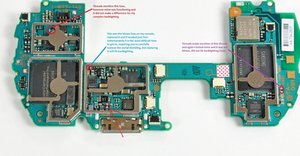
Ok i fixed it, i tested all the fuses and found a faulty one, its a 2.5 amp fuse marked "T" located close to the charging port. I replaced it and now it charges light up and everything.

Block Image

Was dit antwoord nuttig?

Score 0

2 opmerkingen:

Ah good to know! Thanks for sharing the solution! Have fun gaming and take care!!

door

Hey! Can you post a link to where I can get the fuse from? I am having a similar issue but for me windows isn't recognising my PSP go nor charging it. The charger works, I replaced the cable and battery but still no luck. I am at my wit's end!

door

Voeg een opmerking toe
Het nuttigste antwoord

Hi there!

First I would try the easy things first, replacing the battery and see how that goes!

Guide: PSP Go Battery Replacement

If this didn't solved it, then you might want to check the connector and see if there is any dirt in it, clean it if needed.

Also check for damage, if it is damaged then it does need a replacement, but this won't be easy as soldering is required.

Please let us know how it goes!

Was dit antwoord nuttig?

Score 1

2 opmerkingen:

Didn't work. Nothing changed.

door

Then I’m afraid you do need to replace the port! First of all, get the motherboard out. The port is soldered in, so you need an hot air station to get it out! Sorry.

door

Voeg een opmerking toe

Voeg je antwoord toe

pspfan2001 zal eeuwig dankbaar zijn.
Weergavestatistieken:

Afgelopen 24 uren: 1

Afgelopen 7 dagen: 3

Afgelopen 30 dagen: 33

Altijd: 332