Ga door naar hoofdinhoud

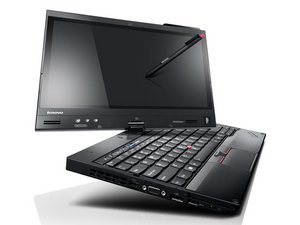
A collection of guides for repairing the Lenovo X230 tablet models X230T and X230iT.

How to instal an Internal camera on X230T?

I bought a used Lenovo Thinkpad X230T (Tablet) Laptop, online.

I found out later, there is no Integrated Camera in it. So I plan to buy the part and install it myself. But I’m not sure how to do it.

On Youtube, I see an instructional video about how to install cam, but, instead, it was about X230. I see the bezel is a bit different than the X230T.

I also see another video about how to take apart and repair a X220T/X230T, but the video doesn’t mention how to remove the bezel and to install the internal Camera.

Would be glad if I can learn how to do it.

Thank you in advance.

Beantwoord! Bekijk het antwoord Dit probleem heb ik ook

Is dit een goede vraag?

Score 0
1 Opmerking

Note: The Lenovo X230T is also called the X230 Tablet.

door

Voeg een opmerking toe

1 Antwoord

Gekozen oplossing

Let's get this straight. The hole for the camera is there but there is just no camera. Is that correct? If that is the case I’m guessing the cables are probably still there inside.

Here's the service manual:

http://download.lenovo.com/pccbbs/mobile...

Camera is on lower half of page 99 and beyond.

Was dit antwoord nuttig?

Score 1

1 Opmerking:

I doubt it's there - you'd need to replace the LVDS cable and install the webcam piece that would replace the blackout option if you can find it, otherwise you need to buy the webcam bezel.

door

Voeg een opmerking toe

Voeg je antwoord toe

Yunus SH zal eeuwig dankbaar zijn.
Weergavestatistieken:

Afgelopen 24 uren: 0

Afgelopen 7 dagen: 1

Afgelopen 30 dagen: 5

Altijd: 837