Ga door naar hoofdinhoud
Word lid van de reparatiegemeenschap - Account aanmaken

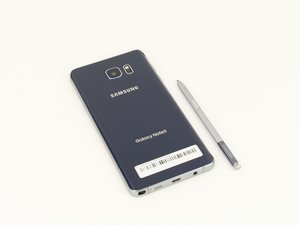
The Samsung Galaxy Note 5 (called the Note5) is a phablet-style phone with stylus, manufactured by Samsung, released in August 2015.

bootlooped note 5 data pull

I found my note 5 caught in a boot loop after I woke up this morning. I've been doing everything to try and get it out but no luck. I am willing to reset my phone if I have my data though, so I was wondering if there is any software I could download which would let me pull data (such as pictures, videos, music etc) while the phone is stuck in a loop. I can power it off using recovery settings. Clearing the cache doesn't help. I'm not even sure if resetting would solve the looping issue but any info would be much appreciated, thanks!

Beantwoord! Bekijk het antwoord Dit probleem heb ik ook

Is dit een goede vraag?

Score 0
Voeg een opmerking toe

2 Antwoorden

Gekozen oplossing

You need to be able to flash a custom recovery then use the file system mtp mounting to computer then you can read the data. System and data partition should be mounted in system recovery.

You might even be able to just get the phone working again by reflash the firmware via Odin.

How to flash android firmware: http://updato.com/how-to/how-to-install-...

I usually use TWRP or clockworkmod recovery Odin flashable to do data recovery on firmware that refuses to boot without factory reset (and or firmware reflash).

Was dit antwoord nuttig?

Score 3

4 opmerkingen:

So I flashed new firmware onto it and it is still looping. Should I try flashing an older version of the firmware or something? What do you suggest?

door

Then you need to flash a custom recovery so that you can use MTP mode to backup contacts and photos while in a custom recovery.

https://twrp.me/devices/samsunggalaxynot...

door

I tried flashing TWRP and It keeps failing, I also get an error on my download screen(on the phone) saying the FAP lock is on? Thanks for your help!

door

Oh.. If you have FRP lock then you are literally out of luck for data recovery. I'm afraid you will have to do a wipe data / factory reset in recovery mode and lose all your data.

If you can still get into the recovery menu and do wipe-data then do it. Otherwise reflash firmware again and wipe data / factory reset in recovery mode.

door

Voeg een opmerking toe

If you can get the phone into recovery mode, connect it to a PC with the adb tool.

The command 'adb pull <file>' can grab <files> from the phone.

Was dit antwoord nuttig?

Score 0

3 opmerkingen:

Could you give me an example of how I could do this to pull music for example and which tool would be the easiest to use? Also, I know I had developer tools enabled on my phone but I'm not sure if USB debugging was enabled. Thanks!

door

Here is a great article on that.

http://www.droidviews.com/push-pull-file...

door

I followed that tutorial but I kept on getting an error that it couldn't find the phone, I might be because the phone isn't in USB debugging mode but I have no way to change that.

door

Voeg een opmerking toe

Voeg je antwoord toe

Robel Efrem zal eeuwig dankbaar zijn.
Weergavestatistieken:

Afgelopen 24 uren: 0

Afgelopen 7 dagen: 1

Afgelopen 30 dagen: 14

Altijd: 3,263
