
Ga door naar hoofdinhoud

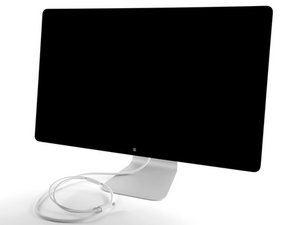
27" display with 2560 x 1440 pixels resolution Thunderbolt & MagSafe cable attachments

Monitor not working at all?

I bought a used Thunderbolt Display. It was sent to me and I wasn't able to check it upon purchase. When it finally came, I saw the housing was in very good condition, no scratches, no bumps. Cables are fine and clean. When monitor is plugged in to a power supply my MacBook Pro can be powered too (the small led correctly indicates charging).

However:

- USB ports dont charge any connected device (like iPhone)

- when connected to laptop, the monitor is neither listed in the monitor list, nor in the thunderbolt section (computer states: no thunderbolt devices connected)

- the same when monitor is connected via a separate thunderbolt cable (not the one going out of the back housing)

What can be wrong? Is there a chance to fix it by myself or service is required?

Beantwoord deze vraag Dit probleem heb ik ook

Is dit een goede vraag?

Score 0
Voeg een opmerking toe

1 Antwoord

The most common problem with the Thunderbolt Display is the cable connecting to the laptop. replacing that one might fix it.

If you have a male to male thunderbolt cable, you can put it in the thunderbolt port on the back of the display, and the other one in your mac, if the screen works fine that way. It is the cable that is having issues.

Replacing the cable is not that hard, but you need the right tools and need to be careful.

Was dit antwoord nuttig?

Score 0
Voeg een opmerking toe

Voeg je antwoord toe

MonsterSale zal eeuwig dankbaar zijn.
Weergavestatistieken:

Afgelopen 24 uren: 0

Afgelopen 7 dagen: 1

Afgelopen 30 dagen: 2

Altijd: 495
