Ga door naar hoofdinhoud
Sluit je aan bij de reparatiegemeenschap! Maak een account aan

iMac Intel 27" EMC 2429 Glass Panel Replacement

Bekeken: 43K

Statistieken weergeven:

Afgelopen 24 uur:
2
Afgelopen 7 dagen:
23
Afgelopen 30 dagen:
131
Altijd:
43.013
Commentaar: 35

35 opmerkingen over de stappen.

Voltooid: 24

24 mensen hebben deze handleiding als "voltooid" gemarkeerd. Ben jij de volgende?

Favorieten: 18

18 mensen hebben deze handleiding als favoriet gemarkeerd en volgen deze. Ben jij de volgende?

Tijd vereist: 5 minuten
Moeilijkheid: Eenvoudig
iMac Intel 27" EMC 2429 Glass Panel Replacement

This guide will help you replace the glass panel.

Wat je nodig hebt

Onderdelen

Gereedschap

    1. iMac Intel 27" EMC 2429 Glass Panel Replacement, Glass Panel: stap 1, afbeelding 1 van 3 iMac Intel 27" EMC 2429 Glass Panel Replacement, Glass Panel: stap 1, afbeelding 2 van 3 iMac Intel 27" EMC 2429 Glass Panel Replacement, Glass Panel: stap 1, afbeelding 3 van 3
      Gereedschap gebruikt in deze stap:
      Heavy-Duty Suction Cups (Pair)
      $16.95
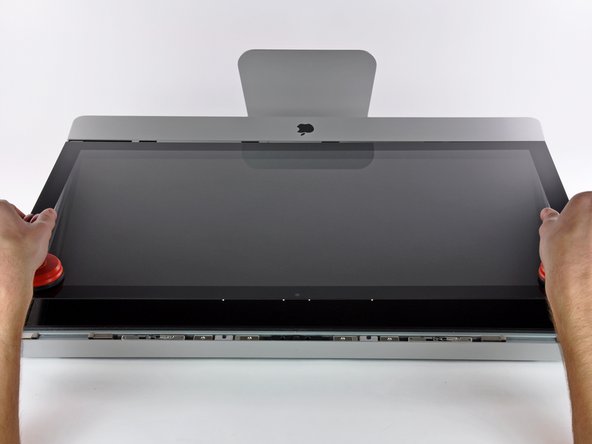
      • Stick a heavy-duty suction cup near each of the two top corners of the glass panel.

      • To attach the suction cups, first position the suction cup with the movable handle parallel to the face of the glass panel (as indicated in the second picture).

      • While lightly holding the suction cup against the glass, raise the movable handle until it is parallel with the other handle (as indicated by the third picture).

      • If your suction cups refuse to stick, try cleaning both the glass panel and the suction cup with a damp soft, lint-free cloth. (Dampen with distilled water, and if needed, an equal ratio of distilled water and white vinegar for best results.)

      • Do not use the suction cups to carry the display glass because if one of them fails to stick, you could drop the screen and break it.

      • The original iMac box makes a good place to store the glass panel. Otherwise, a padded horizontal surface, like a towel on a desk, will do nicely.

      Vraag FixBot

      Voeg opmerking toe

    2. iMac Intel 27" EMC 2429 Glass Panel Replacement: stap 2, afbeelding 1 van 3 iMac Intel 27" EMC 2429 Glass Panel Replacement: stap 2, afbeelding 2 van 3 iMac Intel 27" EMC 2429 Glass Panel Replacement: stap 2, afbeelding 3 van 3
      • Gently lift the glass panel perpendicular to the face of the LCD, enough to clear the steel mounting pins attached along the underside of the top edge of the glass panel.

      • Pull the glass panel away from the lower edge of the iMac and carefully set it aside.

      • Don't use the suction cups to carry the glass panel—if either one loses its grip, the panel could fall and break.

      • After setting the glass panel down safely, be sure to release the suction cups, as the suction force over time can crack the glass.

      • During reinstallation, be sure to meticulously clean the inside of the glass panel and the face of the LCD as any dust or fingerprints trapped inside will be annoyingly visible when the machine is turned on.

      Vraag FixBot

      Voeg opmerking toe

Conclusie

To reassemble your device, follow these instructions in reverse order.

Annuleren: ik heb deze handleiding niet afgemaakt.

24 andere personen hebben deze handleiding voltooid.

Auteur

met

Phillip Takahashi

Lid sinds: 08/22/11

88.138 Reputatie

87 handleidingen geschreven

0 opmerkingen onder de handleiding

Voeg opmerking toe

Weergavestatistieken:

Afgelopen 24 uren: 2

Afgelopen 7 dagen: 23

Afgelopen 30 dagen: 131

Altijd: 43,013