Ga door naar hoofdinhoud
Word lid van de reparatiegemeenschap - Account aanmaken

Zoom Q3HD Handy Video Recorder Lens Cleaning

Wat je nodig hebt

    1. Zoom Q3HD Handy Video Recorder Lens Cleaning, Zoom Q3HD Handy Video Recorder Lens Cleaning: stap 1, afbeelding 1 van 1
      • Remove the two screws from the bottom of the device.

      • Make sure to put your screws in a safe place.

      Vraag FixBot

      Voeg opmerking toe

    2. Zoom Q3HD Handy Video Recorder Lens Cleaning: stap 2, afbeelding 1 van 1
      • Flip the device over and remove the four screws bordering the grate of the device.

      Vraag FixBot

      Voeg opmerking toe

    3. Zoom Q3HD Handy Video Recorder Lens Cleaning: stap 3, afbeelding 1 van 1
      • On the front of the device, slide the battery compartment cover off by pushing inward and sliding downward.

      Vraag FixBot

      Voeg opmerking toe

    4. Zoom Q3HD Handy Video Recorder Lens Cleaning: stap 4, afbeelding 1 van 1
      • Remove the two screws from the lip of the battery compartment.

      Vraag FixBot

      Voeg opmerking toe

    5. Zoom Q3HD Handy Video Recorder Lens Cleaning: stap 5, afbeelding 1 van 1
      • Remove the final screw from the bed of the battery compartment.

      Vraag FixBot

      Voeg opmerking toe

    6. Zoom Q3HD Handy Video Recorder Lens Cleaning: stap 6, afbeelding 1 van 1
      • WARNING: Pieces may become loose when you separate the device in half!

      • Run the pry tool along the edges of the device to begin separating the device in two halves.

      Vraag FixBot

      Voeg opmerking toe

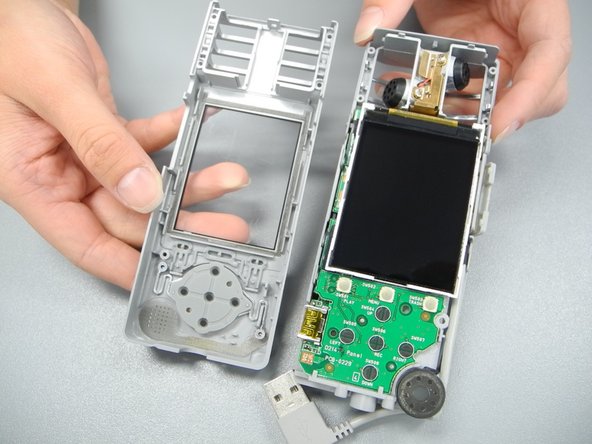
    7. Zoom Q3HD Handy Video Recorder Lens Cleaning: stap 7, afbeelding 1 van 2 Zoom Q3HD Handy Video Recorder Lens Cleaning: stap 7, afbeelding 2 van 2
      • REMINDER: Pieces may become loose when you separate the device in half!

      • Apply upward pressure to fully separate the device into two halves.

      Vraag FixBot

      Voeg opmerking toe

    8. Zoom Q3HD Handy Video Recorder Lens Cleaning: stap 8, afbeelding 1 van 1
      • WARNING: If you’re not careful with keeping the screen close to the board, you will rip off the ribbon attaching the screen to the circuit board.

      • Lift display screen keeping the top half close to the board.

      Vraag FixBot

      Voeg opmerking toe

    9. Zoom Q3HD Handy Video Recorder Lens Cleaning: stap 9, afbeelding 1 van 1
      • Gently flip the black clip up attaching the ribbon of the screen to the circuit board.

      Vraag FixBot

      Voeg opmerking toe

    10. Zoom Q3HD Handy Video Recorder Lens Cleaning: stap 10, afbeelding 1 van 1
      • Gently slide the ribbon from the circuit board, removing the screen.

      Vraag FixBot

      Voeg opmerking toe

Conclusie

To reassemble your device, follow these instructions in reverse order.

Annuleren: ik heb deze handleiding niet afgemaakt.

2 andere personen hebben deze handleiding voltooid.

Grace Bently

Lid sinds: 10/13/14

4 Reputatie

1 Handleiding geschreven

Team

Ohio State, Team 1-1, Mccook Fall 2014 Lid van Ohio State, Team 1-1, Mccook Fall 2014

OSU-MCCOOK-F14S1G1

4 Leden

12 handleidingen geschreven

3Gids Commentaar

My zoom q3HD only have the red light turned on when powering up. No display at all. What is happening? How can I claim warranty? I didn't use the device more than a year. Help me

stancalvin - Antwoord Deel

This is not comlete, leaves you half way through, would be great if you could finish this, thank you.

smoldas.l - Antwoord Deel

Yes it would be good to see it finished. I am half way through taking mine apart to clean the lens amd i don't know if i should proceed or not. Its the 2nd time the lens has fogged up. My 2nd q3hd.

steven kemsley - Antwoord Deel

Voeg opmerking toe

Weergavestatistieken:

Afgelopen 24 uren: 4

Afgelopen 7 dagen: 20

Afgelopen 30 dagen: 77

Altijd: 2,895