
Samsung NX2000 LCD Replacement

Maria Zamora en
Voor het laatst geüpdatet op 7 mei 2024
Bekeken: 1,7K
Statistieken weergeven:
- Afgelopen 24 uur:
- 5
- Afgelopen 7 dagen:
- 20
- Afgelopen 30 dagen:
- 87
- Altijd:
- 1.666
Commentaar: 0
Niemand heeft een opmerking bij deze handleiding geplaatst. Ben jij de eerste?
Bekijk de opmerkingen bij de handleidingVoltooid: 2 3
2 mensen hebben deze handleiding als "voltooid" gemarkeerd. Ben jij de volgende?
3 personen hebben deze handleiding als "voltooid" gemarkeerd. Een daarvan ben jij—lekker bezig!
Favorieten: 0 1
Niemand heeft deze handleiding gemarkeerd als favoriet of volgt de handleiding. Ben jij de eerste?
1 persoon heeft deze handleiding als favoriet gemarkeerd (en blijft daarmee op de hoogte van meldingen)—dat ben jij!
Inleiding
Ga naar stap 1 ↓This guide will help you learn how to replace the LCD of Samsung NX2000. It will show you the step by step procedures for removing the display successfully. Be sure to use the correct tool that is safe for the removal and does not damage the device.
Wat je nodig hebt
Gereedschap
-
-
Spudger4.9
-


-
-
-
First begin by flipping your camera upside down.
-
Remove the seven 4mm screws from indicated circles shown using a Y0 screwdriver. There are three on the bottom, and two on each side
 Vraag FixBot
-
-
-
Insert a plastic opening tool into the gab between the camera body and the back panel. Carefully pry open the camera and separate the back panel.
-
-
-
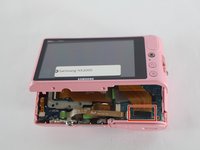
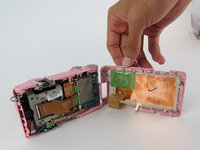
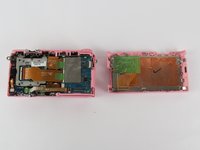
Before taking it apart you'll have to detach the display ribbon cable.
-
Use a plastic opening tool, lift up the black strip to release the ribbon cable from the connector.
-
-
-
Gereedschap gebruikt in deze stap:Tweezers$4.99
-
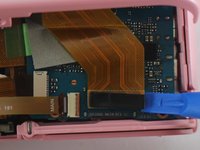
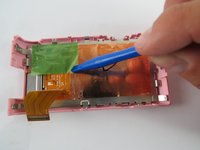
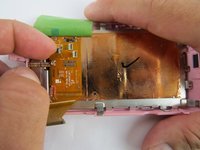
Use a plastic opening tool or tweezers to lift the green tape located on top of the LCD controller board.
-
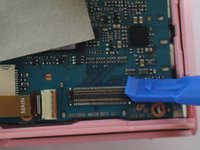
Detach the two ribbon cables, by first lifting the black tab on top of the connector.
-
Pull the ribbon cables out of the connectors with tweezers or two fingers.
-
-
-
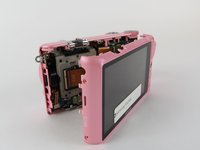
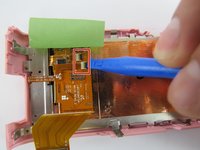
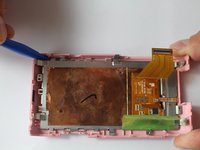
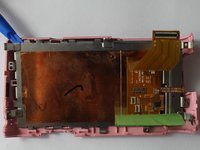
Place blue plastic spudger in between LCD screen and plastic surrounding.
-
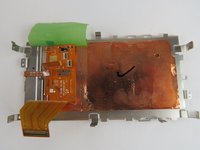
Begin to lift up slowly, removing the LCD screen from the main frame.
-
-









To reassemble your device, follow these instructions in reverse order.
Annuleren: ik heb deze handleiding niet afgemaakt.
2 andere personen hebben deze handleiding voltooid.

Team

USF Tampa, Team 7-4, Cheng Spring 2016 Lid van USF Tampa, Team 7-4, Cheng Spring 2016
USFT-CHENG-S16S7G4
4 Leden
60 handleidingen geschreven
