Ga door naar hoofdinhoud
Word lid van de reparatiegemeenschap - Account aanmaken

Samsung Galaxy Tab 2 10.1 Headphone Jack Replacement

Wat je nodig hebt

  1. Samsung Galaxy Tab 2 10.1 Headphone Jack Replacement, Back Cover: stap 1, afbeelding 1 van 2 Samsung Galaxy Tab 2 10.1 Headphone Jack Replacement, Back Cover: stap 1, afbeelding 2 van 2
    Gereedschap gebruikt in deze stap:
    Heavy-Duty Spudger
    $4.99
    • The plastic opening tool may break during this step. You may need to use the heavy duty spudger instead.

    • Insert the plastic opening tool between the glass screen and the back cover so the curved end of the plastic opening tool is under the glass. Gently pry the back cover away from the glass screen.

    • Be sure to lift the entire display from the body and that you are not are lifting the glass from the display. You will need to reach down a little further for the correct removal.

    • Continue inserting the plastic opening tool around the whole device screen to completely separate the back cover from the glass screen.

    Vraag FixBot

    Voeg opmerking toe

  2. Samsung Galaxy Tab 2 10.1 Headphone Jack Replacement: stap 2, afbeelding 1 van 2 Samsung Galaxy Tab 2 10.1 Headphone Jack Replacement: stap 2, afbeelding 2 van 2
    • Gently lift the screen up with your finger.

    • If the screen will not separate from the back cover, try repeating step 1.

    Vraag FixBot

    Voeg opmerking toe

  3. Samsung Galaxy Tab 2 10.1 Headphone Jack Replacement, Battery Disconnect: stap 3, afbeelding 1 van 1
    • Using your fingers, remove the green tape covering the battery connector.

    Vraag FixBot

    Voeg opmerking toe

  4. Samsung Galaxy Tab 2 10.1 Headphone Jack Replacement: stap 4, afbeelding 1 van 3 Samsung Galaxy Tab 2 10.1 Headphone Jack Replacement: stap 4, afbeelding 2 van 3 Samsung Galaxy Tab 2 10.1 Headphone Jack Replacement: stap 4, afbeelding 3 van 3
    Gereedschap gebruikt in deze stap:
    Heavy-Duty Spudger
    $4.99
    • Insert the flat end of the heavy-duty spudger between the wires and underneath the battery connector. Carefully lift the black battery connector up to disconnect it from the motherboard.

    • The metal spudger shown in the photo is not recommended due to the possibility of an electrical short. Use an ESD-safe tool, such as a heavy-duty (nylon) spudger.

    Vraag FixBot

    Voeg opmerking toe

  5. Samsung Galaxy Tab 2 10.1 Headphone Jack Replacement, Headphone Jack: stap 5, afbeelding 1 van 2 Samsung Galaxy Tab 2 10.1 Headphone Jack Replacement, Headphone Jack: stap 5, afbeelding 2 van 2
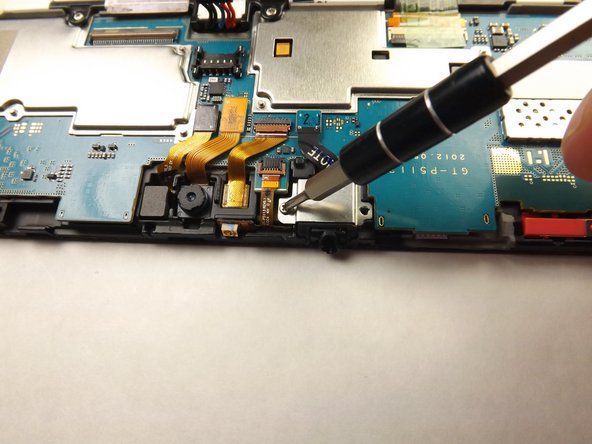
    • Unscrew the two 3mm screws with the Phillips 000 screwdriver.

    Vraag FixBot

    Voeg opmerking toe

  6. Samsung Galaxy Tab 2 10.1 Headphone Jack Replacement: stap 6, afbeelding 1 van 1
    • Lift the black cable connector with the plastic opening tool to disconnect the cable from the device.

    Vraag FixBot

    Voeg opmerking toe

  7. Samsung Galaxy Tab 2 10.1 Headphone Jack Replacement: stap 7, afbeelding 1 van 1
    Gereedschap gebruikt in deze stap:
    Heavy-Duty Spudger
    $4.99
    • Slide the flat end of heavy-duty spudger under the audio jack cover and lift up to remove the metal cover from the device.

    Vraag FixBot

    Voeg opmerking toe

  8. Samsung Galaxy Tab 2 10.1 Headphone Jack Replacement: stap 8, afbeelding 1 van 1
    • Insert the flat end of the heavy-duty spudger under the headphone jack and gently lift up to remove the headphone jack from the device.

    Vraag FixBot

    Voeg opmerking toe

Conclusie

To reassemble your device, follow these instructions in reverse order.

Annuleren: ik heb deze handleiding niet afgemaakt.

6 andere personen hebben deze handleiding voltooid.

Amy Tsai

Lid sinds: 01/30/15

2.005 Reputatie

2 handleidingen geschreven

Team

Cal Poly, Team 6-26, Amido Winter 2015 Lid van Cal Poly, Team 6-26, Amido Winter 2015

CPSU-AMIDO-W15S6G26

5 Leden

14 handleidingen geschreven

0Gids Commentaar

Voeg opmerking toe

Weergavestatistieken:

Afgelopen 24 uren: 2

Afgelopen 7 dagen: 10

Afgelopen 30 dagen: 49

Altijd: 4,111