Ga door naar hoofdinhoud
Word lid van de reparatiegemeenschap - Account aanmaken

Ring Video Doorbell Pro Speaker Replacement

Wat je nodig hebt

  1. Ring Video Doorbell Pro Speaker Replacement, Housing: stap 1, afbeelding 1 van 1
    • Start by using the star-shaped end of the included Ring screwdriver to take out the 5 mm screw on the bottom of the device.

    Vraag FixBot
  2. Ring Video Doorbell Pro Speaker Replacement: stap 2, afbeelding 1 van 3 Ring Video Doorbell Pro Speaker Replacement: stap 2, afbeelding 2 van 3 Ring Video Doorbell Pro Speaker Replacement: stap 2, afbeelding 3 van 3
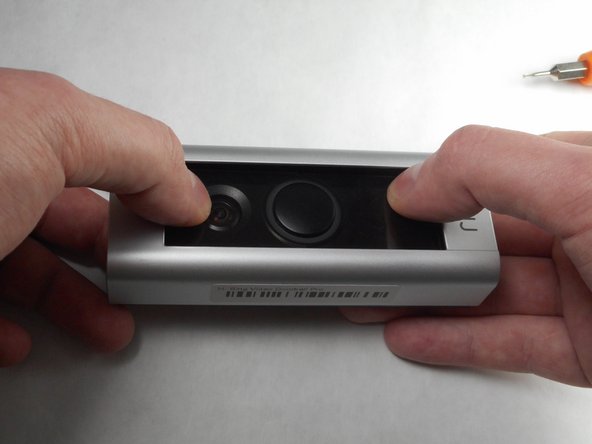
    • Use your thumbs to apply downward pressure on the glass part of the device while pulling the faceplate up and off of the device.

    Vraag FixBot
  3. Ring Video Doorbell Pro Speaker Replacement: stap 3, afbeelding 1 van 1
    • Using a PH-000 screwdriver, unscrew and set aside all four of these 5.25 mm screws.

    Vraag FixBot
  4. Ring Video Doorbell Pro Speaker Replacement: stap 4, afbeelding 1 van 2 Ring Video Doorbell Pro Speaker Replacement: stap 4, afbeelding 2 van 2
    • Using a plastic pry tool, go along the edge of the device prying the device apart. While doing this, focus on the four clips, two of which are on either side of the device.

    Vraag FixBot
  5. Ring Video Doorbell Pro Speaker Replacement: stap 5, afbeelding 1 van 1
    • Remove the front of the device from the back plate.

    Vraag FixBot
  6. Ring Video Doorbell Pro Speaker Replacement, Speaker: stap 6, afbeelding 1 van 1
    • With the Video Doorbell Pro opened up the speaker is exposed.

    Vraag FixBot
  7. Ring Video Doorbell Pro Speaker Replacement: stap 7, afbeelding 1 van 1
    • Remove this 5.25 mm screw.

    Vraag FixBot
  8. Ring Video Doorbell Pro Speaker Replacement: stap 8, afbeelding 1 van 1
    • Remove this wire connection by gently prying it off with a plastic pry tool.

    Vraag FixBot
  9. Ring Video Doorbell Pro Speaker Replacement: stap 9, afbeelding 1 van 1
    • Remove the speaker from the device.

    Vraag FixBot
Conclusie

To reassemble your device, insert the new speaker and follow these instructions in reverse order.

6 andere personen hebben deze handleiding voltooid.

Jake Dixon

Lid sinds: 11/09/17

901 Reputatie

4 handleidingen geschreven

Team

IUPUI, Team S7-G4, Baechle Fall 2017 Lid van IUPUI, Team S7-G4, Baechle Fall 2017

IUPUI-BAECHLE-F17S7G4

3 Leden

5 handleidingen geschreven

8Gids Commentaar

Hi Jake. This looks brilliant - I would love to contact you directly as I have a further question about this. My member name is robinfeild, and my email is email is robinfeild@gmail.com.

Hope to hear from you!

Thanks

Robin

Robin Feild - Antwoord Deel

Anyone happen to know where you can purchase the replacement speaker from?

John Clark - Antwoord Deel

Where did you get a replacement speaker from?

Volodymyr Kazantsev - Antwoord Deel

Where did you get a replacement speaker from?

Sammy - Antwoord Deel

I dismantled the speaker in mine having verified it was faulty by testing it with one from a standard Ring Doorbell, (It has the same connector but the housing is a different shape. Having cracked open the plastic housing of the speaker it has one of these inside (1w 8 Ohm Rectangular speaker 15*11*3.5mm) such as https://www.ebay.co.uk/itm/224485373996 a couple of drops of superglue and two dabs of solder, works like new.

cagedbat - Antwoord Deel

Voeg opmerking toe

Weergavestatistieken:

Afgelopen 24 uren: 3

Afgelopen 7 dagen: 11

Afgelopen 30 dagen: 66

Altijd: 16,350