Ga door naar hoofdinhoud
Word lid van de reparatiegemeenschap - Account aanmaken

Ring Stick Up Cam Battery Speaker Replacement

Wat je nodig hebt

  1. Ring Stick Up Cam Battery Speaker Replacement, Battery: stap 1, afbeelding 1 van 1
    • Turn the camera so the lens is facing away from you, and the back is facing towards you.

    • Place one hand securely on the base and the other on the stand.

    • Carefully twist your bottom hand counterclockwise until the indicator line reaches the unlock icon.

    Vraag FixBot
  2. Ring Stick Up Cam Battery Speaker Replacement: stap 2, afbeelding 1 van 1
    • Gently pull down to separate the stand from the camera body.

    Vraag FixBot
  3. Ring Stick Up Cam Battery Speaker Replacement: stap 3, afbeelding 1 van 2 Ring Stick Up Cam Battery Speaker Replacement: stap 3, afbeelding 2 van 2
    • Hold the camera so the opening containing the battery is toward the ceiling.

    • Squeeze the silver lever labeled "push" and extract the battery from its slot.

    Vraag FixBot
  4. Ring Stick Up Cam Battery Speaker Replacement, Motherboard: stap 4, afbeelding 1 van 1
    Gereedschap gebruikt in deze stap:
    Halberd Spudger
    $2.99
    • Remove the upper and lower silicon covers on the rear panel with your fingers or the hook-end of the halberd spudger.

    Vraag FixBot
  5. Ring Stick Up Cam Battery Speaker Replacement: stap 5, afbeelding 1 van 1
    • Remove the 6 mm white screw from the rear panel with the a T3 Torx screwdriver.

    Vraag FixBot
  6. Ring Stick Up Cam Battery Speaker Replacement: stap 6, afbeelding 1 van 1
    • Rotate the device so the base is facing upward.

    • Remove the two 6 mm screws from the base (on either side of the QR code) using a Phillips #00 screwdriver.

    • Remove the two 4 mm screws that connect the silver latch on the outside rim using a Phillips #00 screwdriver.

    Vraag FixBot
  7. Ring Stick Up Cam Battery Speaker Replacement: stap 7, afbeelding 1 van 1
    • Remove the silver latch from the base.

    • Remove the front cover.

    • Remove the eight 6 mm screws from the inside panel with a Philips #00 screwdriver.

    • Remove the two 4 mm screws from the inside panel with a Phillips #00 screwdriver.

    Vraag FixBot
  8. Ring Stick Up Cam Battery Speaker Replacement: stap 8, afbeelding 1 van 1
    • Pry the inside panel open using your hands or a spudger if necessary.

    Vraag FixBot
  9. Ring Stick Up Cam Battery Speaker Replacement: stap 9, afbeelding 1 van 1
    • Remove the seven 4 mm screws connecting the motherboard to the camera body with a Phillips #00 screwdriver.

    Vraag FixBot
  10. Ring Stick Up Cam Battery Speaker Replacement: stap 10, afbeelding 1 van 2 Ring Stick Up Cam Battery Speaker Replacement: stap 10, afbeelding 2 van 2
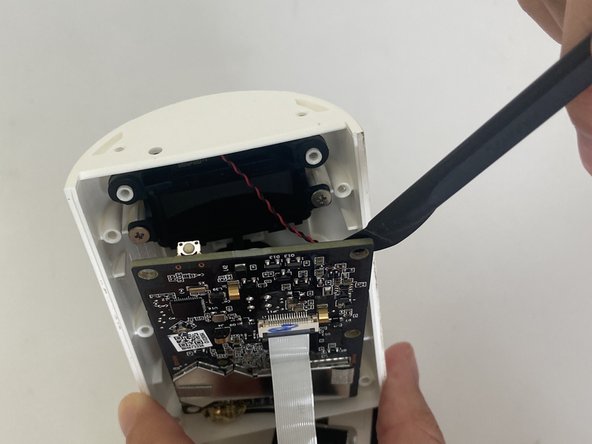
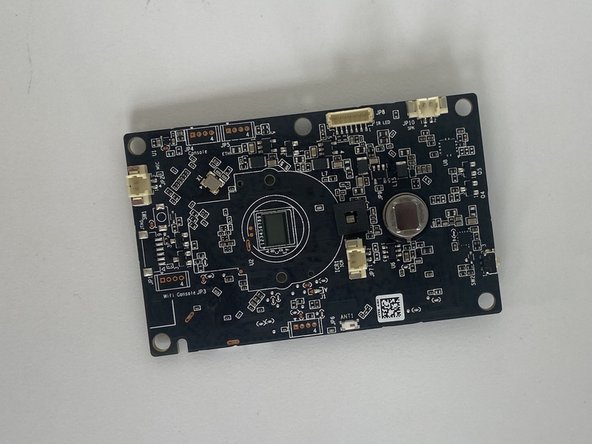
    • Lift the motherboard from the camera body with the halberd spudger.

    Vraag FixBot
  11. Ring Stick Up Cam Battery Speaker Replacement: stap 11, afbeelding 1 van 2 Ring Stick Up Cam Battery Speaker Replacement: stap 11, afbeelding 2 van 2
    • Rotate the device to its side.

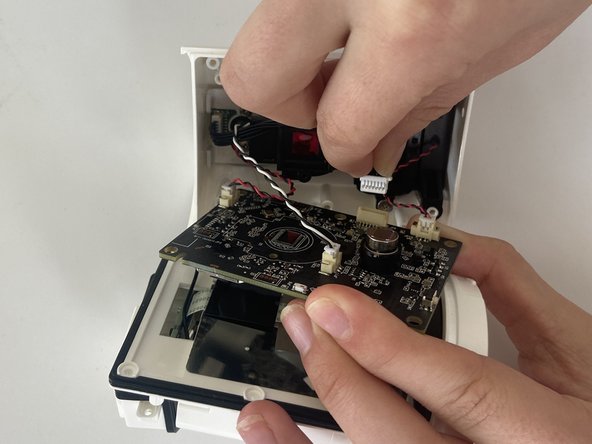
    • With your fingers, carefully remove the white part of the cord clip from the beige base.

    • Repeat this for the remaining three cords connecting the motherboard to the camera body.

    Vraag FixBot
  12. Ring Stick Up Cam Battery Speaker Replacement: stap 12, afbeelding 1 van 1
    • Fold the motherboard downward from the camera body, revealing a white connecting strip.

    • Using the flat end of a spudger, flick the black hinge upward.

    • Pull the white strip out of the slot.

    Vraag FixBot
  13. Ring Stick Up Cam Battery Speaker Replacement: stap 13, afbeelding 1 van 2 Ring Stick Up Cam Battery Speaker Replacement: stap 13, afbeelding 2 van 2
    • Carefully insert the spudger underneath gold adhesive at the lower left-hand corner of the motherboard.

    • Gently remove the adhesive cover from the motherboard.

    Vraag FixBot
  14. Ring Stick Up Cam Battery Speaker Replacement, Camera: stap 14, afbeelding 1 van 1
    • Orient your device so that the interior of the camera body is facing the ceiling.

    Vraag FixBot
  15. Ring Stick Up Cam Battery Speaker Replacement: stap 15, afbeelding 1 van 1
    • Remove the two 6 mm screws that connect the camera to the camera body using a Phillips #00 screwdriver.

    Vraag FixBot
  16. Ring Stick Up Cam Battery Speaker Replacement: stap 16, afbeelding 1 van 1
    • Grab and twist the camera counterclockwise with your thumb and index finger.

    Vraag FixBot
  17. Ring Stick Up Cam Battery Speaker Replacement: stap 17, afbeelding 1 van 2 Ring Stick Up Cam Battery Speaker Replacement: stap 17, afbeelding 2 van 2
    • Using your fingers, lift out the camera component including the camera lens and the attached wire.

    Vraag FixBot
  18. Ring Stick Up Cam Battery Speaker Replacement, Microphone: stap 18, afbeelding 1 van 1
    • Remove the two 4 mm screws connecting the metal protective piece to the camera body using a Phillips #00 screwdriver.

    Vraag FixBot
  19. Ring Stick Up Cam Battery Speaker Replacement: stap 19, afbeelding 1 van 1
    • Using your fingers, carefully pinch the white connector attached to the black cable, and gently pull it out of its slot on the daughterboard.

    Vraag FixBot
  20. Ring Stick Up Cam Battery Speaker Replacement: stap 20, afbeelding 1 van 1
    • Rotate the camera body to a comfortable position.

    • Use the spudger to pry the metal component from the camera body.

    • The daughterboard and microphone should now be exposed.

    Vraag FixBot
  21. Ring Stick Up Cam Battery Speaker Replacement: stap 21, afbeelding 1 van 1
    • Gently remove the daughterboard from the base with your hands or the spudger if necessary.

    Vraag FixBot
  22. Ring Stick Up Cam Battery Speaker Replacement: stap 22, afbeelding 1 van 2 Ring Stick Up Cam Battery Speaker Replacement: stap 22, afbeelding 2 van 2
    Gereedschap gebruikt in deze stap:
    Halberd Spudger
    $2.99
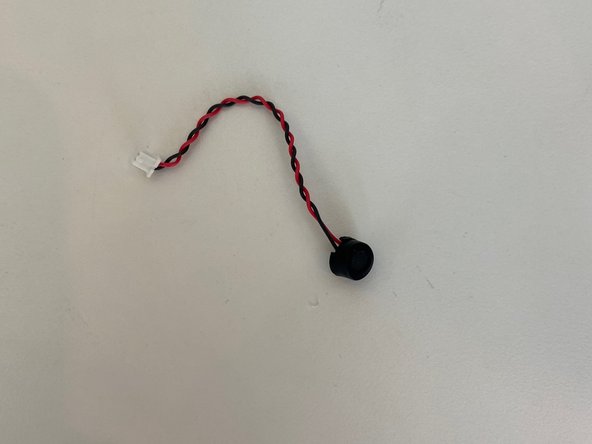
    • Use the hook end of the halberd spudger to carefully lift the microphone from the base.

    Vraag FixBot
  23. Ring Stick Up Cam Battery Speaker Replacement, Speaker: stap 23, afbeelding 1 van 1
    • Remove the two 4 mm screws from the upper black cover panel using a Phillips #00 screwdriver.

    • Remove the two 4 mm screws from the lower black cover panel using a Phillips #00 screwdriver.

    Vraag FixBot
  24. Ring Stick Up Cam Battery Speaker Replacement: stap 24, afbeelding 1 van 1
    • Use the spudger to pry the rectangular black panel from the camera body.

    Vraag FixBot
  25. Ring Stick Up Cam Battery Speaker Replacement: stap 25, afbeelding 1 van 2 Ring Stick Up Cam Battery Speaker Replacement: stap 25, afbeelding 2 van 2
    • Rotate the camera body upward.

    • Use your hands or the spudger to lift the lower black panel to reveal the speaker.

    Vraag FixBot
Conclusie

To reassemble your device, follow these instructions in reverse order.

Vanessa Hasbrouck

Lid sinds: 02/24/23

366 Reputatie

2 handleidingen geschreven

Team

Marist, Team 1-1, Chaterdon Spring 2023 Lid van Marist, Team 1-1, Chaterdon Spring 2023

MARS-CHATERDON-S23S1G1

3 Leden

8 handleidingen geschreven

0Gids Commentaar

Voeg opmerking toe

Weergavestatistieken:

Afgelopen 24 uren: 0

Afgelopen 7 dagen: 6

Afgelopen 30 dagen: 48

Altijd: 548