Ga door naar hoofdinhoud
Word lid van de reparatiegemeenschap - Account aanmaken

Panasonic Lumix ZS50 Lens Assembly Replacement

Wat je nodig hebt

  1. Panasonic Lumix ZS50 Lens Assembly Replacement, Battery: stap 1, afbeelding 1 van 2 Panasonic Lumix ZS50 Lens Assembly Replacement, Battery: stap 1, afbeelding 2 van 2
    • Turn the camera off and identify the battery door located on the bottom of the camera.

    Vraag FixBot

    Voeg opmerking toe

  2. Panasonic Lumix ZS50 Lens Assembly Replacement: stap 2, afbeelding 1 van 2 Panasonic Lumix ZS50 Lens Assembly Replacement: stap 2, afbeelding 2 van 2
    • Slide the "open" latch to the left: the battery door should spring open.

    • If your battery door doesn't open you may have to pry it open using a plastic opening tool or a standard spudger.

    Vraag FixBot

    Voeg opmerking toe

  3. Panasonic Lumix ZS50 Lens Assembly Replacement: stap 3, afbeelding 1 van 1
    • To release the battery, slide the white release lever next to the SD card slot.

    • If you find the battery release lever to be jammed you can push it using a plastic opening tool or standard spudger.

    Vraag FixBot

    Voeg opmerking toe

  4. Panasonic Lumix ZS50 Lens Assembly Replacement: stap 4, afbeelding 1 van 1
    • The battery should now be released; you may now remove the battery from the camera body.

    Vraag FixBot

    Voeg opmerking toe

  5. Panasonic Lumix ZS50 Lens Assembly Replacement, LCD Screen: stap 5, afbeelding 1 van 3 Panasonic Lumix ZS50 Lens Assembly Replacement, LCD Screen: stap 5, afbeelding 2 van 3 Panasonic Lumix ZS50 Lens Assembly Replacement, LCD Screen: stap 5, afbeelding 3 van 3
    • Orient the camera so the bottom is facing up and the battery door is on the right side.

    • Remove four black screws from the bottom of the camera.

    • Remove two black screws from the right side of the camera.

    • Remove one black screw from the left side of the camera.

    Vraag FixBot

    Voeg opmerking toe

  6. Panasonic Lumix ZS50 Lens Assembly Replacement: stap 6, afbeelding 1 van 2 Panasonic Lumix ZS50 Lens Assembly Replacement: stap 6, afbeelding 2 van 2
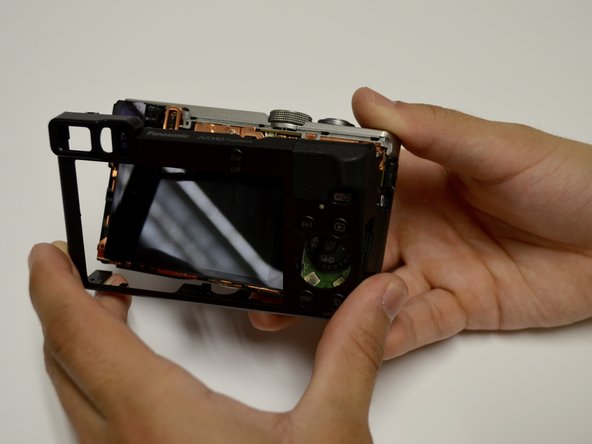
    • Remove the casing from the camera by hand or using a plastic opening tool.

    Vraag FixBot

    Voeg opmerking toe

  7. Panasonic Lumix ZS50 Lens Assembly Replacement: stap 7, afbeelding 1 van 2 Panasonic Lumix ZS50 Lens Assembly Replacement: stap 7, afbeelding 2 van 2
    • Use a spudger to lift up and tug off the green button board.

    • Be careful to not damage the attached ribbon cable.

    Vraag FixBot

    Voeg opmerking toe

  8. Panasonic Lumix ZS50 Lens Assembly Replacement: stap 8, afbeelding 1 van 3 Panasonic Lumix ZS50 Lens Assembly Replacement: stap 8, afbeelding 2 van 3 Panasonic Lumix ZS50 Lens Assembly Replacement: stap 8, afbeelding 3 van 3
    • Remove the screen using the plastic opening tool, prying from the top.

    • Once it's lifted up, tug lightly on the large ribbon cable to detach the screen from the camera body.

    Vraag FixBot

    Voeg opmerking toe

  9. Panasonic Lumix ZS50 Lens Assembly Replacement, Lens Assembly: stap 9, afbeelding 1 van 3 Panasonic Lumix ZS50 Lens Assembly Replacement, Lens Assembly: stap 9, afbeelding 2 van 3 Panasonic Lumix ZS50 Lens Assembly Replacement, Lens Assembly: stap 9, afbeelding 3 van 3
    • Remove the three screws from the center of the copper plate.

    • Remove the four screws from the outer edges of the copper plate.

    • Use a plastic or metal spudger to pry the copper plate out of place.

    Vraag FixBot

    Voeg opmerking toe

  10. Panasonic Lumix ZS50 Lens Assembly Replacement: stap 10, afbeelding 1 van 2 Panasonic Lumix ZS50 Lens Assembly Replacement: stap 10, afbeelding 2 van 2
    • Remove the casing from the circuitboard by hand.

    • Remove the HDMI port casing by hand.

    Vraag FixBot

    Voeg opmerking toe

  11. Panasonic Lumix ZS50 Lens Assembly Replacement: stap 11, afbeelding 1 van 3 Panasonic Lumix ZS50 Lens Assembly Replacement: stap 11, afbeelding 2 van 3 Panasonic Lumix ZS50 Lens Assembly Replacement: stap 11, afbeelding 3 van 3
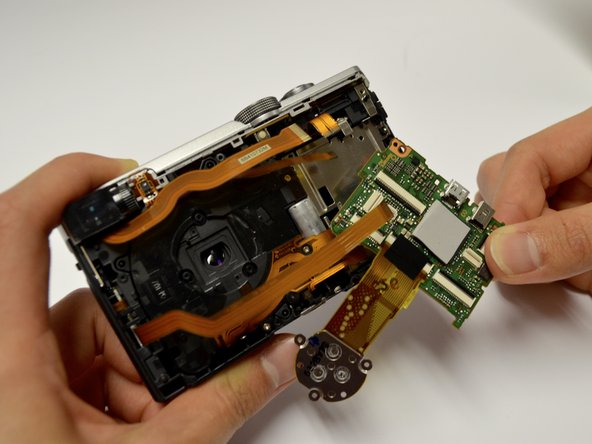
    • Disconnect all orange ribbon cables connecting to the circuitboard by hand.

    • Disconnect the circuitboard by hand.

    • There will be one orange ribbon cable attached to the top that can now be removed.

    Vraag FixBot

    Voeg opmerking toe

  12. Panasonic Lumix ZS50 Lens Assembly Replacement: stap 12, afbeelding 1 van 3 Panasonic Lumix ZS50 Lens Assembly Replacement: stap 12, afbeelding 2 van 3 Panasonic Lumix ZS50 Lens Assembly Replacement: stap 12, afbeelding 3 van 3
    • Remove the seven screws surrounding the lens assembly.

    • Move all ribbon cables out of your way while unscrewing.

    • Remove the three springs surrounding the lens.

    • Apply pressure on the front of the lens to push the lens out.

    Vraag FixBot

    Voeg opmerking toe

Conclusie

To reassemble your device, follow these instructions in reverse order.

Annuleren: ik heb deze handleiding niet afgemaakt.

Bridget Lathrop

Lid sinds: 02/01/17

158 Reputatie

2 handleidingen geschreven

Team

Baylor, Team 8-5, Whitney Spring 2017 Lid van Baylor, Team 8-5, Whitney Spring 2017

BU-WHITNEY-S17S8G5

3 Leden

7 handleidingen geschreven

0Gids Commentaar

Voeg opmerking toe

Weergavestatistieken:

Afgelopen 24 uren: 5

Afgelopen 7 dagen: 15

Afgelopen 30 dagen: 111

Altijd: 2,693