Ga door naar hoofdinhoud

P775DM3 M.2 SSD replacement

Wat je nodig hebt

  1. P775DM3 M.2 SSD replacement, Battery: stap 1, afbeelding 1 van 2 P775DM3 M.2 SSD replacement, Battery: stap 1, afbeelding 2 van 2
    • Unlock the lock circled in red.

  2. P775DM3 M.2 SSD replacement: stap 2, afbeelding 1 van 3 P775DM3 M.2 SSD replacement: stap 2, afbeelding 2 van 3 P775DM3 M.2 SSD replacement: stap 2, afbeelding 3 van 3
    • Lift the battery while unlocking the lock circled in red.

  3. P775DM3 M.2 SSD replacement, Disk access: stap 3, afbeelding 1 van 1
    • Unscrew the two screws circled in red.

    • Slide the plate in the direction of the arrow.

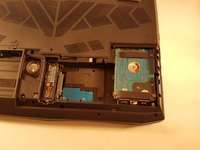
  4. P775DM3 M.2 SSD replacement: stap 4, afbeelding 1 van 2 P775DM3 M.2 SSD replacement: stap 4, afbeelding 2 van 2
    • Lift the plate

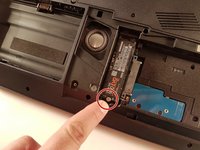
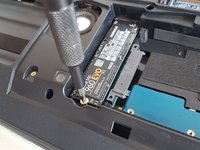
  5. P775DM3 M.2 SSD replacement, M.2 SSD: stap 5, afbeelding 1 van 2 P775DM3 M.2 SSD replacement, M.2 SSD: stap 5, afbeelding 2 van 2
    • Unscrew the screw circled in red.

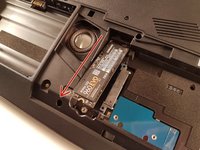
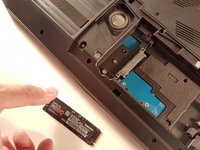
  6. P775DM3 M.2 SSD replacement: stap 6, afbeelding 1 van 2 P775DM3 M.2 SSD replacement: stap 6, afbeelding 2 van 2
    • Pull the SSD in the direction of the red arrow.

Conclusie

To reassemble your device follow the following instructions in reverse order

Één andere persoon heeft deze handleiding voltooid.

Met dank aan deze vertalers:

fr en

100%

Deze vertalers helpen ons de wereld te repareren! Doe je mee?
Begin met vertalen ›

Felice Suglia

Lid sinds: 06/15/13

33.538 Reputatie

283 handleidingen geschreven

1Gids Commentaar

Voeg opmerking toe

Weergavestatistieken:

Afgelopen 24 uren: 0

Afgelopen 7 dagen: 1

Afgelopen 30 dagen: 9

Altijd: 621