Ga door naar hoofdinhoud
Word lid van de reparatiegemeenschap - Account aanmaken

Optoma HD20 Light Bulb Replacement

Wat je nodig hebt

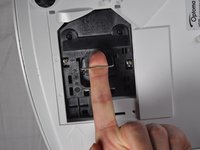
  1. Optoma HD20 Light Bulb Replacement, Rear Panel: stap 1, afbeelding 1 van 2 Optoma HD20 Light Bulb Replacement, Rear Panel: stap 1, afbeelding 2 van 2
    • Use a Phillips #1 screwdriver to loosen the screws that secure the panel on the bottom of the Optoma HD20.

    Vraag FixBot
  2. Optoma HD20 Light Bulb Replacement: stap 2, afbeelding 1 van 1
    • Lift the panel off of the device.

    Vraag FixBot
  3. Optoma HD20 Light Bulb Replacement, Light Bulb Casing: stap 3, afbeelding 1 van 1
    • Use a Phillips #1 screwdriver to loosen the two screws securing the black casing.

    • The screws don't come out all the way.

    Vraag FixBot
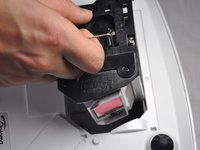
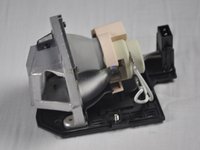
  4. Optoma HD20 Light Bulb Replacement: stap 4, afbeelding 1 van 3 Optoma HD20 Light Bulb Replacement: stap 4, afbeelding 2 van 3 Optoma HD20 Light Bulb Replacement: stap 4, afbeelding 3 van 3
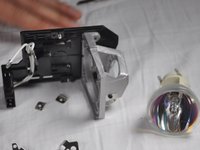
    • Remove the light bulb casing from the device.

    • Steps 5-9 are unnecessary if the replacement light bulb comes with housing.

    Vraag FixBot
  5. Optoma HD20 Light Bulb Replacement, Light Bulb: stap 5, afbeelding 1 van 1
    • Remove the three 4.5 mm screws on the light bulb case.

    Vraag FixBot
  6. Optoma HD20 Light Bulb Replacement: stap 6, afbeelding 1 van 1
    • Carefully remove the light bulb insulator from the light bulb casing.

    Vraag FixBot
  7. Optoma HD20 Light Bulb Replacement: stap 7, afbeelding 1 van 1
    Gereedschap gebruikt in deze stap:
    Tweezers
    $4.99
    • Gently pull the wires off of the pins using tweezers.

    Vraag FixBot
  8. Optoma HD20 Light Bulb Replacement: stap 8, afbeelding 1 van 1
    • Remove the 4 screws on the back of the light bulb casing using a Phillips #1 screwdriver.

    Vraag FixBot
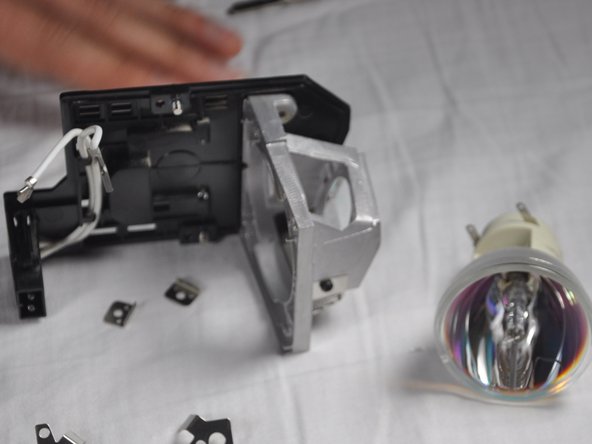
  9. Optoma HD20 Light Bulb Replacement: stap 9, afbeelding 1 van 2 Optoma HD20 Light Bulb Replacement: stap 9, afbeelding 2 van 2
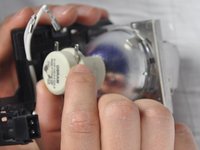
    • Remove the casing, then gently pull out the old light bulb and replace it with the new one.

    Vraag FixBot
Conclusie

To reassemble your device, follow these instructions in reverse order.

7 andere personen hebben deze handleiding voltooid.

Trever

Lid sinds: 01/22/15

1.282 Reputatie

6 handleidingen geschreven

Team

Cal Poly, Team 21-23, Maness Winter 2015 Lid van Cal Poly, Team 21-23, Maness Winter 2015

CPSU-MANESS-W15S21G23

4 Leden

6 handleidingen geschreven

5Gids Commentaar

I recently replaced my bulb for the third time and the insulator had grown brittle I am guessing from the heat and it broke. I can't seem to find this part for sale anywhere. Does anyone know if is possible to purchase it?

Thomas - Antwoord Deel

The screws in step 8 are extremely hard to get off. I went and bought proper screwdrivers before even attempting since theyre small, but in a day I've only managed to get one off and I'm having to resort to other tactics, even using a drill to just grind the heads off.

dv01_ - Antwoord Deel

king@okinlamps.com

Need LAD60 20PCS

kingshen92 - Antwoord Deel

The manual says the new light won’t come back on until a lamp reset I’d done via menu , but how can you see the text if the light isn’t on?????

Taringajohn - Antwoord Deel

my hd 20 projects dull images i recently replaced my bulb for the first time successfully and i followed as per menu trying to bulb reset but it is not working and still image is dull how to solve the problem

kumar - Antwoord Deel

Voeg opmerking toe

Weergavestatistieken:

Afgelopen 24 uren: 1

Afgelopen 7 dagen: 12

Afgelopen 30 dagen: 64

Altijd: 12,676