Ga door naar hoofdinhoud
Word lid van de reparatiegemeenschap - Account aanmaken

Olympus Pen E-PL7 Back Case Replacement

Wat je nodig hebt

  1. Olympus Pen E-PL7 Back Case Replacement, Back Case: stap 1, afbeelding 1 van 1
    • Use a Phillips #00 screwdriver to remove the six 2 mm screws on the bottom of the camera.

  2. Olympus Pen E-PL7 Back Case Replacement: stap 2, afbeelding 1 van 1
    • Remove the two 4 mm reverse threaded Phillips screws from the bottom of the camera.

    • Reverse threaded screws tighten counter clockwise and loosen clockwise.

  3. Olympus Pen E-PL7 Back Case Replacement: stap 3, afbeelding 1 van 1
    • Remove the two 4 mm Phillips screws under the HDMI port cover.

  4. Olympus Pen E-PL7 Back Case Replacement: stap 4, afbeelding 1 van 1
    • Use a Phillips #00 screwdriver to remove the 5 mm screw near the left hand grip.

  5. Olympus Pen E-PL7 Back Case Replacement: stap 5, afbeelding 1 van 1
    • Use a Phillips #00 screwdriver to remove the 5 mm screw near the right hand grip.

  6. Olympus Pen E-PL7 Back Case Replacement: stap 6, afbeelding 1 van 1
    • Flip open the LCD.

    • Use a Phillips #00 screwdriver to remove the 2 mm screw beneath the LCD assembly.

  7. Olympus Pen E-PL7 Back Case Replacement: stap 7, afbeelding 1 van 1
    • Use a Phillips #00 screwdriver to remove the four 6.3 mm screws from the lens mount.

  8. Olympus Pen E-PL7 Back Case Replacement: stap 8, afbeelding 1 van 1
    Gereedschap gebruikt in deze stap:
    Tweezers
    $4.99
  9. Olympus Pen E-PL7 Back Case Replacement: stap 9, afbeelding 1 van 1
    • Use tweezers to remove the inner metal ring.

  10. Olympus Pen E-PL7 Back Case Replacement: stap 10, afbeelding 1 van 2 Olympus Pen E-PL7 Back Case Replacement: stap 10, afbeelding 2 van 2
    • Use tweezers to remove the two springs lying beneath the inner metal ring.

  11. Olympus Pen E-PL7 Back Case Replacement: stap 11, afbeelding 1 van 1
    • Use a Phillips #00 screwdriver to remove the three 5 mm screws.

  12. Olympus Pen E-PL7 Back Case Replacement: stap 12, afbeelding 1 van 1
    • Remove the two 4 mm Phillips screws.

  13. Olympus Pen E-PL7 Back Case Replacement: stap 13, afbeelding 1 van 3 Olympus Pen E-PL7 Back Case Replacement: stap 13, afbeelding 2 van 3 Olympus Pen E-PL7 Back Case Replacement: stap 13, afbeelding 3 van 3
    • Press and hold the lens release button while using tweezers to remove the lens hook.

    • Use tweezers to remove the spring underneath the lens hook.

  14. Olympus Pen E-PL7 Back Case Replacement: stap 14, afbeelding 1 van 3 Olympus Pen E-PL7 Back Case Replacement: stap 14, afbeelding 2 van 3 Olympus Pen E-PL7 Back Case Replacement: stap 14, afbeelding 3 van 3
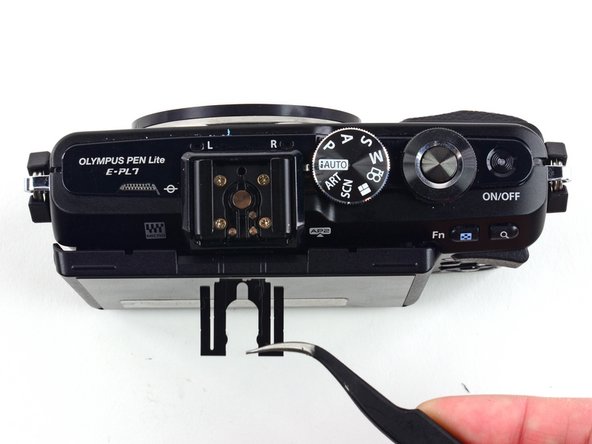
    • Use tweezers to remove the metal clip from the external flash mount.

  15. Olympus Pen E-PL7 Back Case Replacement: stap 15, afbeelding 1 van 1
    • Use a Phillips #00 screwdriver to remove the four 4 mm screws from the external flash port.

  16. Olympus Pen E-PL7 Back Case Replacement: stap 16, afbeelding 1 van 2 Olympus Pen E-PL7 Back Case Replacement: stap 16, afbeelding 2 van 2
    • Remove the second external flash clip with tweezers.

  17. Olympus Pen E-PL7 Back Case Replacement: stap 17, afbeelding 1 van 2 Olympus Pen E-PL7 Back Case Replacement: stap 17, afbeelding 2 van 2
    • Remove the external flash port casing to expose five more screws.

  18. Olympus Pen E-PL7 Back Case Replacement: stap 18, afbeelding 1 van 1
    • Use a Phillips #00 screwdriver to remove the two 6.4 mm screws.

    • Remove the 2 mm Phillips screw.

  19. Olympus Pen E-PL7 Back Case Replacement: stap 19, afbeelding 1 van 1
    • Remove the two 3.8 mm Phillips screws from the sides of the external flash connector.

  20. Olympus Pen E-PL7 Back Case Replacement: stap 20, afbeelding 1 van 1
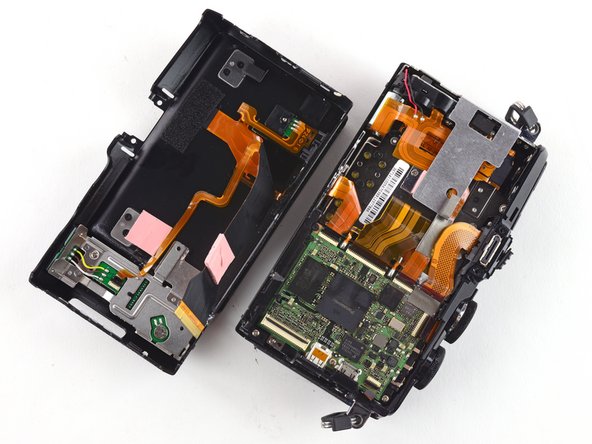
    • Gently pull the back case away from the camera.

    • Do not attempt to remove the back case, as it is attached to the camera by a ribbon cable.

  21. Olympus Pen E-PL7 Back Case Replacement: stap 21, afbeelding 1 van 3 Olympus Pen E-PL7 Back Case Replacement: stap 21, afbeelding 2 van 3 Olympus Pen E-PL7 Back Case Replacement: stap 21, afbeelding 3 van 3
    • To remove the ribbon holding the back case to the camera, use the pointed end of a spudger to flip back the top bar on top of the ZIF connector.

  22. Olympus Pen E-PL7 Back Case Replacement: stap 22, afbeelding 1 van 3 Olympus Pen E-PL7 Back Case Replacement: stap 22, afbeelding 2 van 3 Olympus Pen E-PL7 Back Case Replacement: stap 22, afbeelding 3 van 3
    • Use tweezers to pull the ribbon out of the connector.

    • Remove the back case.

Conclusie

To reassemble your device, follow these instructions in reverse order.

3 andere personen hebben deze handleiding voltooid.

Kelsea Weber

Lid sinds: 11/12/15

21.103 Reputatie

32 handleidingen geschreven

1Gids Commentaar

Loads of screws that don’t need to be removed just to remove the rear case.

Omit step 3,

Omit steps 6 to 13

Omit step 18

Take great care not to pull on ribbon cables

Rod Heeley - Antwoord

Voeg opmerking toe

Weergavestatistieken:

Afgelopen 24 uren: 3

Afgelopen 7 dagen: 9

Afgelopen 30 dagen: 50

Altijd: 3,992