Ga door naar hoofdinhoud
Word lid van de reparatiegemeenschap - Account aanmaken

Nokia 6310i Motherboard Replacement

Wat je nodig hebt

  1. Nokia 6310i Motherboard Replacement, Battery: stap 1, afbeelding 1 van 2 Nokia 6310i Motherboard Replacement, Battery: stap 1, afbeelding 2 van 2
    • Press and hold the battery release button and slide the battery away from the Nokia logo

    Vraag FixBot
  2. Nokia 6310i Motherboard Replacement, SIM card: stap 2, afbeelding 1 van 3 Nokia 6310i Motherboard Replacement, SIM card: stap 2, afbeelding 2 van 3 Nokia 6310i Motherboard Replacement, SIM card: stap 2, afbeelding 3 van 3
    • Slide the SIM card lock away from the SIM card.

    • The SIM card pops out. Remove the SIM card.

    Vraag FixBot
  3. Nokia 6310i Motherboard Replacement, Back Cover: stap 3, afbeelding 1 van 1
    • Unscrew and remove the four T6 Torx screws.

    Vraag FixBot
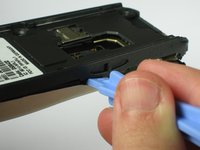
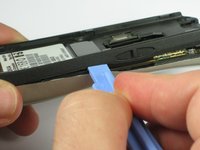
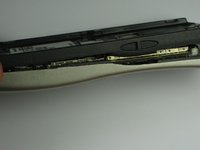
  4. Nokia 6310i Motherboard Replacement: stap 4, afbeelding 1 van 3 Nokia 6310i Motherboard Replacement: stap 4, afbeelding 2 van 3 Nokia 6310i Motherboard Replacement: stap 4, afbeelding 3 van 3
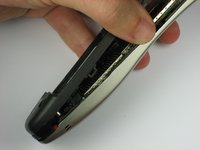
    • Insert a plastic opening tool between the faceplate and the black backplate. Gently pry them apart, working from the lower end to the upper side of the phone.

    Vraag FixBot
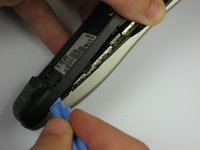
  5. Nokia 6310i Motherboard Replacement: stap 5, afbeelding 1 van 3 Nokia 6310i Motherboard Replacement: stap 5, afbeelding 2 van 3 Nokia 6310i Motherboard Replacement: stap 5, afbeelding 3 van 3
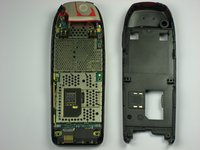
    • Use the plastic opening tool to separate the top part of the backplate.

    • The plastic clips at the top require slightly more force to separate.

    Vraag FixBot
  6. Nokia 6310i Motherboard Replacement, Antenna: stap 6, afbeelding 1 van 2 Nokia 6310i Motherboard Replacement, Antenna: stap 6, afbeelding 2 van 2
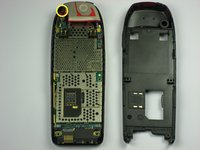
    • Remove the screw holding the antenna to the circuit board.

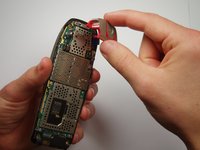
    • Carefully lift off the antenna from the circuit board.

    Vraag FixBot
  7. Nokia 6310i Motherboard Replacement, Motherboard: stap 7, afbeelding 1 van 1
    • Lift off the motherboard from the faceplate.

    Vraag FixBot
Conclusie

To reassemble your device, follow these instructions in reverse order.

Één andere persoon heeft deze handleiding voltooid.

Mustafa

Lid sinds: 09/23/10

175 Reputatie

4 handleidingen geschreven

Team

Cal Poly, Team 14-41, Forte Fall 2010 Lid van Cal Poly, Team 14-41, Forte Fall 2010

CPSU-FORTE-F10S14G41

5 Leden

22 handleidingen geschreven

1Gids Commentaar

This includes removing the antenna, since it's just one screw.

The antenna guide talks about "replacing the antenna."

Mustafa - Antwoord Deel

Voeg opmerking toe

Weergavestatistieken:

Afgelopen 24 uren: 3

Afgelopen 7 dagen: 11

Afgelopen 30 dagen: 111

Altijd: 7,789