Ga door naar hoofdinhoud

Nintendo Wii Fan Replacement

Wat je nodig hebt

  1. Nintendo Wii Fan Replacement, Faceplate: stap 1, afbeelding 1 van 2 Nintendo Wii Fan Replacement, Faceplate: stap 1, afbeelding 2 van 2
    • Use a metal spudger to remove the white plastic screw covers stuck to the lower case near the front of the Wii.

  2. Nintendo Wii Fan Replacement: stap 2, afbeelding 1 van 1
    • Remove the two 8.3 mm Tri-Point screws hidden under the covers you just removed.

  3. Nintendo Wii Fan Replacement: stap 3, afbeelding 1 van 1
    • Remove the single 5.9 mm Phillips screw under the controller port door nearest the faceplate.

  4. Nintendo Wii Fan Replacement: stap 4, afbeelding 1 van 1
    • Use a metal spudger to remove the rubber foot stuck to the side of the Wii near the DVD drive opening.

  5. Nintendo Wii Fan Replacement: stap 5, afbeelding 1 van 1
    • Remove the single 5.9 mm Phillips screw hidden under the foot you just removed.

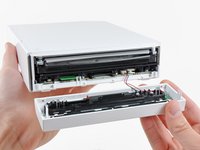
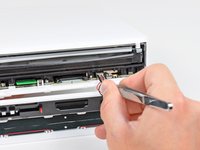
  6. Nintendo Wii Fan Replacement: stap 6, afbeelding 1 van 2 Nintendo Wii Fan Replacement: stap 6, afbeelding 2 van 2
    Gereedschap gebruikt in deze stap:
    Tweezers
    $4.99
    • Carefully pull the faceplate away from the front of the Wii.

    • Use a pair of tweezers to disconnect the LED cable's plastic connector from the motherboard.

    • Remove the faceplate.

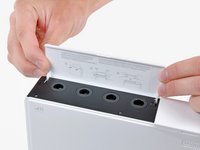
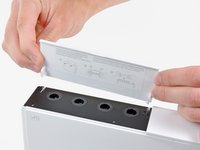
  7. Nintendo Wii Fan Replacement, Outer Case: stap 7, afbeelding 1 van 3 Nintendo Wii Fan Replacement, Outer Case: stap 7, afbeelding 2 van 3 Nintendo Wii Fan Replacement, Outer Case: stap 7, afbeelding 3 van 3
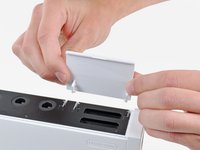
    • Open the controller port cover until it is perpendicular to the black controller port bezel.

    • Pull the controller port cover straight up to release it from the outer case.

    • Repeat this procedure for the memory card port cover.

  8. Nintendo Wii Fan Replacement: stap 8, afbeelding 1 van 2 Nintendo Wii Fan Replacement: stap 8, afbeelding 2 van 2
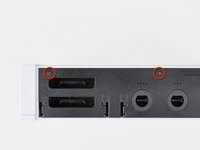
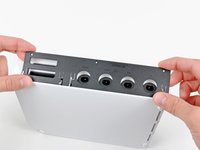
    • Remove the two remaining 4.1 mm Phillips screws along the top edge of the black plastic controller port bezel.

    • Lift the bezel from the long edge furthest away from the controller ports and remove it from the Wii.

  9. Nintendo Wii Fan Replacement: stap 9, afbeelding 1 van 1
    • Remove the two 5 mm Phillips screws above the controller ports.

  10. Nintendo Wii Fan Replacement: stap 10, afbeelding 1 van 1
    • Use a metal spudger to remove the three highlighted screw covers stuck to the side of the Wii.

  11. Nintendo Wii Fan Replacement: stap 11, afbeelding 1 van 1
    • Remove the following screws:

    • Two 5 mm Phillips screws

    • One 8.2 mm Tri-Point screw

  12. Nintendo Wii Fan Replacement: stap 12, afbeelding 1 van 1
    • Use a metal spudger to remove the two rubber feet stuck to the bottom face of the Wii near the rear ports.

  13. Nintendo Wii Fan Replacement: stap 13, afbeelding 1 van 1
    Gereedschap gebruikt in deze stap:
    iFixit Precision 4 mm Screwdriver Bit
    $2.99
    • Remove the two 8.2 mm Tri-Point screws hidden under the feet you just removed.

    • You may use a 4 mm hex nut driver to extend your bit into the recesses and reach the screws.

  14. Nintendo Wii Fan Replacement: stap 14, afbeelding 1 van 1
    • Lift the outer case straight up off the body of the Wii.

  15. Nintendo Wii Fan Replacement, Fan: stap 15, afbeelding 1 van 1
    Gereedschap gebruikt in deze stap:
    Tweezers
    $4.99
    • Grab the fan connector with a pair of tweezers and lift it straight up and out of its socket on the motherboard.

    • Be sure your tweezers are clamped down on the fan connector, not the socket attached to the motherboard.

  16. Nintendo Wii Fan Replacement: stap 16, afbeelding 1 van 1
    • Remove the two 10 mm Phillips screws securing the fan to the fan shroud.

  17. Nintendo Wii Fan Replacement: stap 17, afbeelding 1 van 1
    • Remove the fan from the Wii.

Conclusie

To reassemble your device, follow these instructions in reverse order.

34 andere personen hebben deze handleiding voltooid.

9Gids Commentaar

Awesome guide, just replaced faulty fan unit in my 9 year old wii. Should hopefully keep it going for another 9 years :)

Finlay Macrae - Antwoord

Super easy and great instructions! I feel a little guilty that my Wii sat in the garage for 4 years! Now it'll be a great birthday present for my 2 boys.

e_gayheart - Antwoord

Does anyone have a diagram for the Wii’s airflow? I’m looking to install a booster fan at the bottom to help blow air in but I want to make sure it is effective.

Jessica Parnelli Fawkes - Antwoord

nice¡¡¡¡¡¡¡¡¡¡¡¡¡¡

RIGO NOLASCO - Antwoord

Thanks! Wii Quarantine’n in 2021!

Daniel Thomas - Antwoord

Voeg opmerking toe

Weergavestatistieken:

Afgelopen 24 uren: 17

Afgelopen 7 dagen: 106

Afgelopen 30 dagen: 530

Altijd: 47,680