Ga door naar hoofdinhoud
Word lid van de reparatiegemeenschap - Account aanmaken

Nintendo Wii Drive Board Fuse Replacement

Wat je nodig hebt

  1. Nintendo Wii Drive Board Fuse Replacement, Faceplate: stap 1, afbeelding 1 van 2 Nintendo Wii Drive Board Fuse Replacement, Faceplate: stap 1, afbeelding 2 van 2
    • Use a metal spudger to remove the white plastic screw covers stuck to the lower case near the front of the Wii.

    Vraag FixBot

    Voeg opmerking toe

  2. Nintendo Wii Drive Board Fuse Replacement: stap 2, afbeelding 1 van 1
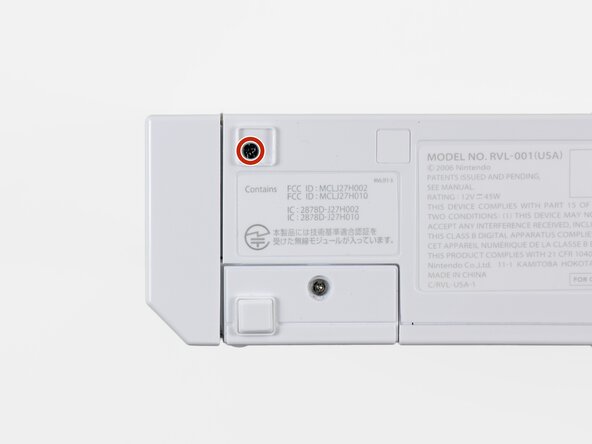
    • Remove the two 8.3 mm Tri-Point screws hidden under the covers you just removed.

    Vraag FixBot

    Voeg opmerking toe

  3. Nintendo Wii Drive Board Fuse Replacement: stap 3, afbeelding 1 van 1
    • Remove the single 5.9 mm Phillips screw under the controller port door nearest the faceplate.

    Vraag FixBot

    Voeg opmerking toe

  4. Nintendo Wii Drive Board Fuse Replacement: stap 4, afbeelding 1 van 1
    • Use a metal spudger to remove the rubber foot stuck to the side of the Wii near the DVD drive opening.

    Vraag FixBot

    Voeg opmerking toe

  5. Nintendo Wii Drive Board Fuse Replacement: stap 5, afbeelding 1 van 1
    • Remove the single 5.9 mm Phillips screw hidden under the foot you just removed.

    Vraag FixBot

    Voeg opmerking toe

  6. Nintendo Wii Drive Board Fuse Replacement: stap 6, afbeelding 1 van 2 Nintendo Wii Drive Board Fuse Replacement: stap 6, afbeelding 2 van 2
    Gereedschap gebruikt in deze stap:
    Tweezers
    $4.99
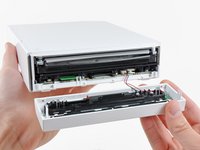
    • Carefully pull the faceplate away from the front of the Wii.

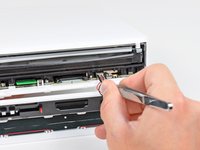
    • Use a pair of tweezers to disconnect the LED cable's plastic connector from the motherboard.

    • Remove the faceplate.

    Vraag FixBot

    Voeg opmerking toe

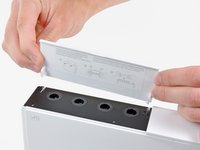
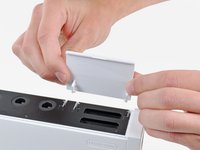
  7. Nintendo Wii Drive Board Fuse Replacement, Outer Case: stap 7, afbeelding 1 van 3 Nintendo Wii Drive Board Fuse Replacement, Outer Case: stap 7, afbeelding 2 van 3 Nintendo Wii Drive Board Fuse Replacement, Outer Case: stap 7, afbeelding 3 van 3
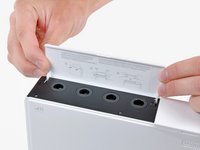
    • Open the controller port cover until it is perpendicular to the black controller port bezel.

    • Pull the controller port cover straight up to release it from the outer case.

    • Repeat this procedure for the memory card port cover.

    Vraag FixBot

    Voeg opmerking toe

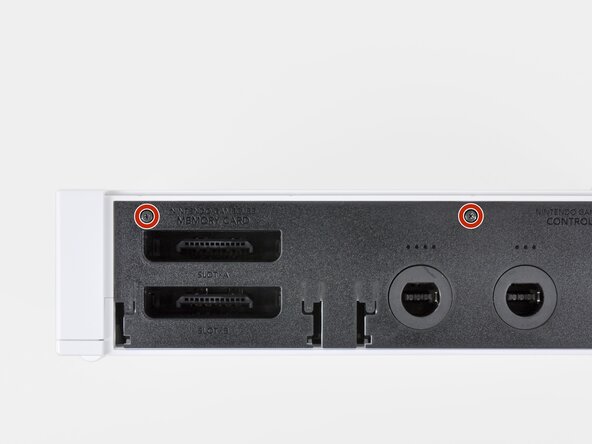
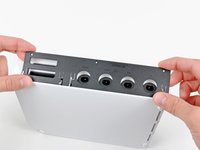
  8. Nintendo Wii Drive Board Fuse Replacement: stap 8, afbeelding 1 van 2 Nintendo Wii Drive Board Fuse Replacement: stap 8, afbeelding 2 van 2
    • Remove the two remaining 4.1 mm Phillips screws along the top edge of the black plastic controller port bezel.

    • Lift the bezel from the long edge furthest away from the controller ports and remove it from the Wii.

    Vraag FixBot

    Voeg opmerking toe

  9. Nintendo Wii Drive Board Fuse Replacement: stap 9, afbeelding 1 van 1
    • Remove the two 5 mm Phillips screws above the controller ports.

    Vraag FixBot

    Voeg opmerking toe

  10. Nintendo Wii Drive Board Fuse Replacement: stap 10, afbeelding 1 van 1
    • Use a metal spudger to remove the three highlighted screw covers stuck to the side of the Wii.

    Vraag FixBot

    Voeg opmerking toe

  11. Nintendo Wii Drive Board Fuse Replacement: stap 11, afbeelding 1 van 1
    • Remove the following screws:

    • Two 5 mm Phillips screws

    • One 8.2 mm Tri-Point screw

    Vraag FixBot

    Voeg opmerking toe

  12. Nintendo Wii Drive Board Fuse Replacement: stap 12, afbeelding 1 van 1
    • Use a metal spudger to remove the two rubber feet stuck to the bottom face of the Wii near the rear ports.

    Vraag FixBot

    Voeg opmerking toe

  13. Nintendo Wii Drive Board Fuse Replacement: stap 13, afbeelding 1 van 1
    Gereedschap gebruikt in deze stap:
    iFixit Precision 4 mm Screwdriver Bit
    $2.99
    • Remove the two 8.2 mm Tri-Point screws hidden under the feet you just removed.

    • You may use a 4 mm hex nut driver to extend your bit into the recesses and reach the screws.

    Vraag FixBot

    Voeg opmerking toe

  14. Nintendo Wii Drive Board Fuse Replacement: stap 14, afbeelding 1 van 1
    • Lift the outer case straight up off the body of the Wii.

    Vraag FixBot

    Voeg opmerking toe

  15. Nintendo Wii Drive Board Fuse Replacement, DVD Drive: stap 15, afbeelding 1 van 2 Nintendo Wii Drive Board Fuse Replacement, DVD Drive: stap 15, afbeelding 2 van 2
    • Remove the small Phillips screw securing the battery door to the bottom panel.

    • This screw is captive to the battery door.

    • Pull the battery door out of the Wii.

    • The system time will be reset once you remove the battery door.

    • This is a good time to change the CR2032 battery if it hasn't been changed recently.

    Vraag FixBot

    Voeg opmerking toe

  16. Nintendo Wii Drive Board Fuse Replacement: stap 16, afbeelding 1 van 1
    • Remove the 8.2 mm Tri-Point screw that was hidden beneath the battery door.

    Vraag FixBot

    Voeg opmerking toe

  17. Nintendo Wii Drive Board Fuse Replacement: stap 17, afbeelding 1 van 1
    • Remove the two 8.2 mm Tri-Point screws securing the DVD drive shield near the controller ports.

    Vraag FixBot

    Voeg opmerking toe

  18. Nintendo Wii Drive Board Fuse Replacement: stap 18, afbeelding 1 van 1
    • Be cautious as you remove the DVD shield, the edges are sharp and could cut you

    • Lift the DVD drive shield upward and remove it from the Wii.

    Vraag FixBot

    Voeg opmerking toe

  19. Nintendo Wii Drive Board Fuse Replacement: stap 19, afbeelding 1 van 1
    • Remove the four 9 mm Phillips screws securing the DVD drive to the bottom panel.

    Vraag FixBot

    Voeg opmerking toe

  20. Nintendo Wii Drive Board Fuse Replacement: stap 20, afbeelding 1 van 1
    • Lift the side of the DVD drive opposite the controller ports enough to access the cables on its bottom face.

    • Carefully pull the DVD drive power cable out from under the plastic shroud near the heat sink.

    Vraag FixBot

    Voeg opmerking toe

  21. Nintendo Wii Drive Board Fuse Replacement: stap 21, afbeelding 1 van 1
    • Pull the DVD drive power cable away from its socket on the DVD drive.

    Vraag FixBot

    Voeg opmerking toe

  22. Nintendo Wii Drive Board Fuse Replacement: stap 22, afbeelding 1 van 2 Nintendo Wii Drive Board Fuse Replacement: stap 22, afbeelding 2 van 2
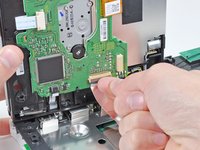
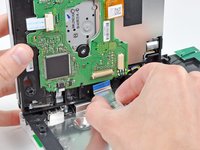
    • Use your fingernail to flip up the retaining flap on the DVD drive ribbon cable socket.

    • Be sure you are prying up on the retaining flap, not the socket itself.

    • Pull the DVD drive ribbon cable out of its socket.

    • Remove the DVD drive from the Wii.

    Vraag FixBot

    Voeg opmerking toe

  23. Nintendo Wii Drive Board Fuse Replacement, Drive Board Fuses: stap 23, afbeelding 1 van 1
    • Measure across each fuse with a continuity meter.

    • If either fuse is open, you will need to replace it with an 0603 fuse; if one is not available, you can use a 0-ohm resistor or jumper wire for testing purposes.

    Vraag FixBot

    Voeg opmerking toe

Conclusie

To reassemble your device, follow these instructions in reverse order.

Annuleren: ik heb deze handleiding niet afgemaakt.

17 andere personen hebben deze handleiding voltooid.

bushing

Lid sinds: 04/23/10

10.502 Reputatie

13 handleidingen geschreven

4Gids Commentaar

Soldering jumpers on those fuses is easier said than done. The left-hand fuse follows the same trace all the way to the larger solder pad above, so don't worry about bridging. But it looks like there's a cap or diode along the trace of the right-hand fuse, so solder carefully! This worked great, and got my Wii drive back to spinning without spending $80 on a new drive.

Robert Allshouse - Antwoord Deel

If anyone could give specifications for the fuses needed, it would be very much appreciated... 0603 Fuses come in different amp ratings. I saw one person suggest elsewhere that after research he found that the ones used in this repair are 2A 0603 fuses, can anyone confirm this please before I get the wrong ones?

Thanks in advance,

James @ Retro Gaming Repair UK

Retro Gaming Repair - Antwoord Deel

I found a datasheet for littelfuse which labels the fuse as 2A. The datasheet can be found here

http://www.littelfuse.com/data/en/data_s....

Hope this helps.

Another tip for after you know the fuse is blown instead of removing the fuse and jumpering it add a little solder on both sides of the fuse then use a lead from a resister heating up the solder and push the lead from a resistor into it then do the same for the other side.

randyhenke - Antwoord Deel

this guide assumes you have one revision of the board....i have another revision and can only find one of the resistors

dude105tanki - Antwoord Deel

Voeg opmerking toe

Weergavestatistieken:

Afgelopen 24 uren: 2

Afgelopen 7 dagen: 56

Afgelopen 30 dagen: 237

Altijd: 69,307