Ga door naar hoofdinhoud
Word lid van de reparatiegemeenschap - Account aanmaken

Motorola V325 Screen and External Display Disassembly

Wat je nodig hebt

  1. Motorola V325 Screen and External Display Disassembly, External Casing: stap 1, afbeelding 1 van 3 Motorola V325 Screen and External Display Disassembly, External Casing: stap 1, afbeelding 2 van 3 Motorola V325 Screen and External Display Disassembly, External Casing: stap 1, afbeelding 3 van 3
    • Remove the rearmost panel by pushing down on the silver button, then simultaneously pulling downward on the panel.

    • Lift the panel off of the phone.

    Vraag FixBot

    Voeg opmerking toe

  2. Motorola V325 Screen and External Display Disassembly: stap 2, afbeelding 1 van 3 Motorola V325 Screen and External Display Disassembly: stap 2, afbeelding 2 van 3 Motorola V325 Screen and External Display Disassembly: stap 2, afbeelding 3 van 3
    • Using your thumbnail or a thin flat head screwdriver, peel back the screen protector on the inside of the phone: It is only held on by glue but may take a good amount of force to be removed.

    Vraag FixBot

    Voeg opmerking toe

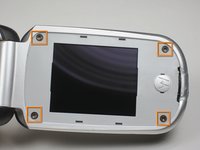
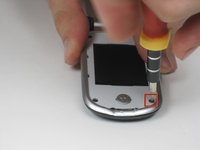
  3. Motorola V325 Screen and External Display Disassembly: stap 3, afbeelding 1 van 2 Motorola V325 Screen and External Display Disassembly: stap 3, afbeelding 2 van 2
    • Unscrew the four screws using the T6 Torx Screwdriver.

    Vraag FixBot

    Voeg opmerking toe

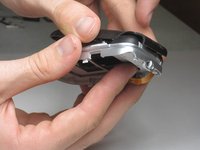
  4. Motorola V325 Screen and External Display Disassembly: stap 4, afbeelding 1 van 3 Motorola V325 Screen and External Display Disassembly: stap 4, afbeelding 2 van 3 Motorola V325 Screen and External Display Disassembly: stap 4, afbeelding 3 van 3
    • Peel back the screen protector frame. Close phone at the hinge, then pull off the front outer casing.

    Vraag FixBot

    Voeg opmerking toe

  5. Motorola V325 Screen and External Display Disassembly, Motorola V325 Screen and External Display Disassembly: stap 5, afbeelding 1 van 2 Motorola V325 Screen and External Display Disassembly, Motorola V325 Screen and External Display Disassembly: stap 5, afbeelding 2 van 2
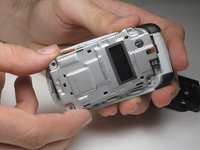
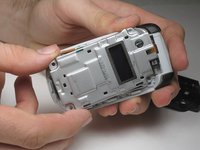
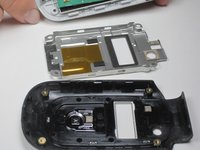
    • After removing the external casing, there are no more screws holding on the gray metal plate. Carefully separate the gray plate from the rest of the phone by simply lifting it off.

    Vraag FixBot

    Voeg opmerking toe

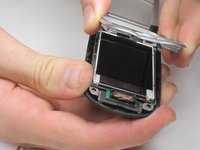
  6. Motorola V325 Screen and External Display Disassembly: stap 6, afbeelding 1 van 3 Motorola V325 Screen and External Display Disassembly: stap 6, afbeelding 2 van 3 Motorola V325 Screen and External Display Disassembly: stap 6, afbeelding 3 van 3
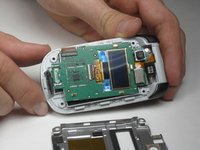
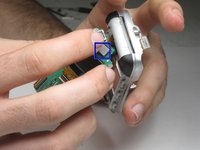
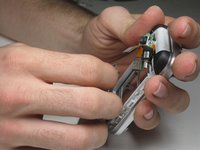
    • Next separate the screen from the phone, pulling it away slowly as it will still be attached by a yellow ribbon.

    • A yellow ribbon attaches to the area boxed in blue. Unclip the yellow ribbon from the circuit board using your fingers.

    Vraag FixBot

    Voeg opmerking toe

Conclusie

To reassemble your device, follow these instructions in reverse order.

Annuleren: ik heb deze handleiding niet afgemaakt.

Één andere persoon heeft deze handleiding voltooid.

Danny Breslow

Lid sinds: 01/14/10

19 Reputatie

1 Handleiding geschreven

Team

Cal Poly, Team 4-15, Forte Winter 2010 Lid van Cal Poly, Team 4-15, Forte Winter 2010

CPSU-FORTE-W10S4G15

5 Leden

8 handleidingen geschreven

1Gids Commentaar

This was SO very helpful! I had dropped my V325 phone the other day and when I opened it, the screen was dark :( However, it still dialed and received calls so I was HOPING that a connection to the screen was the issue. Following this guide, I was able to get to the back of the display and sure enough, a connection was out of place. Put it back together and everything is working great!

Thanks so much!

Bob

Bob - Antwoord Deel

Voeg opmerking toe

Weergavestatistieken:

Afgelopen 24 uren: 3

Afgelopen 7 dagen: 8

Afgelopen 30 dagen: 48

Altijd: 3,228