Ga door naar hoofdinhoud
Word lid van de reparatiegemeenschap - Account aanmaken

Mavic 2 Main Board Replacement

Wat je nodig hebt

  1. Mavic 2 Main Board  Replacement, Remove screws: stap 1, afbeelding 1 van 1
    • Begin to remove screws from belly of drone.

  2. Mavic 2 Main Board  Replacement, Continue to remove screws: stap 2, afbeelding 1 van 3 Mavic 2 Main Board  Replacement, Continue to remove screws: stap 2, afbeelding 2 van 3 Mavic 2 Main Board  Replacement, Continue to remove screws: stap 2, afbeelding 3 van 3
    • remove the rest of the screws

  3. Mavic 2 Main Board  Replacement: stap 3, afbeelding 1 van 2 Mavic 2 Main Board  Replacement: stap 3, afbeelding 2 van 2
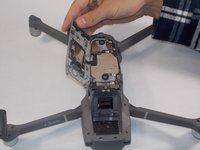
    • After all 8 Screws are removed. Remove the back panel. Keep in mind there is a ribbon connecting the panel and the main board. You must detach the ribbon from either side.

  4. Mavic 2 Main Board  Replacement: stap 4, afbeelding 1 van 1
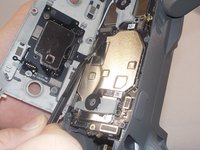
    • Unscrew the screws holding the board in place, as well as all the ribbons and antennas connecting the board to the frame.

  5. Mavic 2 Main Board  Replacement: stap 5, afbeelding 1 van 1
    • Then remove the old board. Replace the new board you have and repeat the process in reverse.

Conclusie

To reassemble your device, follow these instructions in reverse order.

4 andere personen hebben deze handleiding voltooid.

Robert Contraction

Lid sinds: 11/26/19

229 Reputatie

1 Handleiding geschreven

1Gids Commentaar

Hello sir,

I have a question and I hope to find the answer

The plane (Mavic 2) collided with a pilot turned into a pole, and after that, I find a stutter in the camera from time to time, so I hope to find a way to solve this problem since the camera works, the camera shake.

Amr Ahmed - Antwoord

Voeg opmerking toe

Weergavestatistieken:

Afgelopen 24 uren: 1

Afgelopen 7 dagen: 10

Afgelopen 30 dagen: 61

Altijd: 1,867