Inleiding
If the joystick on your Logitech Dual Action controller isn't working properly, refer to the guide to walk you through how to replace the joystick on your Logitech Dual Action controller.
The joystick is an essential part of any controller. A faulty joystick will result in difficulty navigating any software you may encounter where you will need the joystick.
Ensure your controller is disconnected from the power source before beginning your replacement.
Wat je nodig hebt
-
-
To get into the controller, you will need to unscrew the 7 screws on the back.
-
You will have to remove the bottom oval sticker to reveal the screw marked with orange.
-
-
-
-
With the screws removed, turn the controller upside down and separate the front end from the back end.
-
-
-
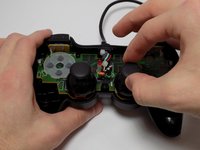
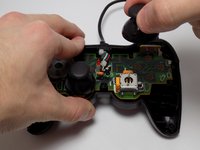
With the case off, the joysticks can be removed by pulling them upward.
-
To put the replacement joystick on, align the hole at the bottom of the joystick with the rectangular peg and gently push down.
-


Annuleren: ik heb deze handleiding niet afgemaakt.
24 andere personen hebben deze handleiding voltooid.



Team

USF Tampa, Team 7-4, Remmell Winter 2015 Lid van USF Tampa, Team 7-4, Remmell Winter 2015
USFT-REMMELL-W15S7G4
4 Leden
5 handleidingen geschreven
5Gids Commentaar
Can the Analogue Stick be replaced with the One of XBOX 360 or PS3 Controller
If you need sticks look for small holed ones like these.
Merci pour le site.excusez moi pour le dérangement j'ai ma manette PS2 qui ne fonctionne pas quand je branche ça me dit que c'est pas connecté
