Ga door naar hoofdinhoud
Word lid van de reparatiegemeenschap - Account aanmaken

Lenovo IdeaTab A2109 System Board Replacement

Wat je nodig hebt

  1. Lenovo IdeaTab A2109 System Board Replacement, Battery: stap 1, afbeelding 1 van 1
    • Look at the back of the tablet and locate the speakers on top of the rear cover.

    • There is a smaller indentation in the plastic cover that runs across the top of the device.

    • Wedge the plastic opening tool, under the middle of the cover as shown, then push up and the cover will pop off.

    Vraag FixBot

    Voeg opmerking toe

  2. Lenovo IdeaTab A2109 System Board Replacement: stap 2, afbeelding 1 van 2 Lenovo IdeaTab A2109 System Board Replacement: stap 2, afbeelding 2 van 2
    • Remove SD card if present.

    • Remove two black 3mm Phillips #00 screws.

    Vraag FixBot

    Voeg opmerking toe

  3. Lenovo IdeaTab A2109 System Board Replacement: stap 3, afbeelding 1 van 2 Lenovo IdeaTab A2109 System Board Replacement: stap 3, afbeelding 2 van 2
    Gereedschap gebruikt in deze stap:
    Tweezers
    $4.99
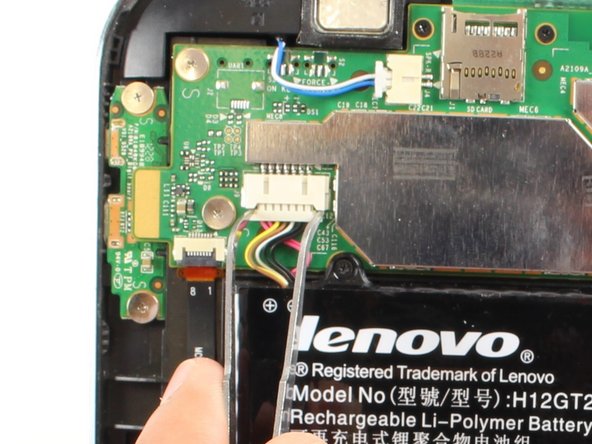
    • Disconnect battery power connector by pinching the connector with tweezers, and sliding it out of the housing.

    Vraag FixBot

    Voeg opmerking toe

  4. Lenovo IdeaTab A2109 System Board Replacement: stap 4, afbeelding 1 van 2 Lenovo IdeaTab A2109 System Board Replacement: stap 4, afbeelding 2 van 2
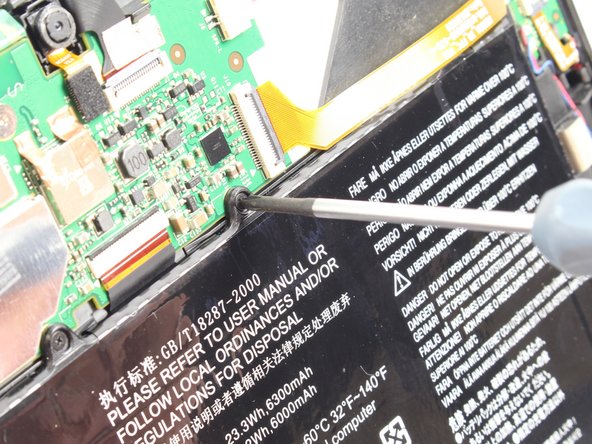
    • Remove seven black 3mm Phillips #00 screws.

    • The top right corner screw is underneath a yellow ribbon. Lift the ribbon up without disconnecting it and unscrew the screw.

    Vraag FixBot

    Voeg opmerking toe

  5. Lenovo IdeaTab A2109 System Board Replacement: stap 5, afbeelding 1 van 2 Lenovo IdeaTab A2109 System Board Replacement: stap 5, afbeelding 2 van 2
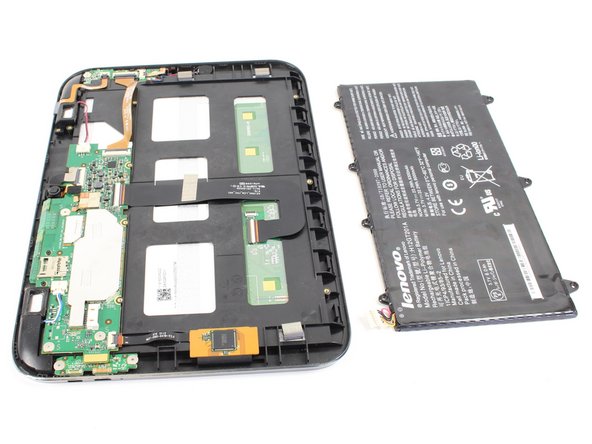
    • Now you can take the battery out in order to either replace it or continue disassembling the device.

    Vraag FixBot

    Voeg opmerking toe

  6. Lenovo IdeaTab A2109 System Board Replacement, System Board: stap 6, afbeelding 1 van 3 Lenovo IdeaTab A2109 System Board Replacement, System Board: stap 6, afbeelding 2 van 3 Lenovo IdeaTab A2109 System Board Replacement, System Board: stap 6, afbeelding 3 van 3
    • Remove two black 3mm Phillips #00 screws.

    • Remove three silver 1.8 mm Phillips #00 screws.

    Vraag FixBot

    Voeg opmerking toe

  7. Lenovo IdeaTab A2109 System Board Replacement: stap 7, afbeelding 1 van 3 Lenovo IdeaTab A2109 System Board Replacement: stap 7, afbeelding 2 van 3 Lenovo IdeaTab A2109 System Board Replacement: stap 7, afbeelding 3 van 3
    Gereedschap gebruikt in deze stap:
    Tweezers
    $4.99
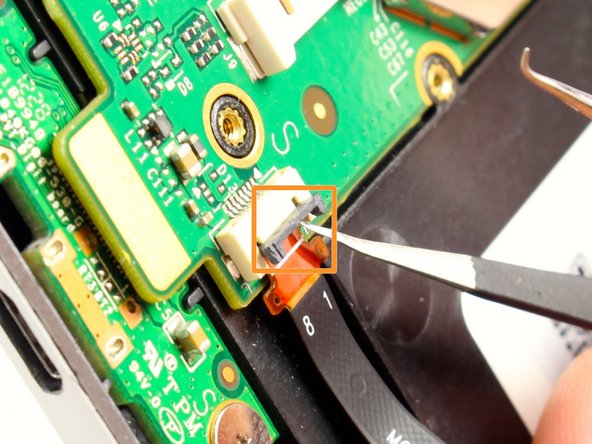
    • Use tweezers to flip up the small black plastic locks on all four connections.

    • Carefully remove each of the exposed ribbons.

    Vraag FixBot

    Voeg opmerking toe

  8. Lenovo IdeaTab A2109 System Board Replacement: stap 8, afbeelding 1 van 2 Lenovo IdeaTab A2109 System Board Replacement: stap 8, afbeelding 2 van 2
    • Disconnect the two speaker connectors by pinching them with tweezers and sliding them out from the system board housing.

    Vraag FixBot

    Voeg opmerking toe

  9. Lenovo IdeaTab A2109 System Board Replacement: stap 9, afbeelding 1 van 2 Lenovo IdeaTab A2109 System Board Replacement: stap 9, afbeelding 2 van 2
    • Use tweezers or your finger nail to disconnect the camera attachment by flipping up the black rectangular connector.

    Vraag FixBot

    Voeg opmerking toe

  10. Lenovo IdeaTab A2109 System Board Replacement: stap 10, afbeelding 1 van 3 Lenovo IdeaTab A2109 System Board Replacement: stap 10, afbeelding 2 van 3 Lenovo IdeaTab A2109 System Board Replacement: stap 10, afbeelding 3 van 3
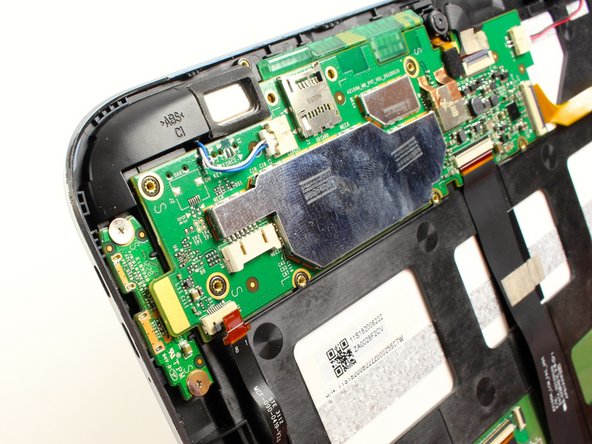
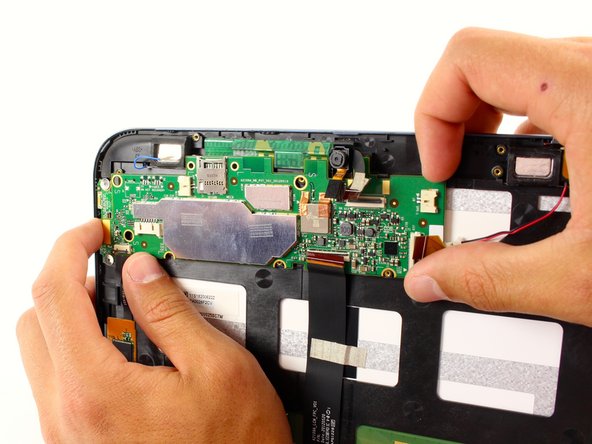
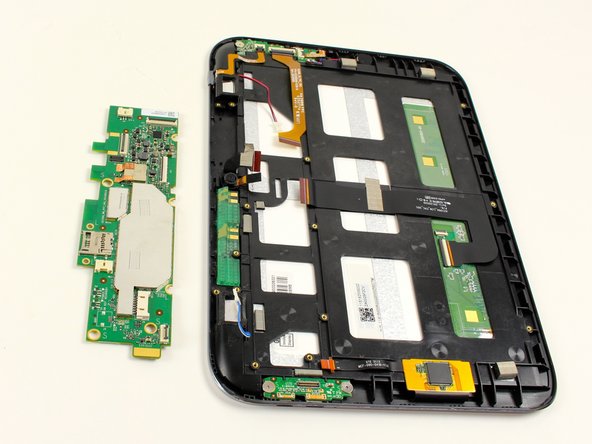
    • Disconnect the HDMI connection with the system board

    • Use a plastic opening tool to pry up the system board, and you will hear a pop as it comes free.

    • Slide out the system board from its housing tab on the upper right corner.

    • Pull the board slowly away from the tab, and it will pop out.

    Vraag FixBot

    Voeg opmerking toe

Conclusie

To reassemble your device, follow these instructions in reverse order.

Annuleren: ik heb deze handleiding niet afgemaakt.

4 andere personen hebben deze handleiding voltooid.

Kyle

Lid sinds: 04/22/14

581 Reputatie

2 handleidingen geschreven

Team

Cal Poly, Team 7-19, Regan Spring 2014 Lid van Cal Poly, Team 7-19, Regan Spring 2014

CPSU-REGAN-S14S7G19

4 Leden

15 handleidingen geschreven

0Gids Commentaar

Voeg opmerking toe

Weergavestatistieken:

Afgelopen 24 uren: 2

Afgelopen 7 dagen: 7

Afgelopen 30 dagen: 45

Altijd: 1,968