Ga door naar hoofdinhoud

Kindle Paperwhite 11th Generation Disassembly

Wat je nodig hebt

  1. Kindle Paperwhite 11th Generation Disassembly, Kindle Paperwhite: stap 1, afbeelding 1 van 3 Kindle Paperwhite 11th Generation Disassembly, Kindle Paperwhite: stap 1, afbeelding 2 van 3 Kindle Paperwhite 11th Generation Disassembly, Kindle Paperwhite: stap 1, afbeelding 3 van 3
    • Using a guitar pick style pry tool and/or black pry tool get started on one of the corners to loosen back cover from display. Once the corner is loose, you'll notice you can pry the back away and slide your pick to the next corner

  2. Kindle Paperwhite 11th Generation Disassembly: stap 2, afbeelding 1 van 2 Kindle Paperwhite 11th Generation Disassembly: stap 2, afbeelding 2 van 2
    • At this point, having one or more corners loose, you can almost pry by hand, but best to be safe and not break the plastic by continuing to run pry tool around each corner (see open case photo for clip style)

  3. Kindle Paperwhite 11th Generation Disassembly: stap 3, afbeelding 1 van 1
    • Ah sweet open Kindle...feels good. Easier than we thought. No messy adhesives. And no cables on back case just unclip, unclip...snap, snap, snap.

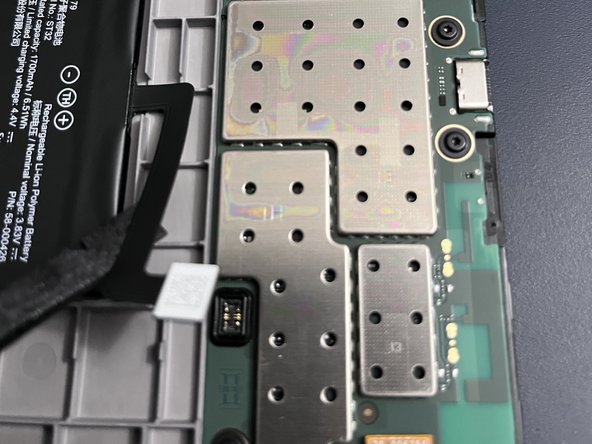
  4. Kindle Paperwhite 11th Generation Disassembly: stap 4, afbeelding 1 van 2 Kindle Paperwhite 11th Generation Disassembly: stap 4, afbeelding 2 van 2
    • Whatever repair you have in mind next, always start with disconnecting the battery, and for this, the black pry tool is your friend. Enjoy.

Conclusie

To reassemble your device, follow these instructions in reverse order.

11 andere personen hebben deze handleiding voltooid.

mcvtech

Lid sinds: 12/20/17

379 Reputatie

1 Handleiding geschreven

Team

mcvtech Lid van mcvtech

Business

1 Lid

5 handleidingen geschreven

6Gids Commentaar

Amazing. Thank you! I see my screen data ribbon is missing a pin (it snapped off) but I still have it. Not sure i can fix it but perhaps can get a new ribbon. Do you know the part number?

James Paxton - Antwoord

sorry I cannot locate that, but perhaps another contributor can. best source is likely ebay...

mcvtech -

La placa esta pegada al marco? No sale facilmente. Te has quedado en como abrirlo pero luego habria que explicar como quitar la bateria o la placa para cambiar la pantalla

Rogelio Montero - Antwoord

I'm curious, could you upgrade the kindle so that it also has colour for book covers? I unfortunately live in Canada or id be getting the colorsoft plus it's expensive price tag doesn't help either. But could this be a possible thing to do for the kindle paperwhite?

Brittney - Antwoord

looks like the battery is stuck. Did you manage to remove it (I need to change the eink screen) ?

richard roberts - Antwoord

Voeg opmerking toe

Weergavestatistieken:

Afgelopen 24 uren: 19

Afgelopen 7 dagen: 130

Afgelopen 30 dagen: 595

Altijd: 9,828