Inleiding
Flipper Zero is a highly versatile multi-tool device that is widely used for hardware hacking, electronics prototyping, and security testing. As with any electronic device, there may be times when it is necessary to open up the Flipper Zero to perform maintenance or repair. However, opening up the Flipper Zero can be a delicate process, and it is important to do it correctly to avoid damaging the device or causing injury.
In this guide, we'll take you through the steps involved in safely opening up your Flipper Zero. Whether you need to replace a component, perform maintenance, or troubleshoot issues, knowing how to safely open up your Flipper Zero is an essential skill for any Flipper Zero user.
By following the steps in this guide, you can ensure that you safely and effectively open up your Flipper Zero, allowing you to continue using this powerful tool for all your hardware hacking, electronics prototyping, and security testing needs.
Wat je nodig hebt
-
-
Go to Main Menu > Settings > Power.
-
Select Power OFF.
-
Confirm by pressing the Right-button.
-
-
-
Gereedschap gebruikt in deze stap:Phillips #0 Screwdriver$5.49
-
Use a PH0 screwdriver to unscrew the four long screws holding the back cover.
-
-
-
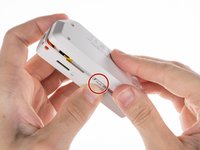
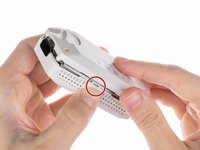
Press the middle of the top cover on both sides, one by one, to release the latches that hold the back cover in place.
-
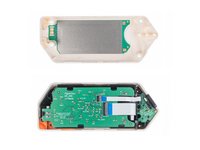
Once the latches are released, you can remove the bottom cover.
-


To reassemble your device, follow these instructions in reverse order.
Annuleren: ik heb deze handleiding niet afgemaakt.
2 andere personen hebben deze handleiding voltooid.


